NOTE: A sample ID or patient ID is displayed in the ID field of
the work list test preparation dialogue. Use the WORK LIST
SELECTION SETTING of MODE FUNCTION to select the SAMPLE
ID/PATIENT NAME button or PATIENT ID/PATIENT NAME
button.
3. Prepare slides.
Prepare appropriate number of slides per test request.
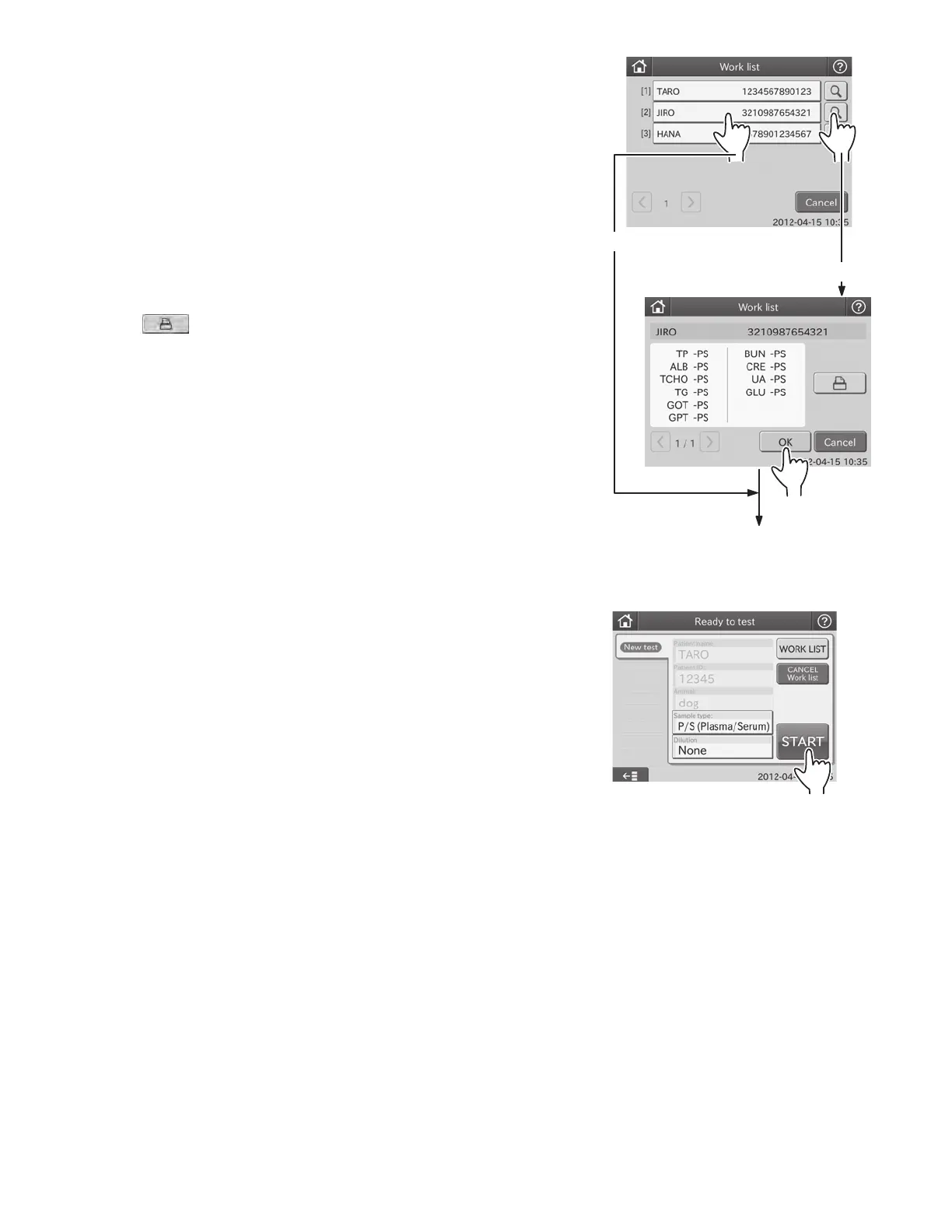
2. Touch an item listed.
The requested item is displayed in the work list test
preparation dialogue.
If there is more than one list, touch the or button to
move to another page.
NOTE: By touching CANCEL, the display returns to the test
preparation dialogue.
NOTE: By touching CONFIRMATION, the work list test name
dialogue is displayed. If no item is selected, the display returns to
the work list index dialogue.
By touching
, a test name of the selected patient is printed
out.
If there is more than one test name list, touch
or to move to
another page.
By touching CANCEL, the display returns to the work list index
dialogue.
By touching OK, the work list test preparation dialogue is
displayed.
NOTE: A patient name is displayed in the No. field of the work list
test preparation dialogue.
Touch an item listed.
Touch the “confirmation” button
The display moves to the work list test
preparation dialogue.
4. Perform the measurements.
For the testing procedures, refer to each instruction (Section 3.8.1 Basic Measurement, 3.8.3 ISE Tests, 3.8.4 Tests that
Require Dilution).
NOTE: Select a sample type by touching the [Sample Type] field.
NOTE: In case of tests that require dilution, select a dilution factor touching the [Dilution] field.
NOTE: To cancel the test for the patient, touch CANCEL WORK LIST. The display returns to the test preparation dialogue.
5. After the tests are completed, the test results will be transmitted.
After the tests are completed, the test results will be transmitted to the PMS automatically.
37



 To Next Page