282
Sending Data Using the FTP Client
Sending a test le
This section describes how to check whether the instrument can send a le using FTP.
> >
2
1
1
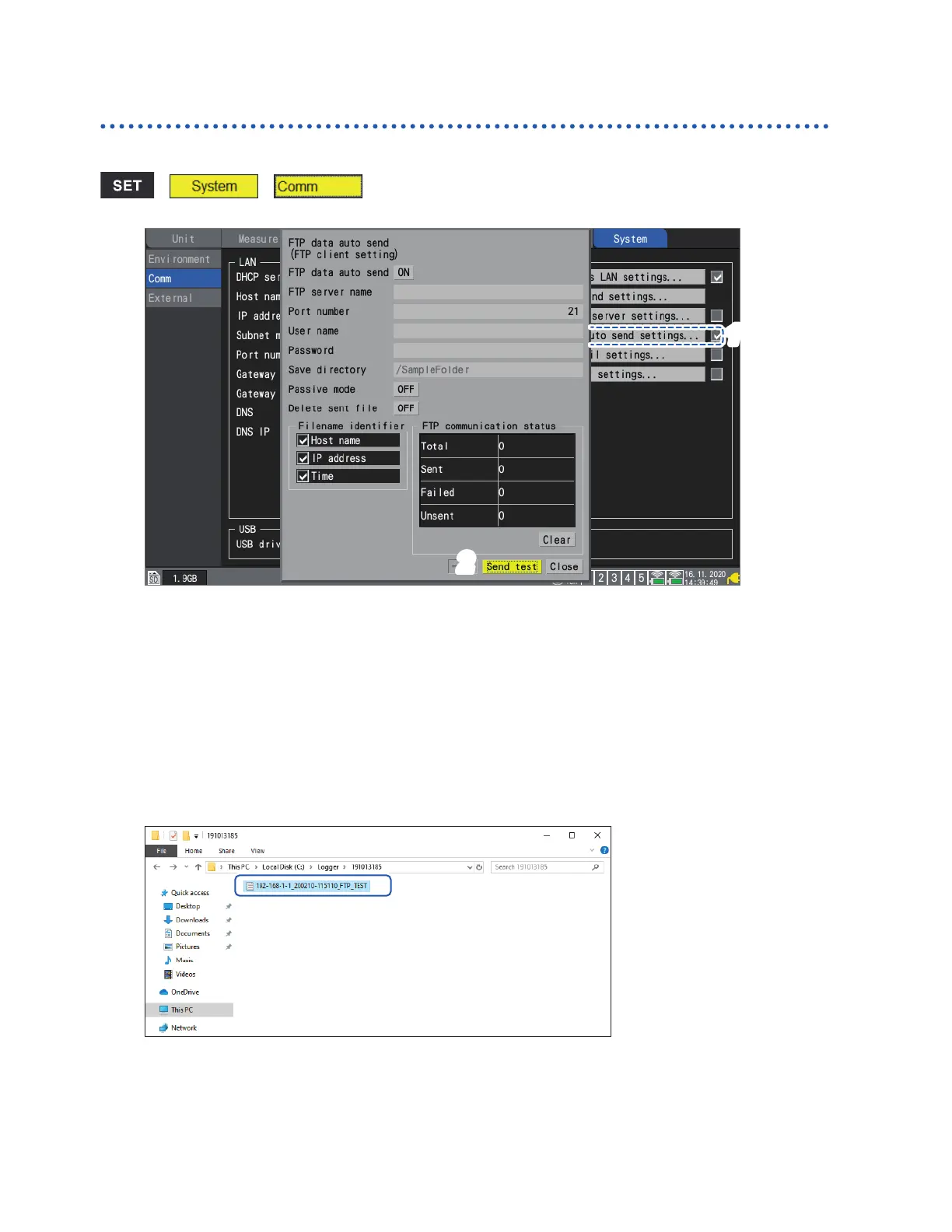
Press the ENTER key while [FTP data auto send settings...] is selected.
The settings window will open.
The identiers whose check boxes are selected under [Filename identier] will be added to the
lename.
2
Press the ENTER key while [Send test] is selected.
The test le [FTP_TEST.TXT] will be transmitted to the specied folder*.
*: The folder specied in “[Save directory]” (p. 281) under [Physical path:], described in the step
“Enter [Site Information].” (p. 277). (Example: C:\LOGGER\data).
If you are unable to send the test le, check the instrument's automatic send settings and the
computer’s FTP settings.
If you nd no issues when sending the test le, start measurement.
Measured waveform data will be automatically sent to the computer’s FTP server.
www.GlobalTestSupply.com
Find Quality Products Online at: sales@GlobalTestSupply.com


 To Next Page
 Loading...