Brevera Breast Biopsy System User Guide
Chapter 7: Biopsy
MAN-04303-002 Revision 006 Page 71
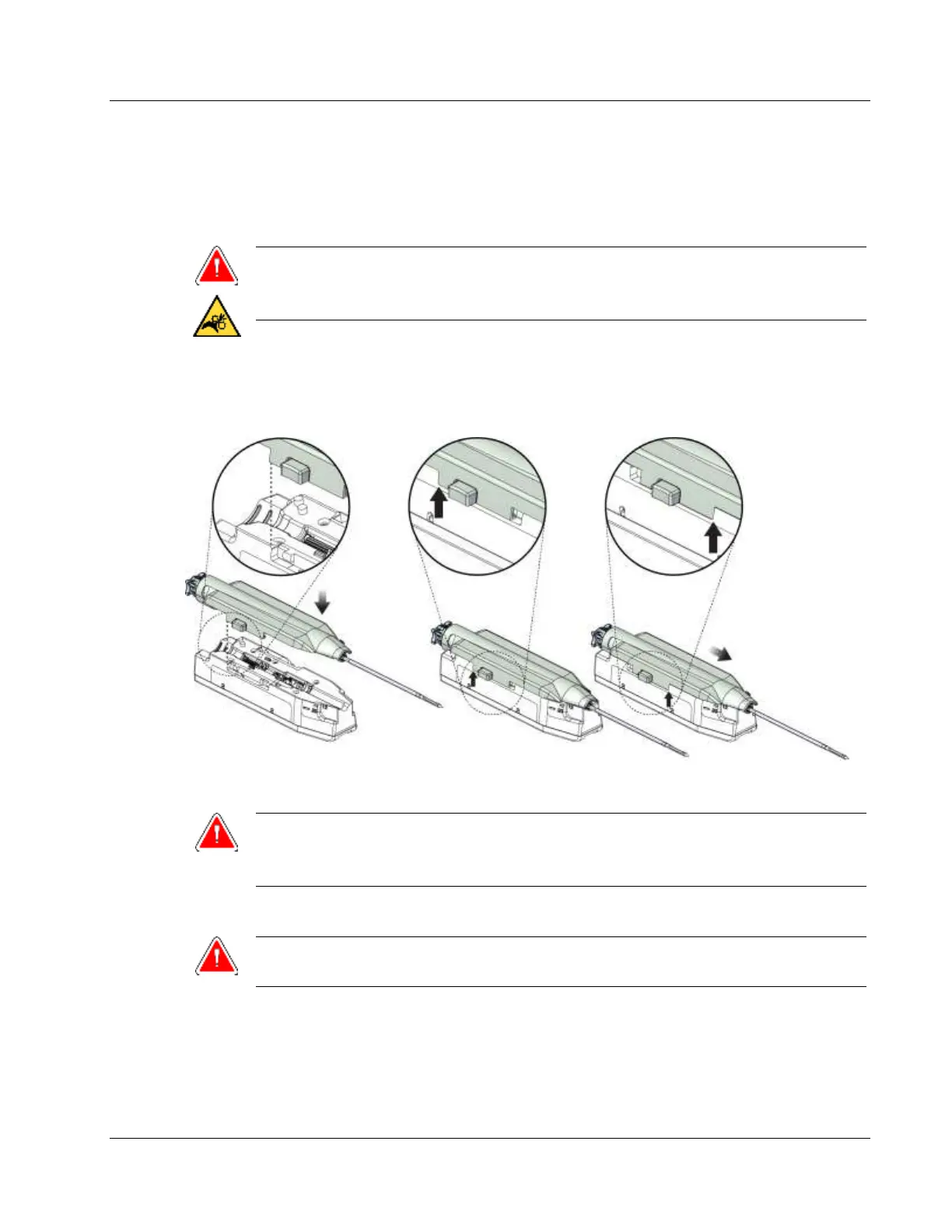
4. Hold the biopsy needle in one hand, with the gears facing down and the sheathed
needle tip facing to the right. Line up the tab on the biopsy needle with the notch in
the device driver.
Warning:
Do not place fingers on the metal parts of the device driver. These parts can
move before a biopsy needle is installed.
5. Carefully move the biopsy needle straight down, aligning the back of the tab with the
back of the notch, until the needle engages with the driver. Do not drag the biopsy
needle across the device driver.
Figure 44: Connect the Biopsy Needle to the Device Driver
Warning:
Do not place fingers on the device driver when system power is on. Parts can
move unexpectedly.
6. Slide the biopsy needle forward (to the right) until it locks into position with a click.
Warning:
Make sure that the biopsy needle is fully latched onto the device driver.













 To Next Page