VIsualEyes 515/525 - Additional Information Page 129
12.8.3 Rotational safety settings
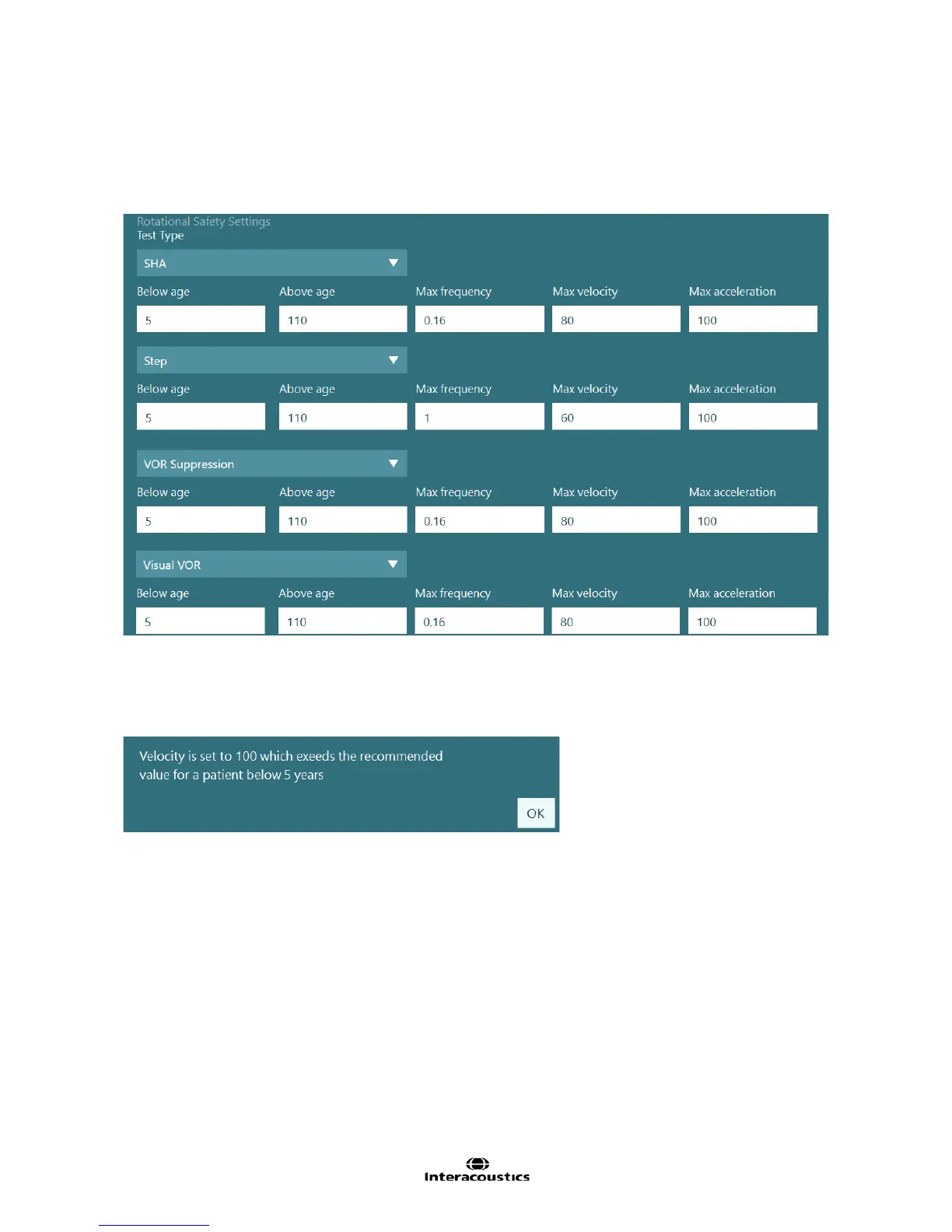
Young patients may be tested in the reclining rotational chair. For the patient’s safety, the reclining rotational
chair will not allow faster tests to be performed for young patients. The software is configured to prevent the
test from running if the patient’s age falls within the values (Figure 12.8.7). In step tests the Max frequency is
set to 1 as the setting is not used in step tests.
Figure 12.8.7 Rotational safety settings for each chair test
Using these default values, a patient below the age of 1 cannot be tested in Step tests with a max velocity
greater than 60 degrees per second. If the patient would be prepared to perform a step test with a velocity of
60 degrees per second, when the test would be started, the software would block the clinician from testing
and give an error message (Figure 12.8.8).
Figure 12.8.8 Warning message preventing the clinician from testing a young patient based on the test
settings














 To Next Page