VIsualEyes 515/525 - Additional Information Page 105
Number of Cycles: The total number of cycles to be performed for this frequency of chair movement. The
initial half cycle is rejected automatically.
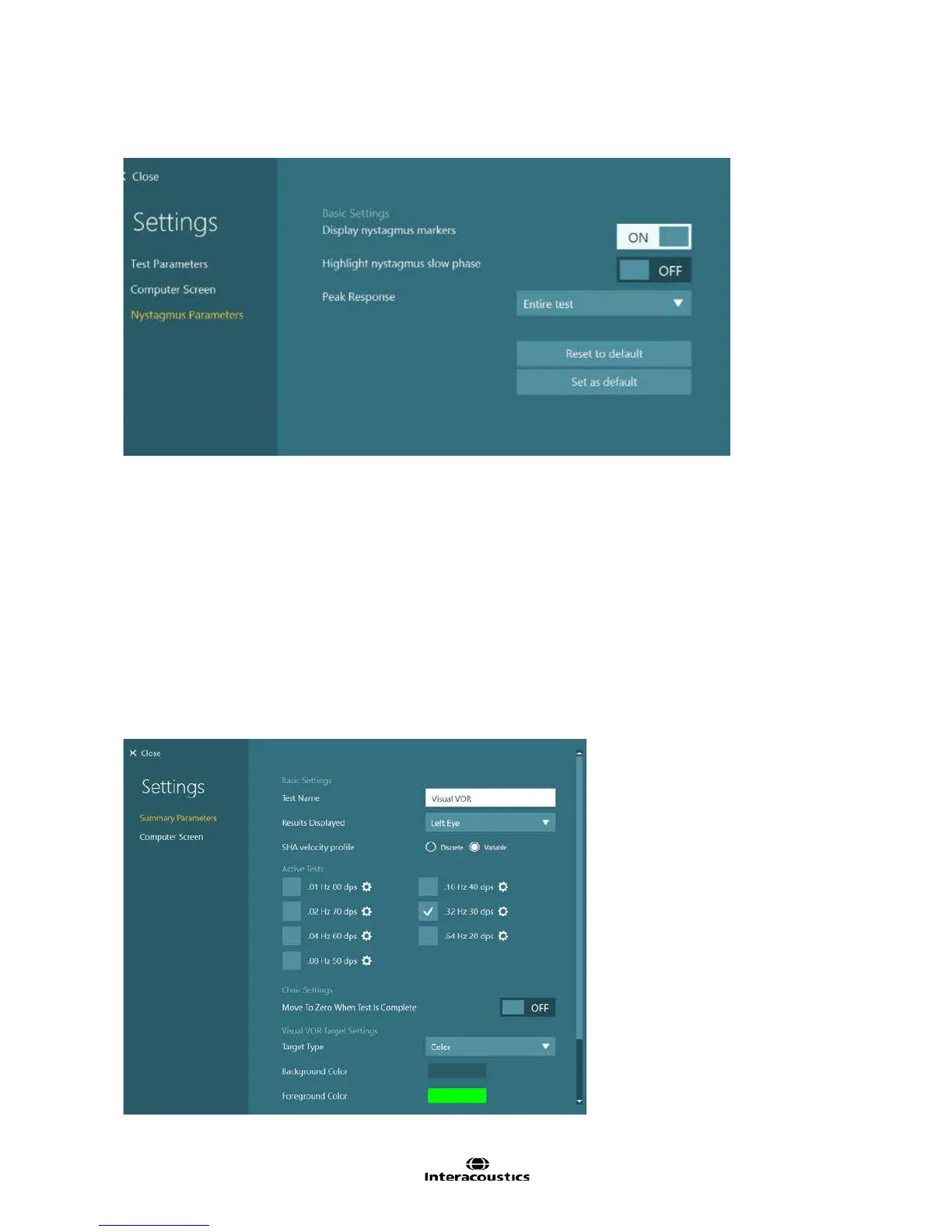
Figure 8.4.11 VOR Suppression subtest Nystagmus Parameters
Display nystagmus markers: Enabling this feature will display a marker i.e. triangle above the nystagmus
fast phase slope to assist identification of a nystagmus beat. The triangle may face upwards (referring to
right/up beating nystagmus) and downwards referring to left/ down beat nystagmus.
Highlight nystagmus slow phase: By default, the slow phases are the same color as the rest of the trace.
However should the user want to differentiate the slow phases amongst the trace data, enabling this feature
will mark the slow phases in green.
Peak Response: Selecting the drop down menu presents several options to define the length of time for the
analysis of the peak response. By default, the entire test will be included in the peak response for accuracy
purposes.
8.4.4 Configuring visual VOR test
Figure 8.4.12 Visual VOR summary settings














 To Next Page