VIsualEyes 515/525 - Additional Information Page 88
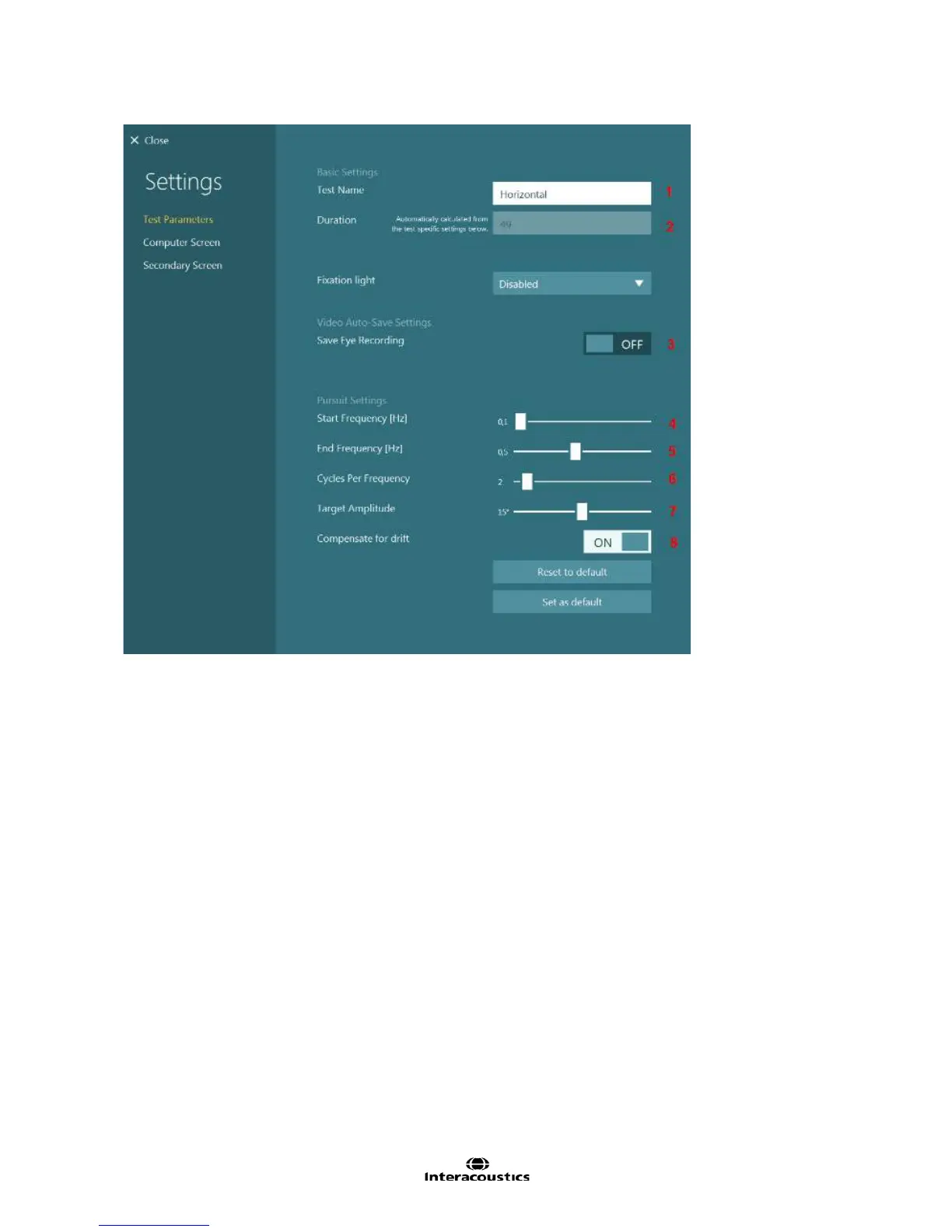
Figure 8.2.6 Smooth Pursuit subtest settings
Test Name: Name of subtest
Duration: Length of time to perform the test based on the number of pursuit cycles and frequencies tested
Fixation light: Determines when the fixation light in the goggles is displayed. Manual will leave the operator
to determine when the fixation light should be displayed. Timed will have the fixation light come on
automatically at the designated time. Disabled (default) will block the fixation light from turning on in the test.
Save Eye Recording: Choice to save eye video recordings.
Start Frequency [Hz]: Initial frequency of the smooth pursuit test
End Frequency [Hz]: End frequency of the smooth pursuit test
Cycles Per Frequency: Determines how many cycles will be required for each frequency step to be
performed
Target Amplitude: Sets the distance the target can move (in degrees)
Compensate for drift: If enabled, the software will adjust the patient’s response to better align with the
target.














 To Next Page