SECTION 13—ANTI-TIPPERS
ProSPIN™ X4™ 88 Part No 1125104
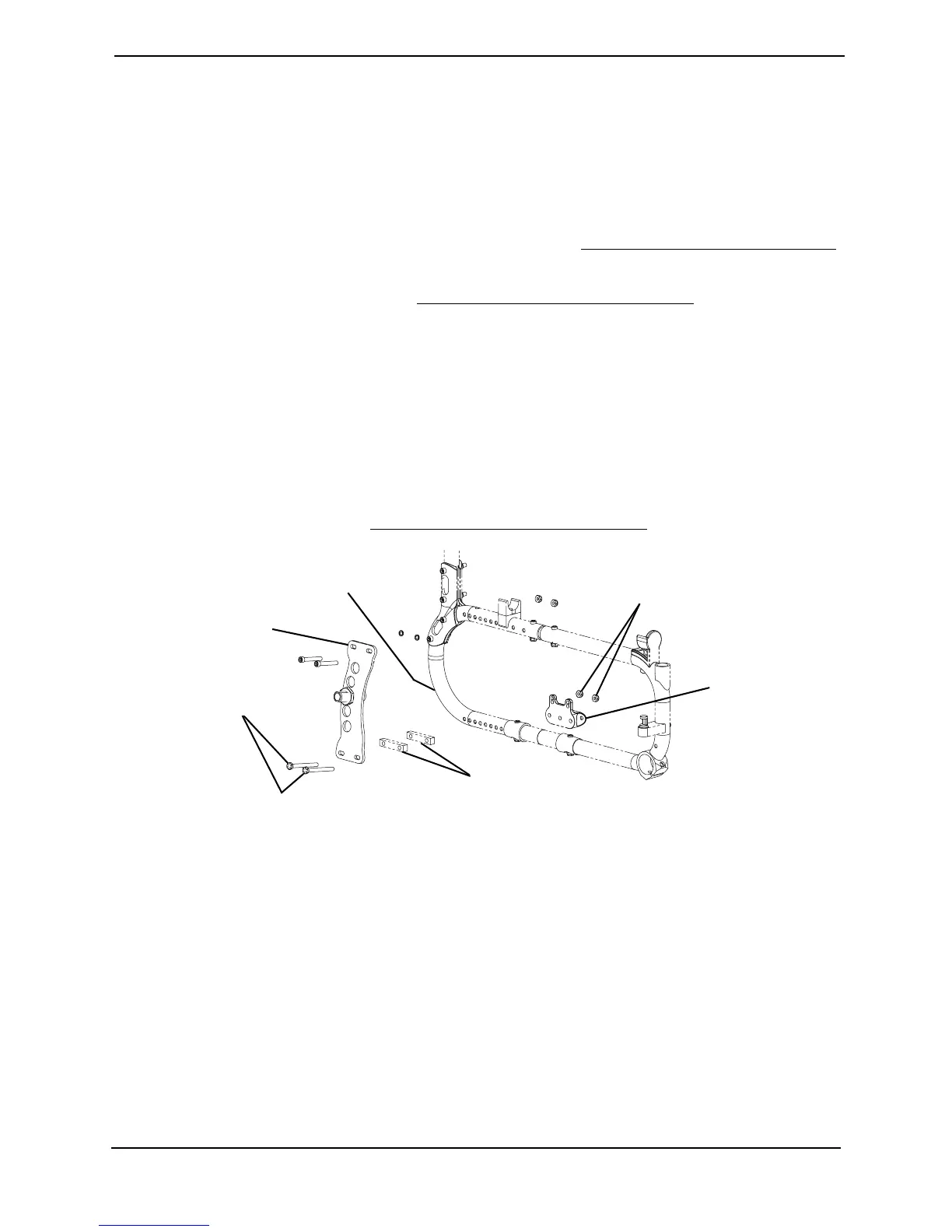
Installing/Removing the Anti-Tipper Bracket
NOTE:Forthisprocedure,refertoFIGURE13.2.
NOTE:Reversethisproceduretoremovetheanti‐tipperbracket.
NOTE:Theanti‐tipperbracketissecuredtothewheelchairframewiththesamemountingscrews
usedtomounttheaxleplateandanycamberspacerspresent.Installingorremovingtheanti‐tipper
bracketmayrequireadifferentlengthmountingscrew.RefertoAdjustingtheRearWheelCamber
onpage 70toensurepropermountingscrewlength.
1. Removetherearwheels.RefertoRemoving/Installing RearWheelsonpage 67.
2. Removethetwoexistingbottommountingscrewsandlocknutsthatsecuretheaxle
plateandanycamberspacerspresenttothewheelchairframe.
3. Inserttwonewbottommountingscrewsthroughtheaxleplateandanycamber
spacerspresent.
4. Positionanti‐tipperbracketontobottommountingscrewsandtightlysecureusing
twolocknuts.
5. RepeatSTEPS2‐4toinstallremaininganti‐tippermountingbracket.
6. Installrearwheels.RefertoRemoving/InstallingRearWheelsonpage 67.
FIGURE 13.2 Installing/Removing the Anti-Tipper Bracket
Bottom Mounting
Screws
Locknuts
Axle Plate
Wheelchair Frame
Camber Spacer(s)
Anti-tipper
Bracket










 To Next Page