SECTION 13—ANTI-TIPPERS
Part No 1125104 89 ProSPIN™ X4™
Adjusting the Anti-tipper Height
Theanti‐tipperheightcanbeadjustedtwoways:
AdjustingtheAnti‐tipper ‐Positioningthewheeledportionoftheanti‐tipperupordown
tomeetthe1½to2‐inchclearance.RefertoAdjustingtheAnti‐tipperonpage 89.
AdjustingtheAnti‐tipperBracket‐Changingtheanti‐tipperbracketmountingposition
and/orangletomeetthe1½to2‐inchclearance.RefertoAdjustingtheAnti‐tipperBracket
onpage 90.
Althoughbothadjustmentsmaybenecessarytomeetthe1½to2‐inchclearance
requirement,itisrecommendedtoadjusttheanti‐tipperfirstbeforeadjustingtheanti‐
tipperbracket.
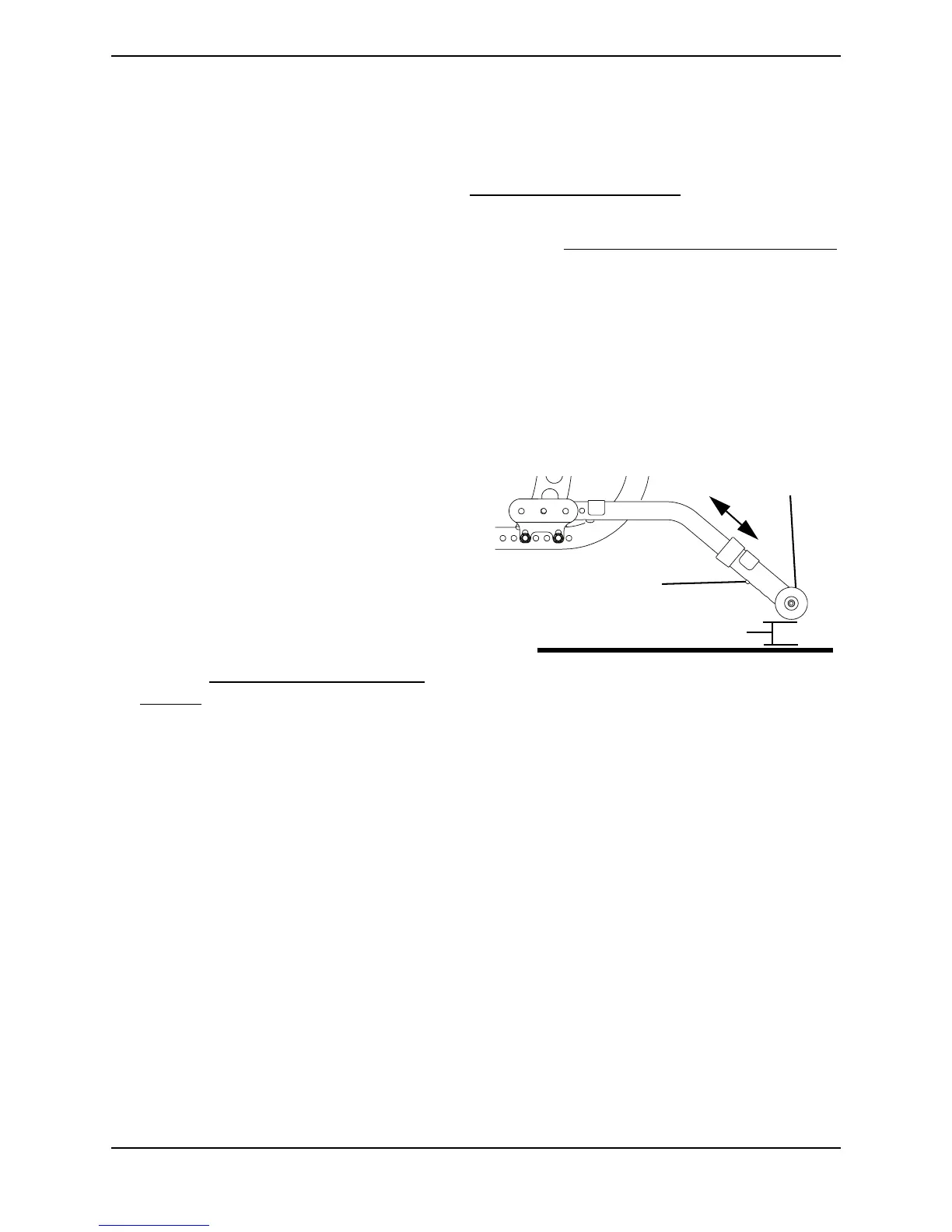
Adjusting the Anti-tipper
NOTE:Forthisprocedure,refertoFIGURE13.3.
1. Pressthespringbuttononthewheeled
portionoftheanti‐tipperandslideitup
ordowntoachievea1‐½to2‐inch
clearance.
2. Checktomakesurethatthespring
buttonsarefullyengagedin
adjustmentholes.
3. If1½to2‐inchclearancecannotbe
achievedadjusttheanti‐tipperbracket.
RefertoAdjustingtheAnti‐tipper
Bracketonpage 90.
FIGURE 13.3 Adjusting the Anti-tipper
Anti-tipper
(Wheels)
Release Button
1½ to 2-inch Clearance






 To Next Page