SECTION 13—ANTI-TIPPERS
ProSPIN™ X4™ 90 Part No 1125104
Adjusting the Anti-tipper Bracket
NOTE:Theanti‐tipperbracketissecuredtothewheelchairframewiththesamemountingscrews
usedtomounttheaxleplateandanycamberspacerspresent.DONOTremovethemounting
screws.
1. Removethetwolocknutssecuringtheanti‐tipperbrackettothewheelchairframeand
mountingscrews.
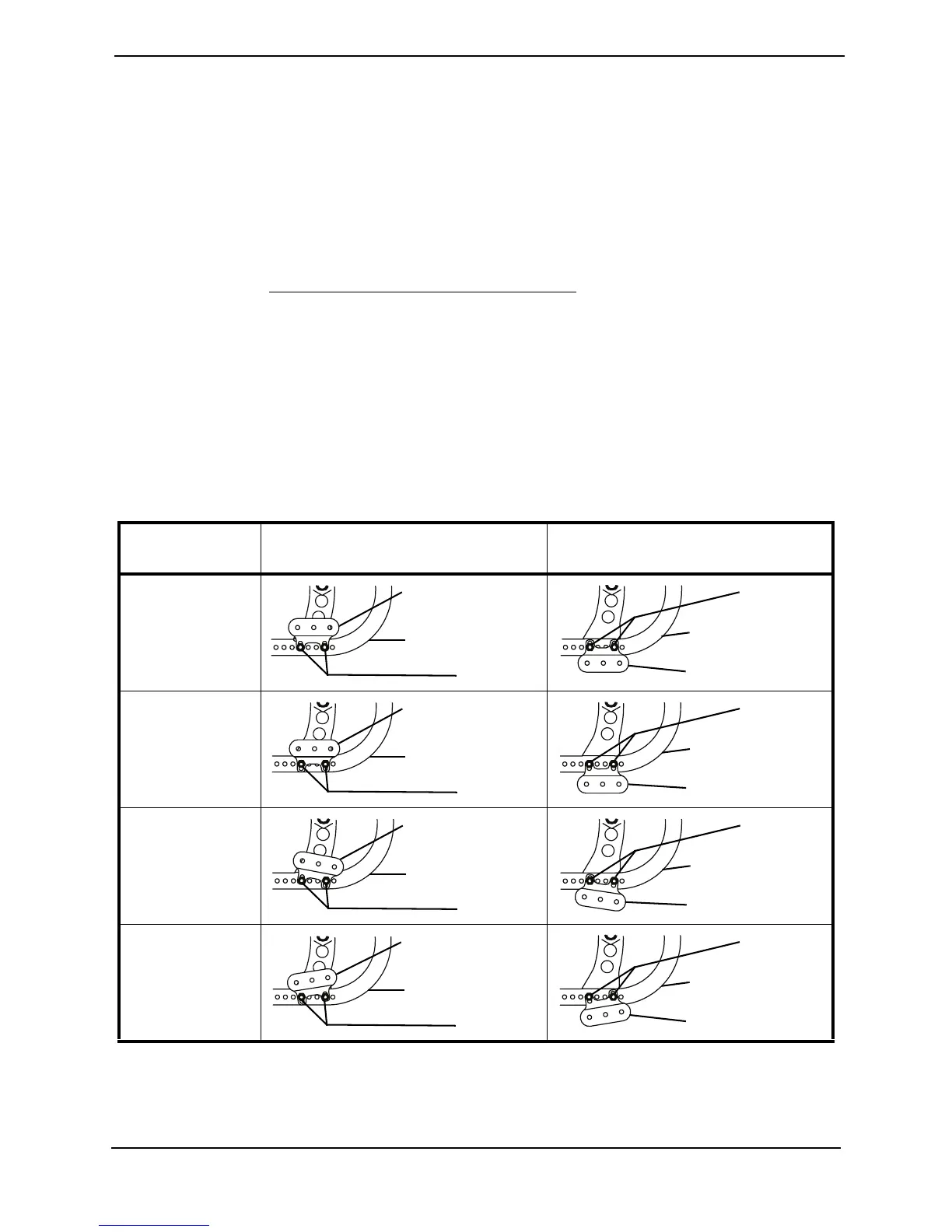
2. Repositiontheanti‐tipperbracketinoneormoreofthefollowingways:
NOTE:RefertoAnti‐TipperBracketMountingPositionsin.
NOTE:Heightandangleadjustmentusethesamemountingholes.
•HeightorAngleAdjustment:
•AdjustHeight‐Positionanti‐tipperbracketinoneoftwopositions.
•AdjustAngle‐Changeangleofanti‐tipperbracketupordownfromthefloor.
•Reposition‐Installingtheanti‐tipperbracketsothatthemountingtubeisaboveor
belowthewheelchairframe.
ANTI-TIPPER BRACKET MOUNTING POSITIONS
MOUNTING
POSITION
ABOVE WHEELCHAIR FRAME BELOW WHEELCHAIR FRAME
UP MOUNTING
POSITION
DOWN
MOUNTING
POSITION
ANGLED
DOWN
ANGLED UP
Wheelchair Frame
Anti-tipper Bracket
Locknuts
Wheelchair Frame
Anti-tipper Bracket
Locknuts
Wheelchair Frame
Anti-tipper Bracket
Locknuts
Wheelchair Frame
Anti-tipper Bracket
Locknuts
Wheelchair Frame
Anti-tipper Bracket
Locknuts
Wheelchair Frame
Anti-tipper Bracket
Locknuts
Wheelchair Frame
Anti-tipper Bracket
Locknuts
Wheelchair Frame
Anti-tipper Bracket
Locknuts







 To Next Page