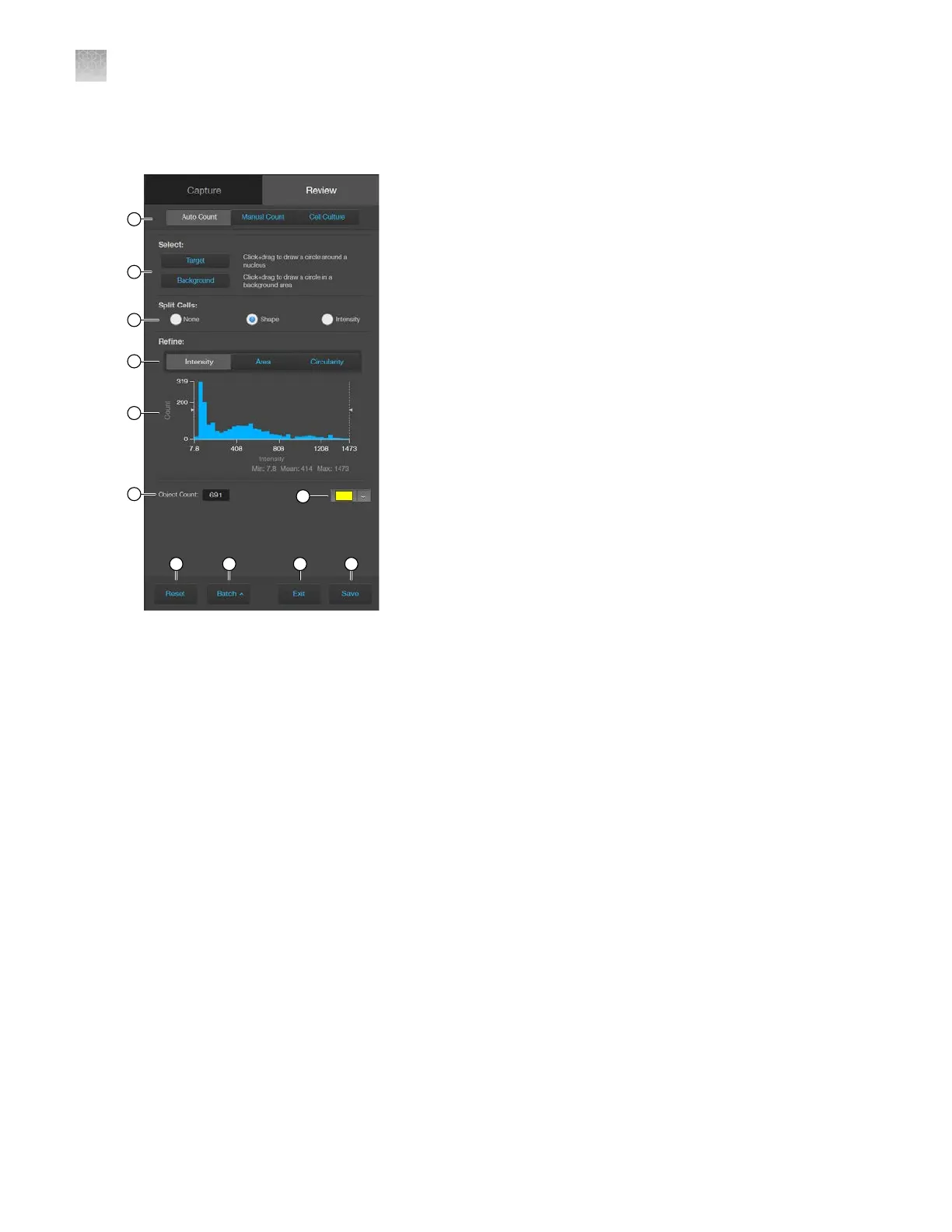
Auto count controls
1.
Analysis tools
: Allows you to toggle between Auto Count, Manual Count, or Cell Culture
(Confluence and Transfection Eciency) tools for image analysis.
2.
Select Target and Background
: Allows you to select representative target objects and
background areas for Auto Count.
3.
Split Cells
: Allows you to split multiple objects that have been counted as one into individual
objects based on shape or pixel intensity to increase the count accuracy.
4.
Refine: Selects intensity, area, or circularity by which to refine Auto Count results using the Count
Histogram.
5.
Count Histogram
: Allows you to set pixel intensity, area, or circularity thresholds to refine the Auto
Count results.
6.
Object Count
: Displays the object count based on the Auto Count parameters.
7.
Object color: Selects the color by which the counted objects are identified.
8.
Reset
: Resets the count to 0 and clears the selected targets and background areas.
9.
Batch Analysis
: Allows you to save and apply the analysis parameters to other images that
you have collected and saved in an image folder (see “Batch analysis” on page94 for more
information).
AppendixBGraphical user interface (GUI)
Auto count controls
B
128
EVOS
™
M5000 Imaging System User Guide



 To Next Page