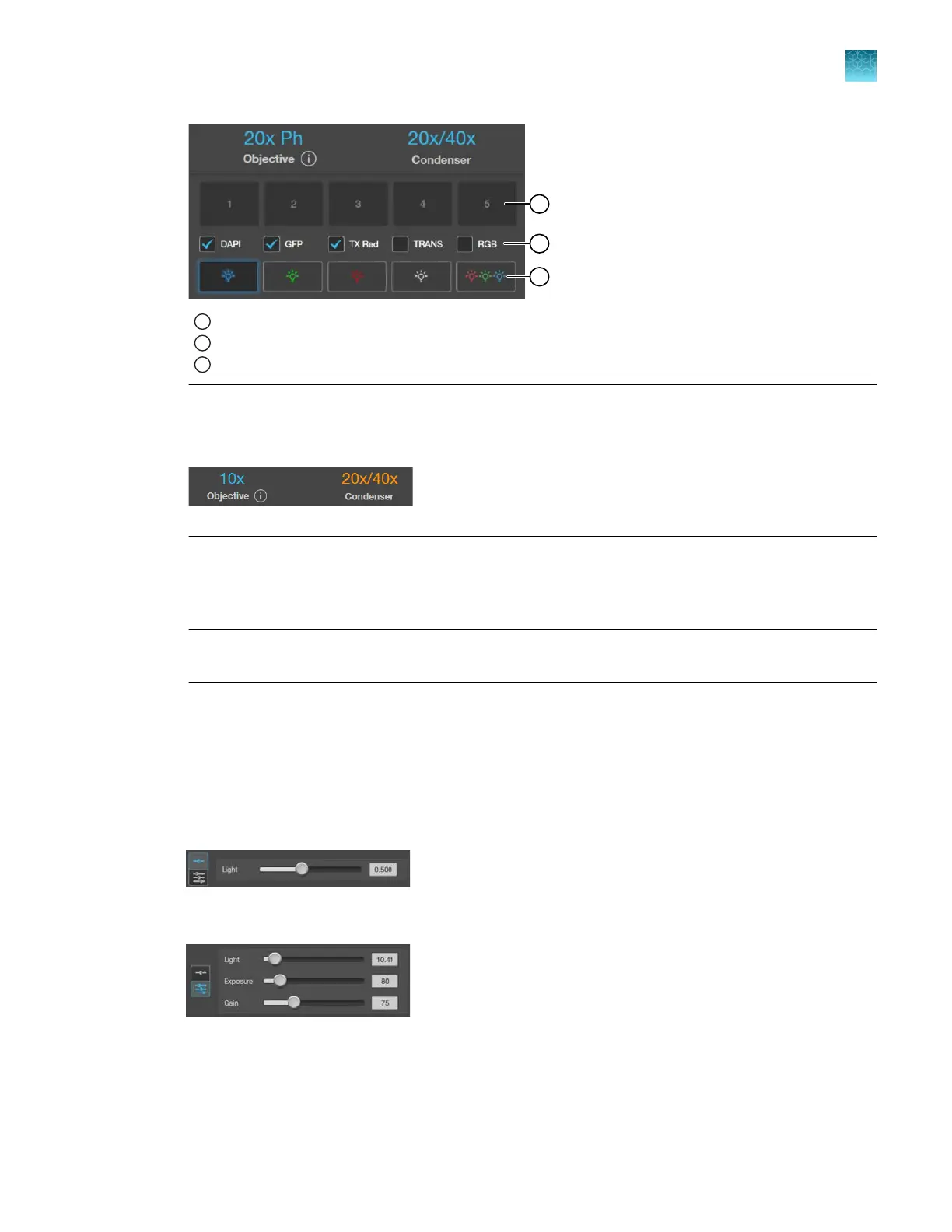
1
Memory
buer thumbnail images
2
Auto-capture channels (via the All
button)
3
Channel selection/light activation buttons
Note: If the phase ring correctly matches the objective, the selected phase ring is depicted in
blue. If the objective and the phase ring ar
e mismatched, the phase ring (Condenser) is displayed
in orange.
4.
Select a
Channel to turn on the excitation light and set the instrument in Live mode.
In the Live mode, you can adjust the brightness, configure display settings for the selected
channel, and set the focus on the sample.
Note:
You can only select a single light source for
Live mode when adjusting brightness and
focus. However, you can capture and display multiple channels sequentially.
Adjust brightness
Brightness is controlled with the use of Light, Exposure, and Gain slider bars in the Capture control
panel. Selecting one of the two Brightness slider panels enables control of the brightness settings.
•
Select the single slide panel to adjust the Light setting and allow the system to automatically
det
ermine the camera Exposure and Gain settings to minimize photobleaching.
•
Select the triple slider panel to individually adjust the Light, Exposure, and Gain settings.
Chapter4Capture images
Capture images in a single channel
4
EVOS
™
M5000 Imaging System User Guide
29



 To Next Page