Capture Z-Stack
Z-Stack tool
The Z-Stack tool allows you to capture multiple images of a selected field at dierent focal planes
along the Z-axis and combine them to generate a final image with a greater depth of field than any of
the individual source images.
Capture Z-stack images
1.
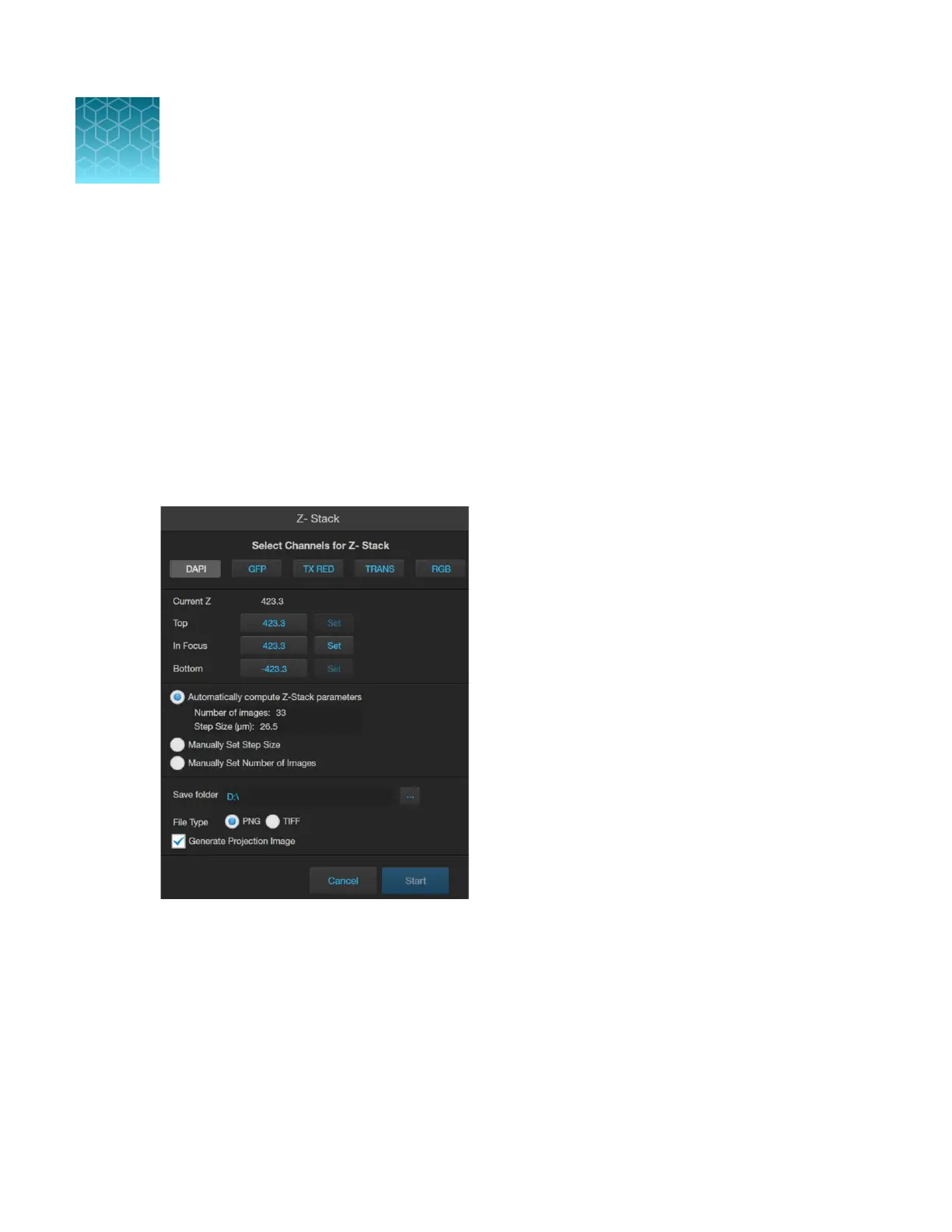
On the Capture tab, click Automate, then select Z-Stack to open the Z-Stack tool.
2.
Select the
Channels for Z-Stack that you want to capture. You can select multiple channels. In
this example, the DAPI channel is selected.
3.
If not already on, click
Light to illuminate the sample, then adjust Brightness and Focus using the
corresponding sliders on the Capture tab.
The focus position you set in this step is the initial Current Z position.
4.
To accept the
Current Z as the In Focus position, click Set.
To change the In Focus position, move the Coarse and Fine focus sliders on the Capture tab to
focus on the sample, then click Set.
8
74
EVOS
™
M5000 Imaging System User Guide



 To Next Page