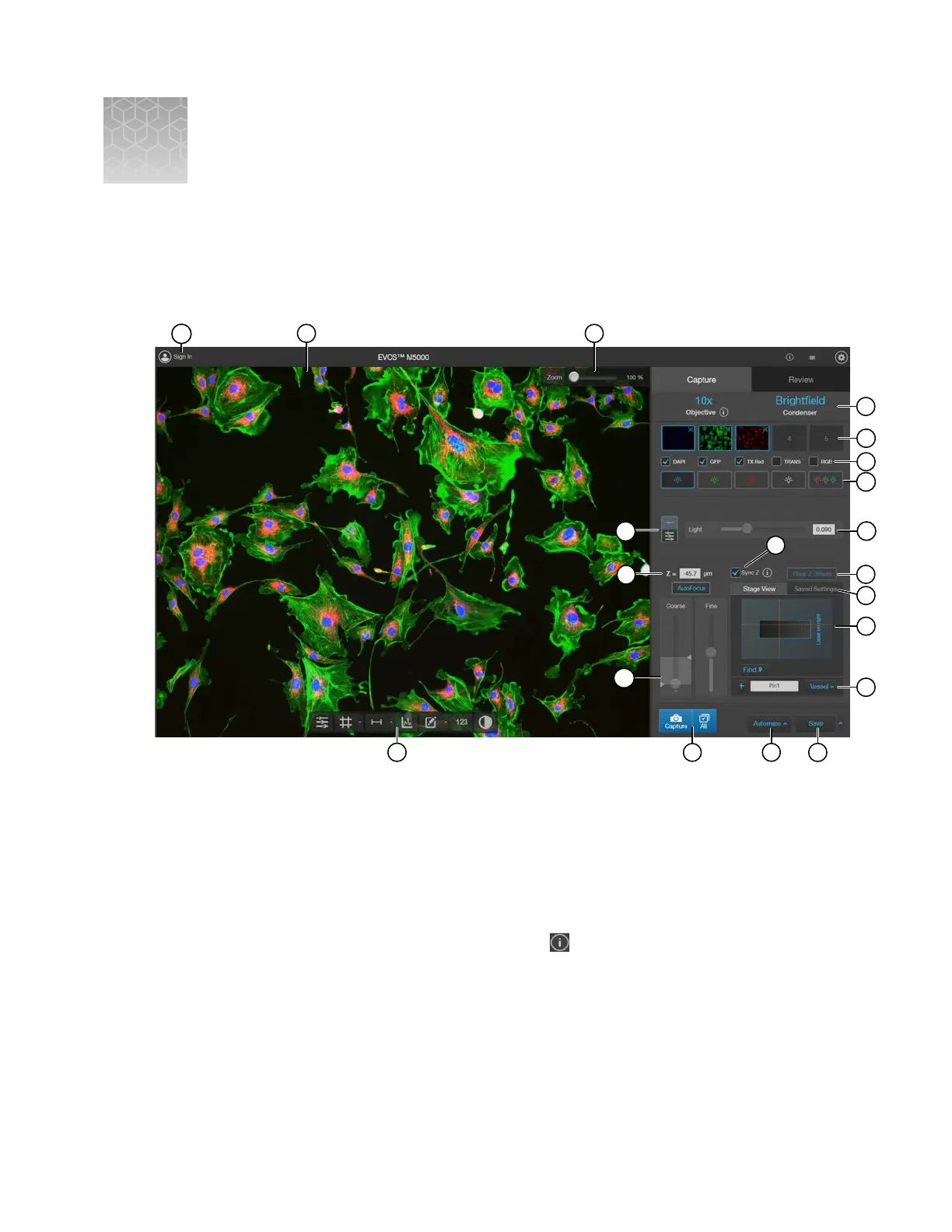
Graphical user interface (GUI)
Capture tab
15
9
12
13
14
4
7
5
6
20
17
18
16
3
11
1
2
8
19
10
1.
Sign In/User
: Allows you to sign in to and sign out of your Connect
account.
2.
Viewing area
: Displays live or captured images of the sample.
3.
Zoom slider: Zooms in and out of the Viewing area. The zoom range is 100% to 1000%.
4.
Active objective and phase ring: Displays the active objective and phase ring information.
•
If the selected objective and phase ring match, the selected phase ring is depicted in blue
font. If the objective and phase ring do not match, the phase ring is depicted in orange font.
•
To learn more about the current objective, click
.
5.
Thumbnails
: Display the most recently captured image stored in the memory buer for the
channel.
6.
Capture channels: Checkmarked channels to be captured using the All button.
B
EVOS
™
M5000 Imaging System User Guide
117



 To Next Page