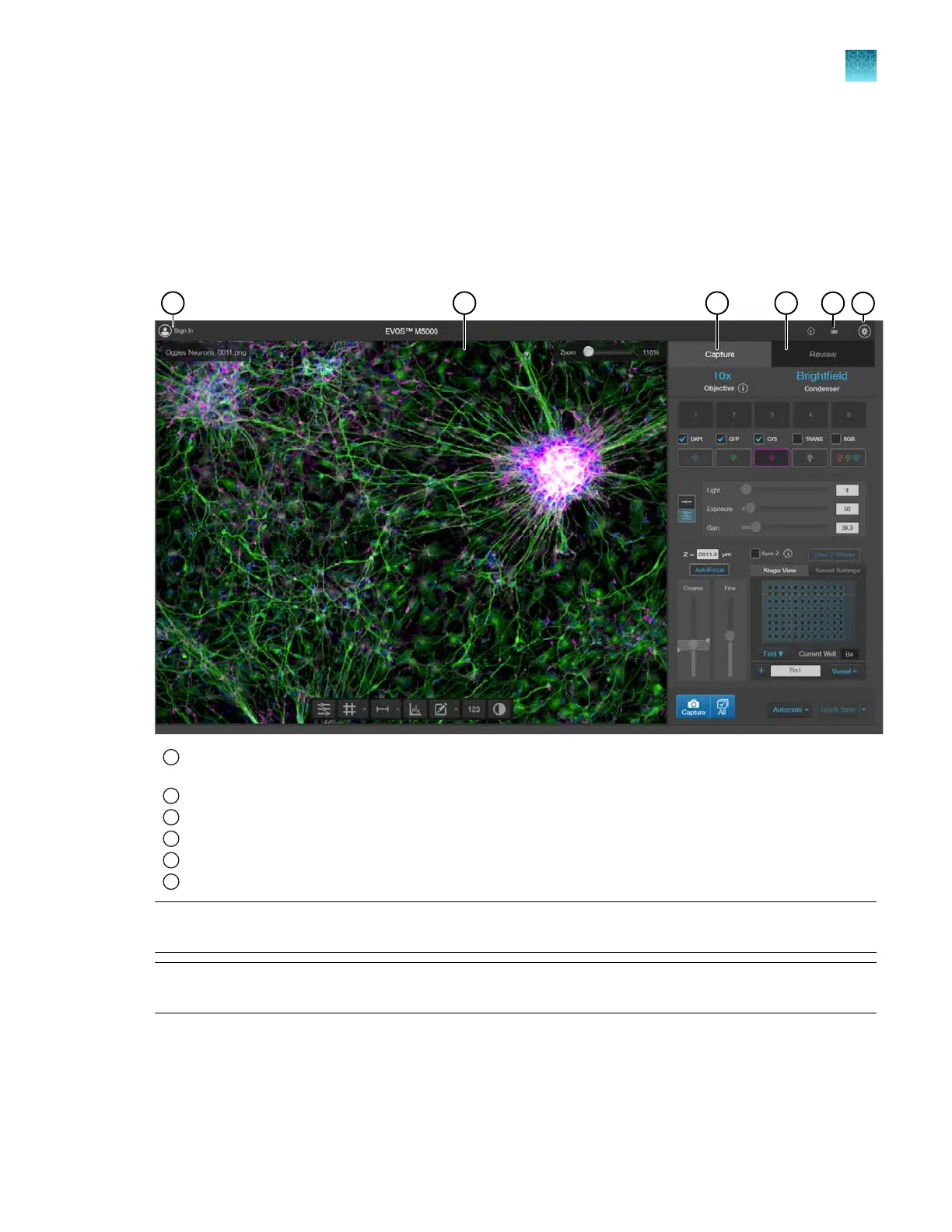
Graphical user interface (GUI)
GUI layout
The GUI of the system consists of the Viewing area on the left and Capture and Review tabs and the
Settings and Virtual keyboard buttons on the right. Each tab and button opens the controls necessary
to execute the selected function.
1
Sign In/User: Allows you to sign in to your Connect account, Connect-based platform, for image storage and
analysis with the EVOS
™
Image Analysis application.
2
Viewing area: Displays the live or captured images of the sample.
3
Capture tab: Contains the controls for image capture.
4
Review tab: Allows you to review and annotate captured images.
5
Keyboard button: Opens the virtual keyboard.
6
Settings button: Opens the Settings tabs, which allow you to select and adjust basic and advanced system settings.
Note: For more information and detailed descriptions of GUI controls, see Appendix B, “Graphical user
interface (GUI)”
.
Note: For more information on the EVOS
™
Image Analysis application, see Appendix D, “EVOS
™
image
analysis”
.
Chapter2Product information
Graphical user interface (GUI)
2
EVOS
™
M5000 Imaging System User Guide
15



 To Next Page