1. Tap the Speakers icon in the Navbar.
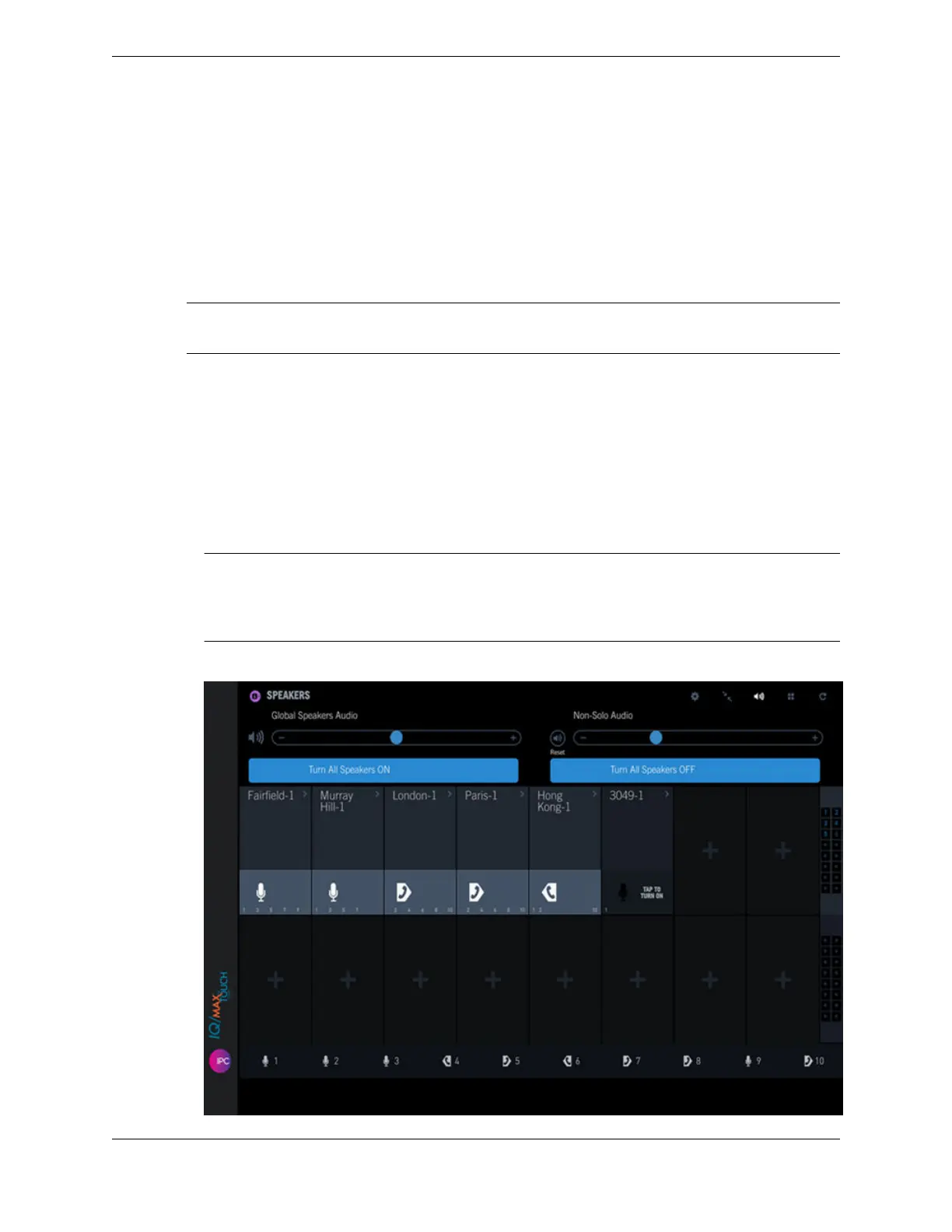
The Speakers application is displayed. See Speakers on a hard turret on page 128 for an illustration.
2. Select a speaker channel and tap the Push-to-Talk button on the lower part of the speaker channel to
turn it on.
TAP TO TURN ON is displayed when the channel is off.
3. To turn the speaker channel off, tap the > icon in the speaker label area, and tap Turn off from the
contextual menu.
Note
When turning a speaker channel on or off repeatedly, pause at least 2 seconds between each action.
10.4.2 Turn all speaker channels on or off
Turn all speaker channels on or turn all speaker channels off. A speaker call is active until the speaker
channel is turned off.
1. Tap the Speakers icon in the Navbar.
The Speakers application is displayed.
2. Tap the Global Speakers Audio icon.
The configured speakers are displayed.
Note
When all speakers are turned on, the Turn All Speakers OFF button is blue and the other button is gray.
When all speakers are turned off, the Turn All Speakers ON button is blue and the other button is gray.
If one or more speakers are on and one or more are off, both buttons are blue.
Figure 54: Speakers application
10.4: Use the Speakers application 131
IPC Proprietary Unigy 4.3
IQ/MAX TOUCH Turret User Guide



 To Next Page