7 Directory
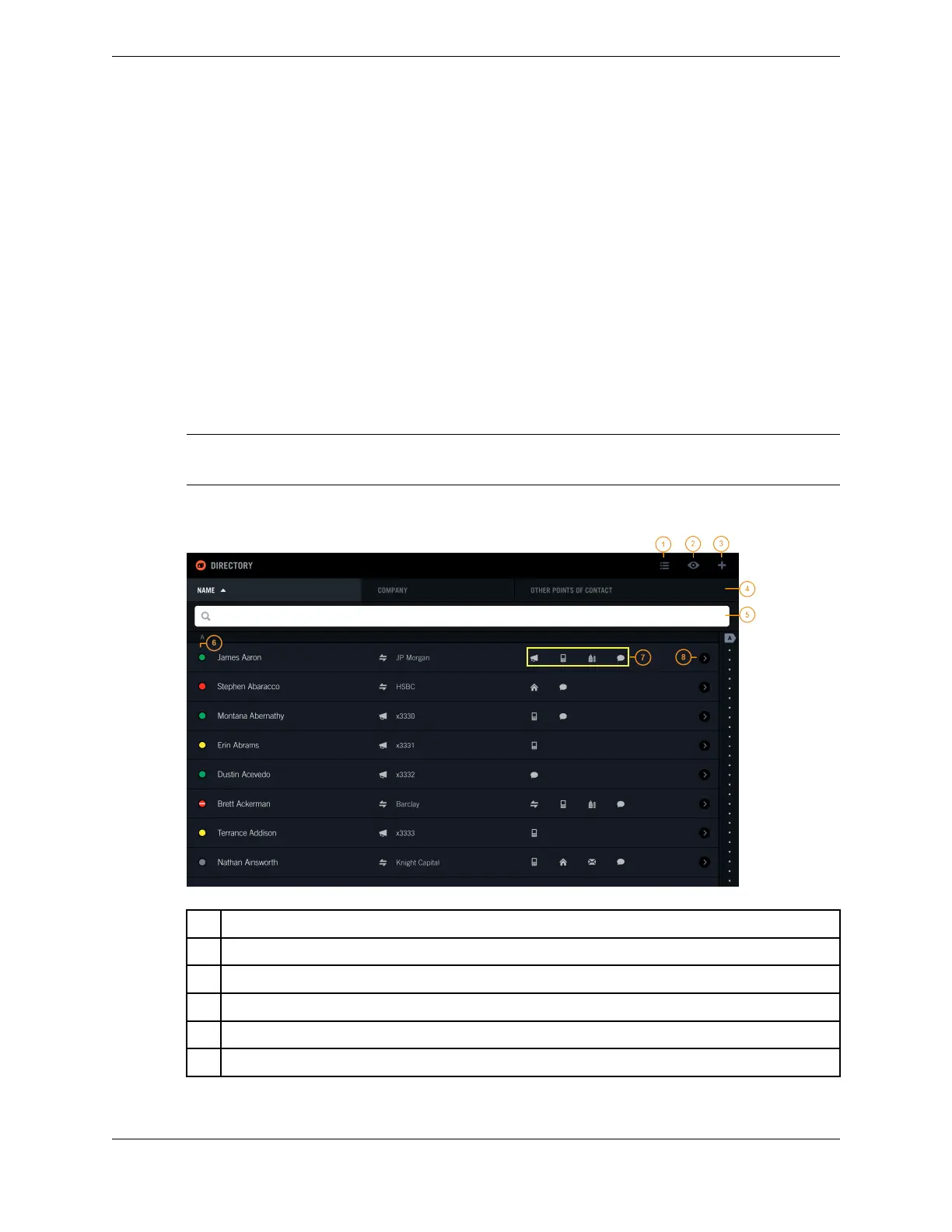
The Directory application provides access to contacts in the Enterprise directory and in your Personal
directory.
A contact can have up to 10 points of contact, such as office phone, mobile phone, and e-mail address.
Each point of contact (POC) is associated with a media type, such as intercom, speed dial, or e-mail.
Before a contact can be displayed on the turret, a contact must have a point of contact. A contact can
have a preferred point of contact that is the default method used to initiate a call.
You can place calls to your contacts through any directory entry that has a point of contact (POC) entry
for a line, speed dial number, or intercom (including group intercom).
Note
For very large directories, it may take some time before all directory entries are displayed upon login.
Figure 49: Directory application
1 Browse icon (also called List icon) - navigate directories and directory categories
2 Filter icon (also called View icon) - show a subset of contact entries by point of contact type
3 Add icon - add a new contact to your Personal directory
4 Directory list header
5 Search field - find a contact entry
6 Presence icon - visual indicator of a contact's availability
83
IPC Proprietary Unigy 4.3
IQ/MAX TOUCH Turret User Guide



 To Next Page