3. Slide your finger to the desired entry and release.
The letter with the selected diacritical mark is displayed in the text field or Search field.
12.2 Enter Japanese characters on the turret
The input method for entering Japanese characters on the IQ/MAX TOUCH turret is called Romaji.
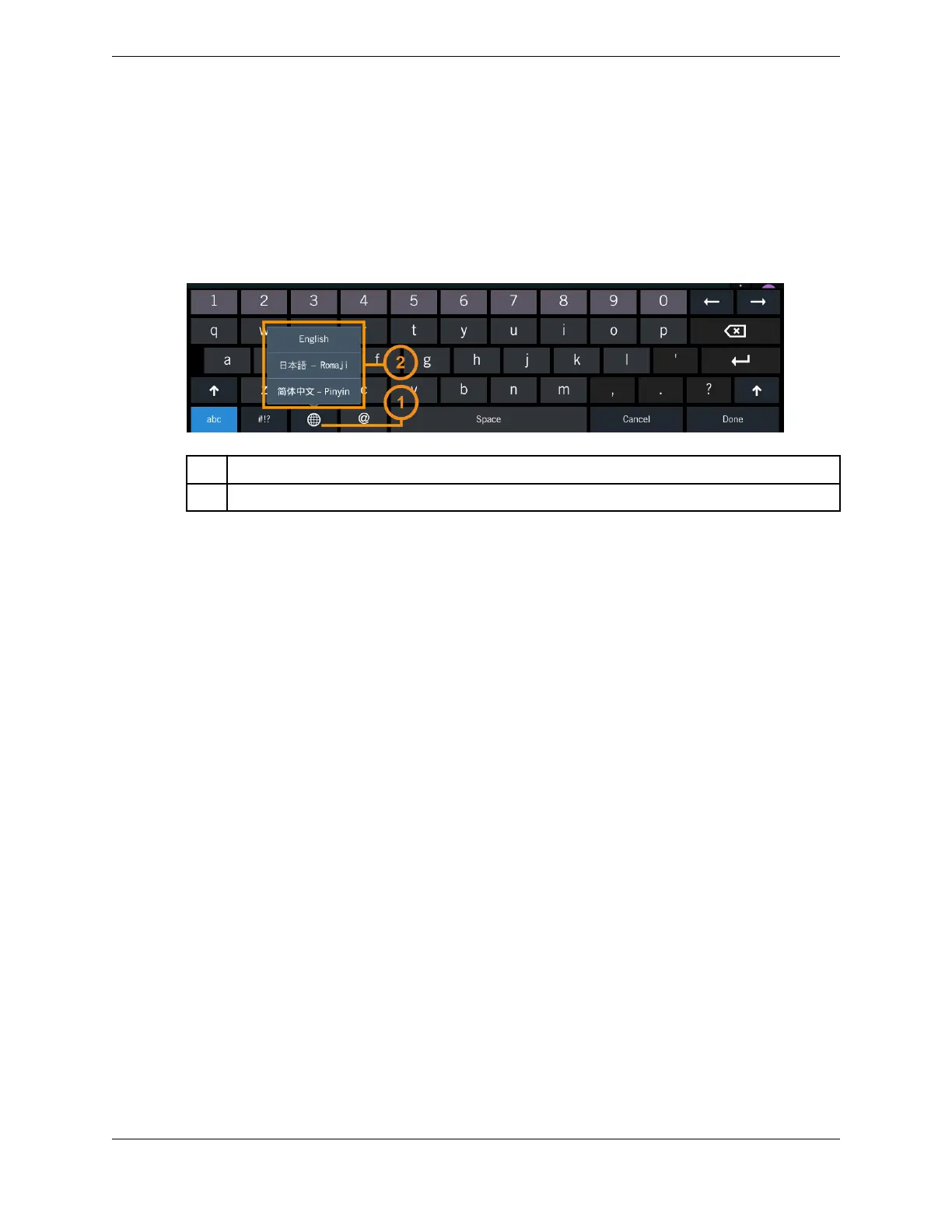
Figure 82: Internationalization switch (globe icon)
1 Internationalization switch (globe icon)
2 Internationalization pop-up menu
1. Tap the text field or Search field that requires text entry.
The soft keyboard is displayed.
2. Tap the internationalization switch (globe icon) then select Romaji from the pop-up menu.
The globe icon is updated to show the Romaji selection.
3. Enter the Romaji text phonetically using the standard keyboard. As you type, if available, the string is
automatically converted to Hiragana characters in the text entry field.
Then a list of corresponding translations of the Hiragana characters that have been entered is
displayed above the standard keyboard. These translations include full- and half-width Hiragana and
Katakana transliterations as well as Kanji conversions.
4. When you have finished entering the text phonetically, tap the desired translation entry from the
display. Slide your finger right or left to view all translation entries.
The selected translation entry is displayed in the text entry field.
12.3 Enter Chinese characters on the turret
The input method for entering Simplified or Traditional Chinese characters on the IQ/MAX TOUCH
turret is called Pinyin.
1. Tap the text field or Search field that requires text entry.
The soft keyboard is displayed.
2. Tap the internationalization switch (globe icon) then select Pinyin from the pop-up menu.
The globe icon is updated to show your selection.
3. Enter the Chinese text phonetically using the standard keyboard. As you type, the set of most likely
Chinese characters that correspond to the phonetic text appears above the standard keyboard.
For example, say you are using Simplified Chinese and you want to enter Beijing. As you type each
letter, possible corresponding Simplified Chinese characters are displayed based on the portion of the
word already entered.
4. When you have finished entering the text phonetically, tap the appropriate set of Chinese characters
from the display.
176 12.2: Enter Japanese characters on the turret
August 26, 2019 IPC Proprietary



 To Next Page