•
The search terms are listed in order of most recently entered.
•
The search terms are saved for the current logon session only. Logging off or rebooting clears the
list.
5.1.1 Search Call History – New Search
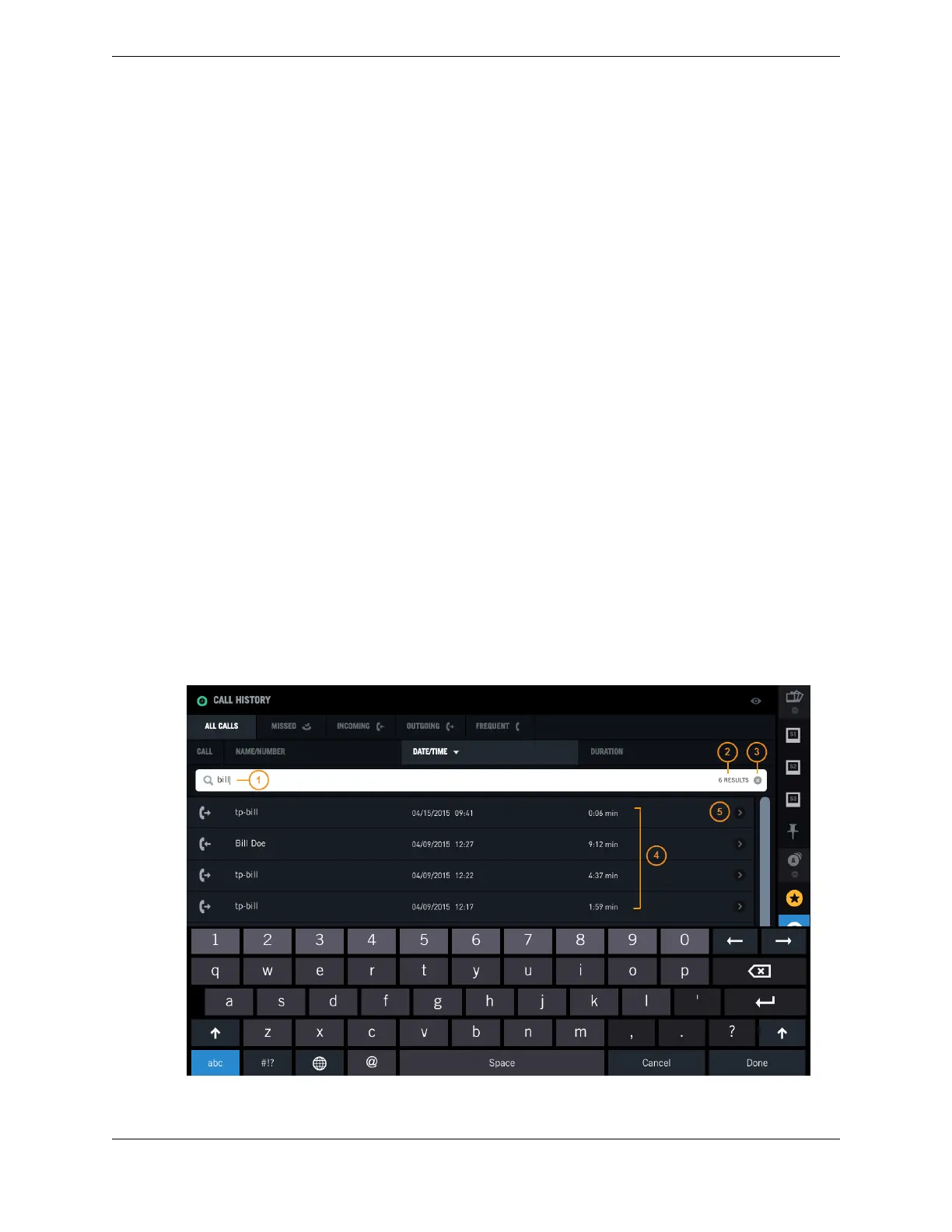
You can search Call History to find a call event using the Search field.
Follow this procedure for a new search, when no Recent Searches exist. For background information,
see Search feature on page 70.
1. Tap the Call History icon in the Navbar.
2. Tap a call category tab to restrict your search to a subset of calls as needed: Missed, Incoming,
Outgoing, or Frequent.
3. Tap the Search field.
The soft keyboard is displayed.
4. Type a sequence of characters using the soft keyboard.
The search begins as soon as a character is entered, and is refined as more characters are entered.
Matching results are displayed, and the number of matching results is shown.
5. You can tap Done to dismiss the soft keyboard, then scroll through the search results list as needed to
find an entry. Your options include:
•
Tap an entry in the search results list to make a call to that person.
•
Tap an entry's Call detail button to access additional options such as creating a new contact.
•
Tap the Remove icon (x) to remove the search results and return to the previous display (all calls
or calls within a category).
Figure 44: Search Call History – New Search
5.1: Search feature 71
IPC Proprietary Unigy 4.3
IQ/MAX TOUCH Turret User Guide



 To Next Page