6 Activity Monitor
The Activity Monitor application provides an area where you can view Favorites buttons that are
designated as fixed buttons and floating buttons (float buttons) on a single page.
A fixed button is always visible in the Activity Monitor. A floating button appears in the Activity
Monitor when call activity occurs on that line. Fixed and floating buttons can be assigned in the Activity
Monitor application or in the Favorites application.
You can resize the display area for fixed buttons and floating buttons using the divider handle (display
area handle). On the IQ/MAX turret, fixed and floating buttons are part of the Favorites application.
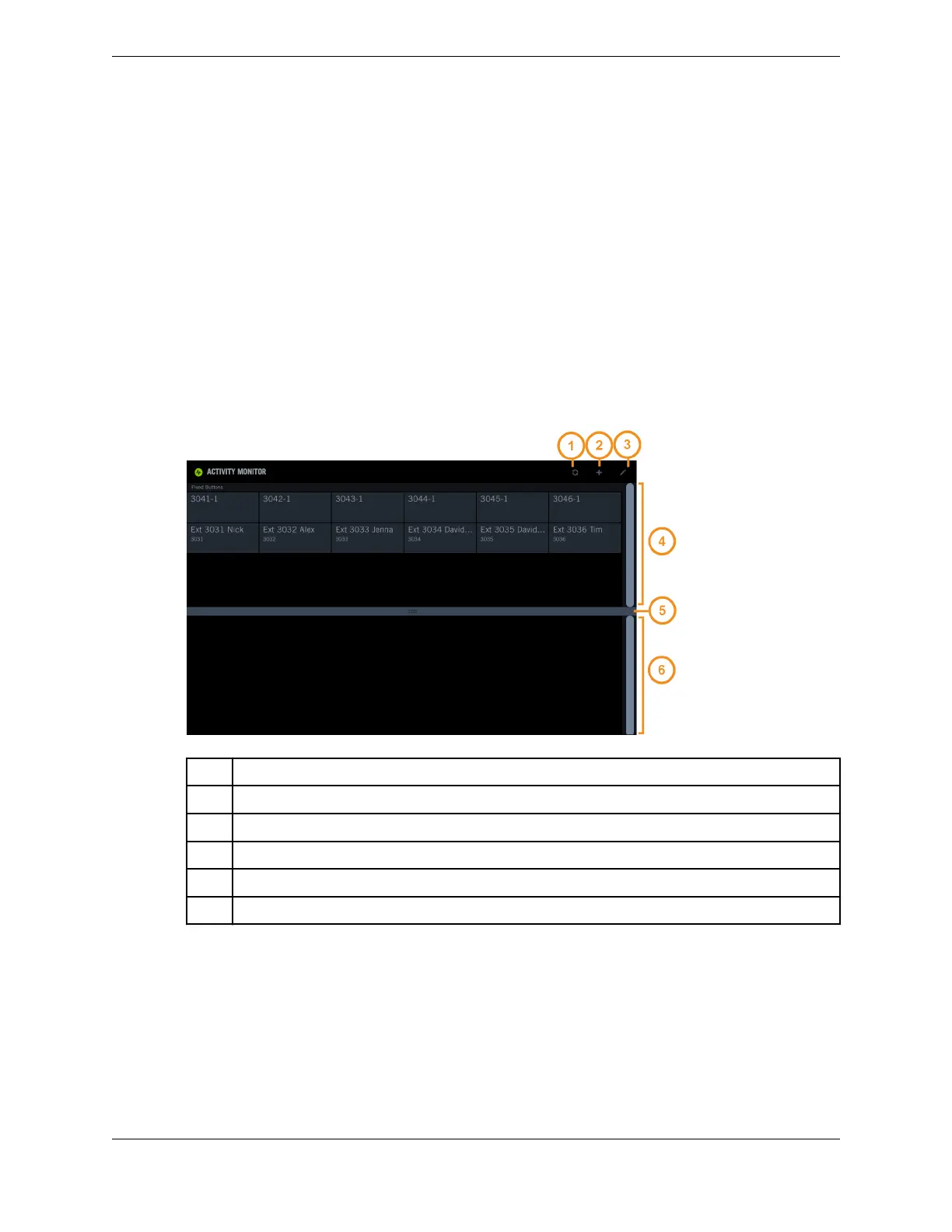
Figure 48: Activity Monitor application
1 Re-sort icon – re-sort the floating buttons area to view buttons that are off-screen
2 Add icon – assign fixed buttons and floating buttons
3 Edit icon – move or swap fixed buttons
4 Fixed buttons area (fixed area)
5 Divider handle (display area handle)
6 Floating buttons area (float area)
Acivity Monitor characteristics
The Activity Monitor has the following characteristics:
•
You can assign up to 12 fixed buttons. In the initial assignment, the fixed buttons are placed in the
next available locations in the fixed area. After the initial assignment, you can move or swap fixed
buttons.
•
There is no limit on the number of buttons that float. You cannot assign a specific location for a float
button.
79
IPC Proprietary Unigy 4.3
IQ/MAX TOUCH Turret User Guide



 To Next Page