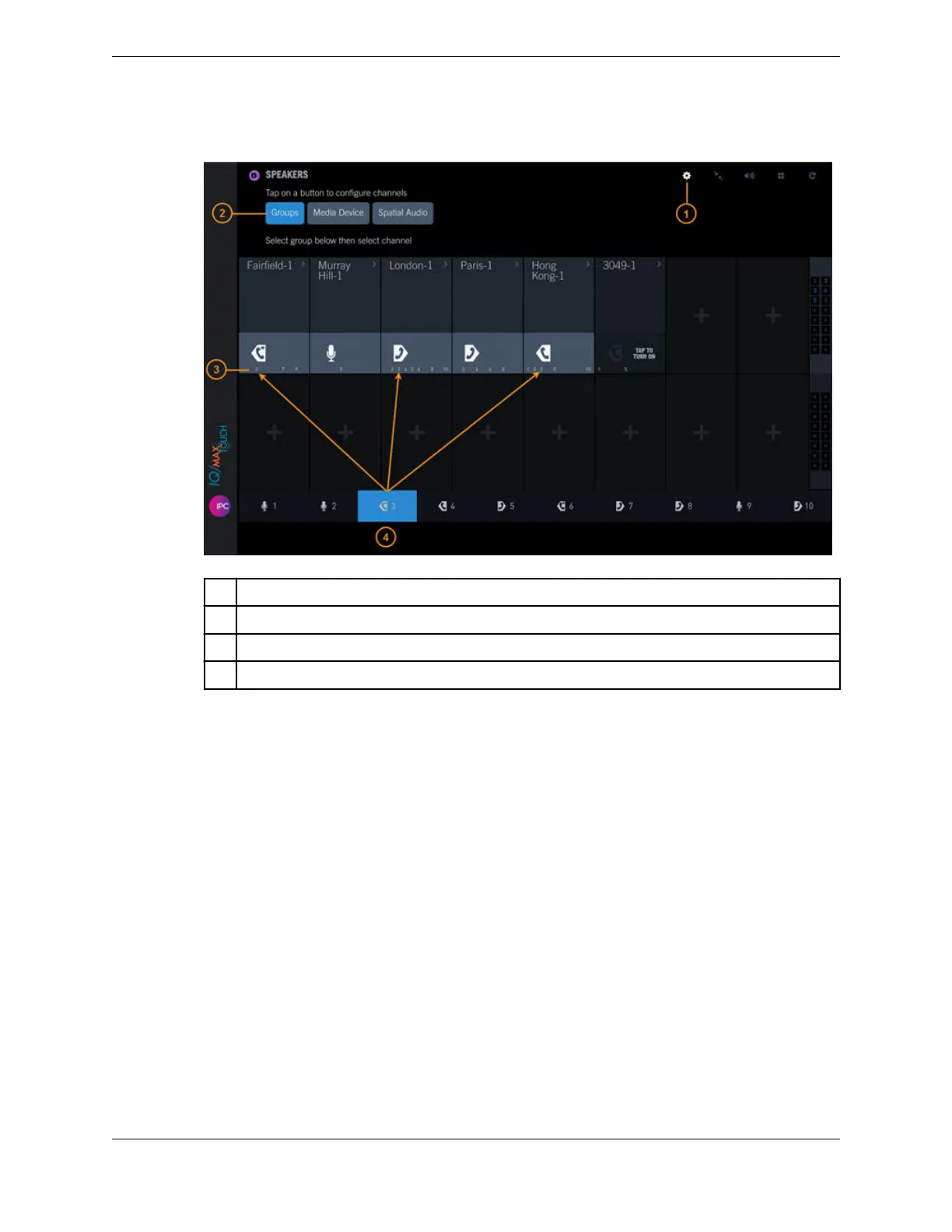
Figure 67: Speakers: Groups
1 Batch Settings Mode icon
2 Groups button
3 Groups the speaker channel is assigned to
4 Currently selected speaker group
2. Tap the Groups button.
3. At the bottom of the screen, tap the speaker group from which you are removing the speaker channel.
4. Tap the speaker channel to remove it from the group.
If you are removing more than one speaker channel from the group, tap each of the speaker channels.
The speaker group number is removed from the speaker channel.
5. Tap the Batch Settings Mode icon to exit edit mode.
10.5.3 Set the latch type for speaker groups
You can set the latch behavior for speaker groups to Push-to-Talk or Push-to-Latch in the Settings
application.
1. Tap the User Badge in the footer.
2. Tap Settings.
3. Tap Speakers.
4. In the Speaker Groups section, tap Push to Talk or Push to Latch/Unlatch for each speaker group.
5. Tap Close to exit Settings.
10.5: Speaker groups 149
IPC Proprietary Unigy 4.3
IQ/MAX TOUCH Turret User Guide



 To Next Page