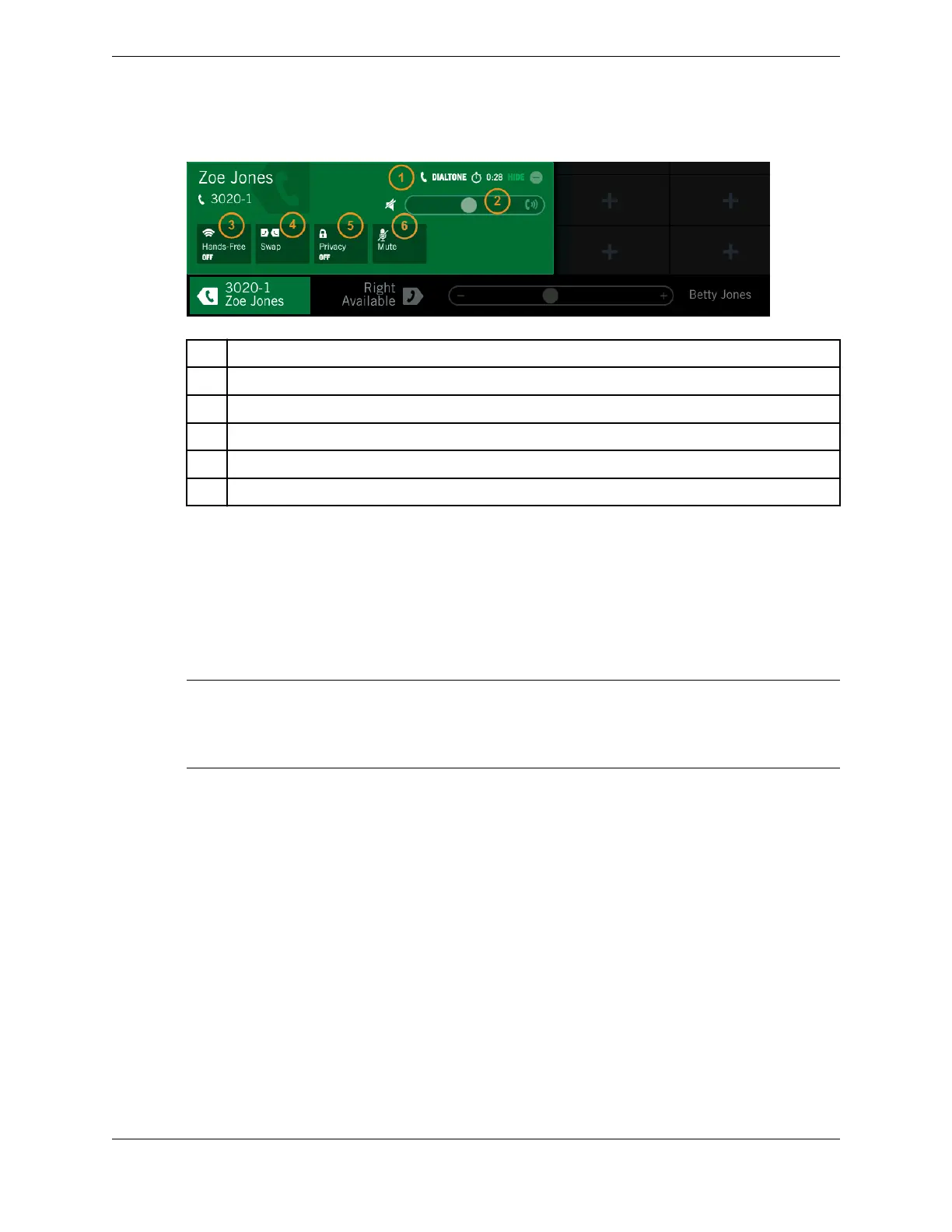
Figure 20: Handset overlay for dial tone call (active call)
1 Call type – dial tone
2 Volume bar (volume slider) – adjust receive volume
3 Hands-Free – toggle hands-free mode (hands-free speaker) on or off
4 Call Swap
5 Privacy – toggle privacy feature on or off
6 Mute – toggle mute
2.4.2 Call Notification popup
When incoming calls arrive, call notifications can pop up on the screen, depending on user preferences
(in the Unigy Management System or on the device).
The Call Notification popup contains a scrollable list of all incoming calls, pending intercoms, and calls
you have put on hold. Calls are listed in the chronological order that they were received or placed on
hold.
Important
In order to show popups, notifications must be configured in the UMS for the end user (in the Display tab
and the button properties in the Favorites tab) or on the device (in User Settings or the notification popup
itself as well as per button using the Favorites Batch Settings).
Each call notification provides calling party information and the duration of the call state in minutes and
seconds and also indicated by the progress bar (if configured for this behavior in the UMS). Up to three
simultaneous notifications can be displayed in the popup area. A scroll bar is provided when there are
more than three notifications.
Tap anywhere in the popup to answer the call on the default handset. You can also swipe left or right to
answer the call on a specified handset. When answered, the call is removed from the notification display.
A Call Notification popup can be minimized and the call unanswered by tapping HIDE. When
minimized, calling party name and number is displayed in the call notification area of the footer. The
time is indicated by the progress bar. When there are multiple incoming calls, the total number of
notifications is displayed. It can be maximized at any time by tapping the call notification area in the
Footer. The display must be maximized in order to answer the call.
When there are no longer any calls to display the Call Notification popup disappears automatically.
32 2.4: Footer area
August 26, 2019 IPC Proprietary



 To Next Page