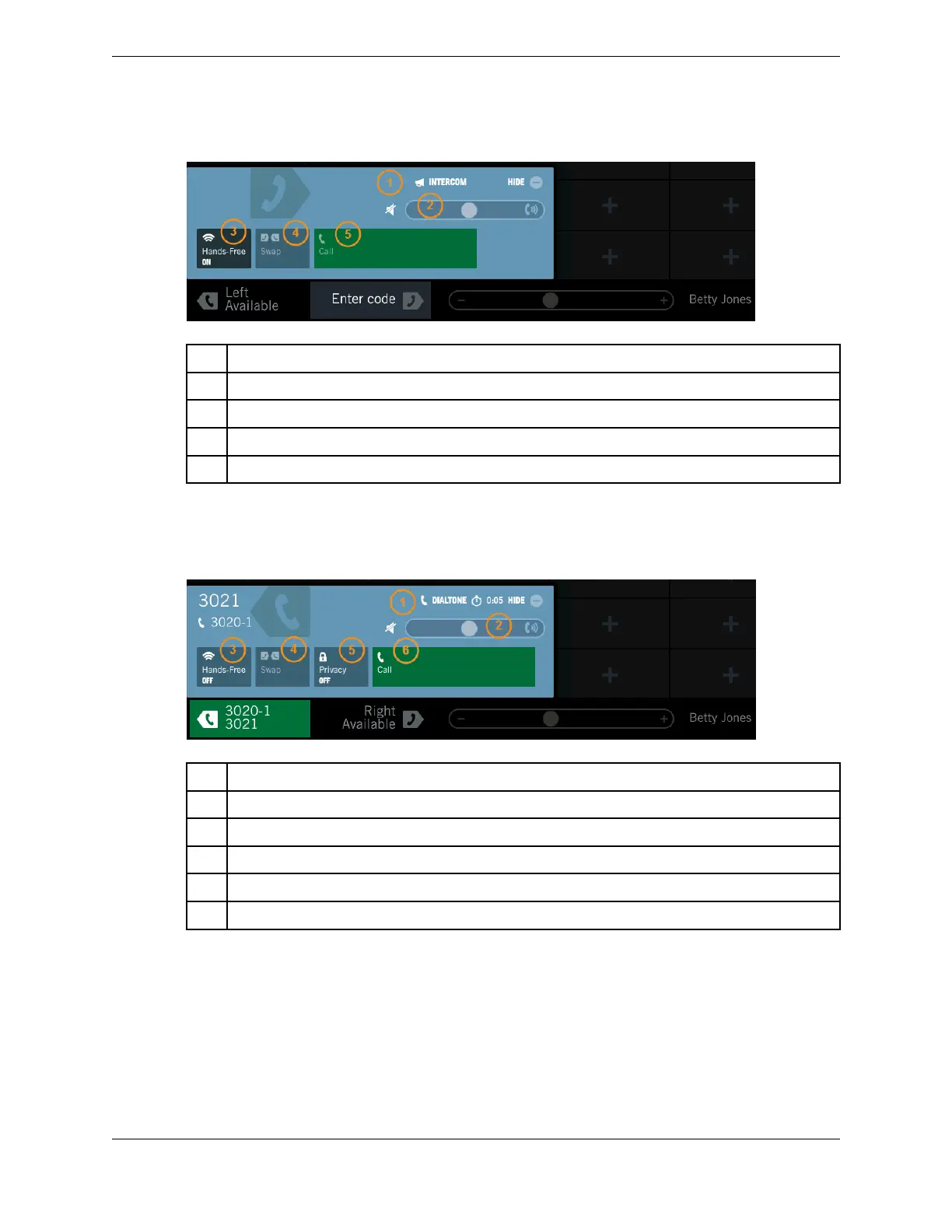
Figure 18: Handset overlay for intercom call (transition state)
1 Call type – intercom
2 Volume bar (volume slider) – adjust receive volume
3 Hands-Free – toggle hands-free mode (hands-free speaker) on or off
4 Call Swap (inactive) – call swap not available for intercom calls
5 Call
When you initiate a dial tone line call, the handset overlay shows the controls illustrated in the following
figure.
Figure 19: Handset overlay for dial tone call (transition state)
1 Call type – dial tone
2 Volume bar (volume slider) – adjust receive volume
3 Hands-Free – toggle hands-free mode (hands-free speaker) on or off
4 Call Swap (inactive) – call swap not available until line call is established
5 Privacy – toggle privacy feature on or off
6 Call
In an active dial tone call, the handset overlay appears as follows.
2.4: Footer area 31
IPC Proprietary Unigy 4.3
IQ/MAX TOUCH Turret User Guide



 To Next Page