Note
When you access the Replay screen, the audio available for replay is the audio recorded at the time you
enter the screen. Any further voice activity is not recorded until you leave the Replay screen.
While you are in the Replay screen, you can replay the current recording as many times as necessary,
however, after you leave the screen, that recording is no longer available for replay.
If multiple copies (clones) of the Speakers application are open, replay can only be open in one
application at a time. Opening replay in copy B while it is already open in copy A automatically closes
replay in copy A, and starts a new replay session in copy B.
For free seating considerations when using replay speaker audio, see Free seating on page 19.
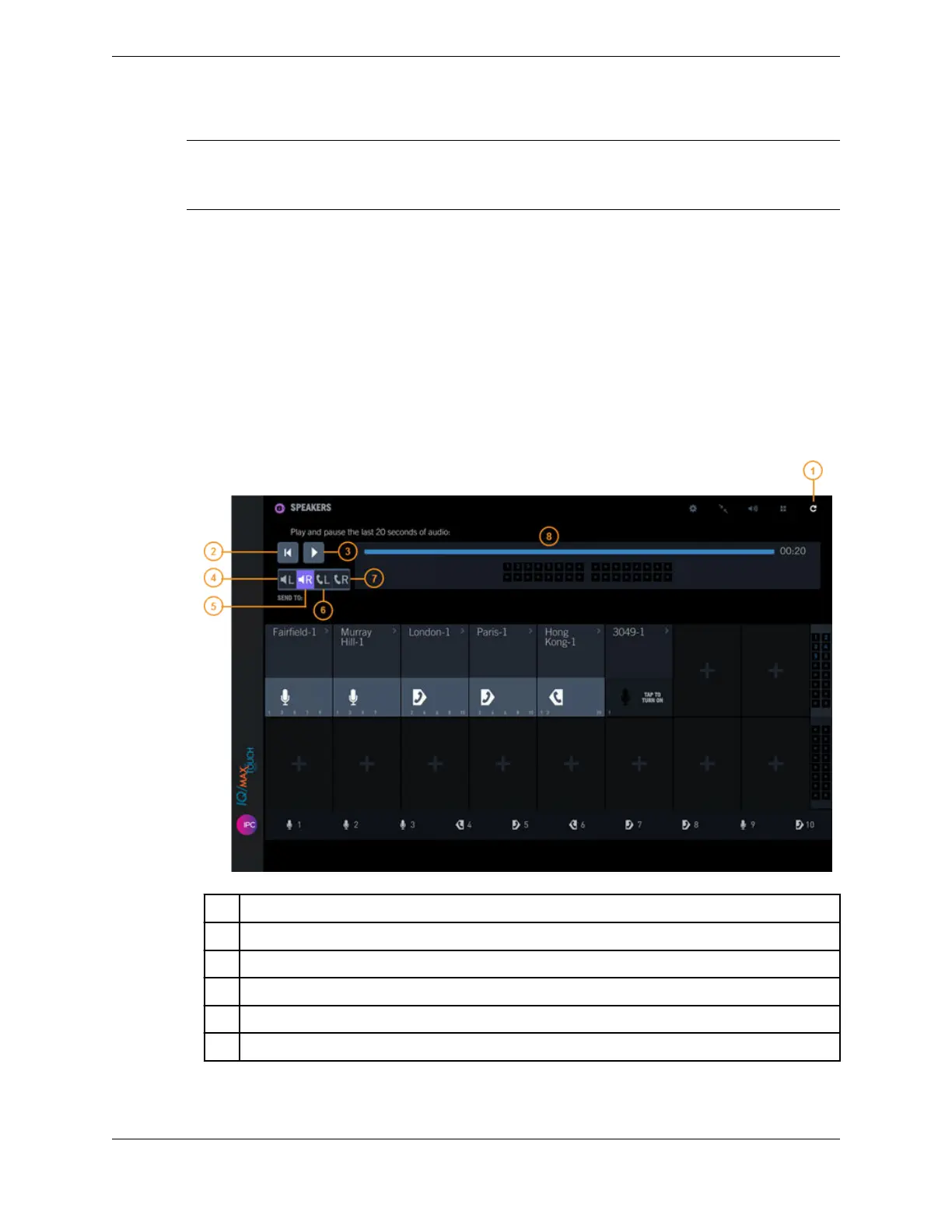
To replay speaker audio in the Speakers application:
1. Tap the Replay audio icon in the Speakers application header bar.
The Replay controls page is displayed.
Figure 59: Speakers replay audio
1 Replay audio button
2 Rewind button
3 Play/Pause button
4 Send to left speaker
5 Send to right speaker
6 Send to left handset
136 10.4: Use the Speakers application
August 26, 2019 IPC Proprietary



 To Next Page