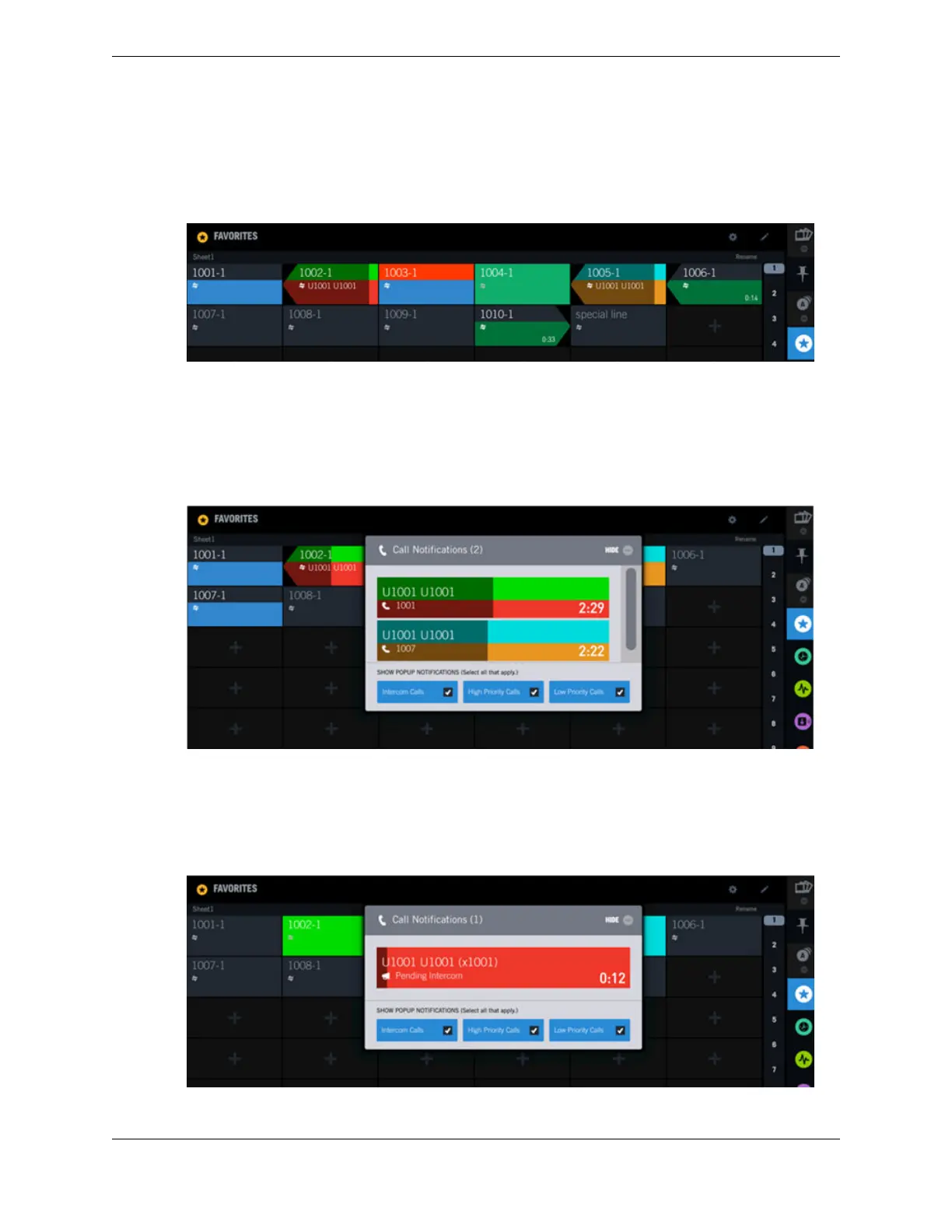
default background color. The other buttons are in the same state as the buttons described in the previous
example, however, the buttons with lines 1002-1 and 1005-1 look different because the pending call
timer bar is overlaying the button colors making them darker.
Figure 36: Line status and pending call timer bar
Call Notification popup with high and low priority calls
This example shows the Call Notification popup at the receiving end of an incoming high priority call
(1001) and an incoming low priority call (1007). The colors displayed are the same as the colors on the
associated buttons for the calls. The darker bars overlaying the buttons and notification indicators are the
call pending timer bars.
Figure 37: Call Notification popup – high and low priority calls
Call Notification popup with high priority intercom call
This example shows the Call Notification popup at the receiving end of a high priority intercom call
with intercom auto-answer disabled. For this scenario the button color shows only the color assigned to
high priority calls.
Figure 38: Call Notification popup – high priority intercom call
4.10: Batch settings mode 61
IPC Proprietary Unigy 4.3
IQ/MAX TOUCH Turret User Guide



 To Next Page