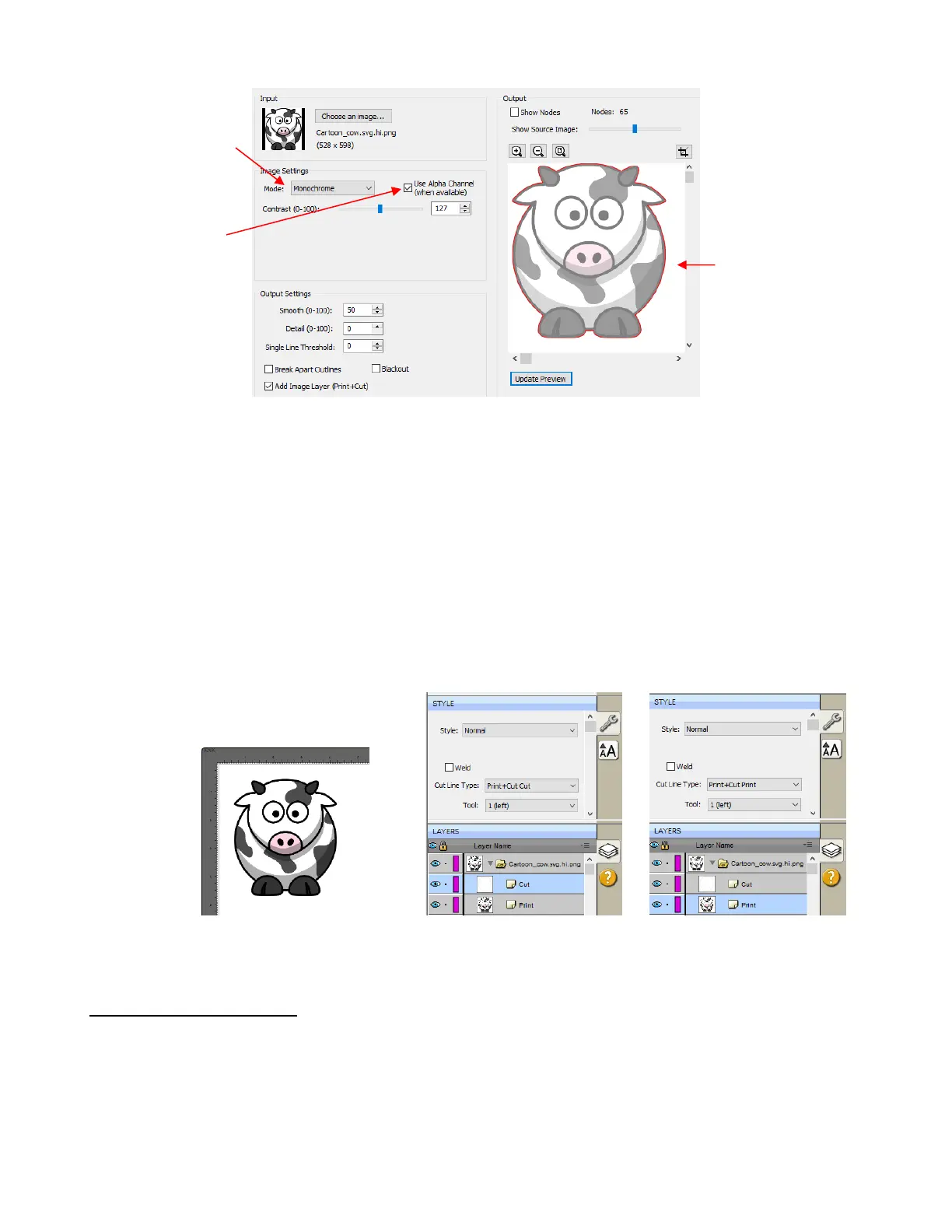
Regarding a few of the relevant Settings:
Contrast: It shouldn’t be necessary to adjust this setting because of the transparent background
Smooth: In some cases, it might be necessary to decrease Smooth to get a tighter fit for a print and cut
application. Alternatively, you can also create an Inset after the trace, when needed. Refer to the Inset
Offset option in Section 8.03.
Blackout: apply if there are internal cut lines that are not needed
Add Image Layer (Print + Cut): Mark this box if you want a second layer with the original image.
If the Add Image Layer option is marked, after clicking on OK, the image will appear on the Cutting Mat
and the Layers Panel will indicate which layer is the Print and which is the Cut. Note that on the Style
Panel, the Cut layer will be designated as Print+Cut Cut and the Print layer will be designated at
Print+Cut Print. This means that the Cut layer will not be printed and the Print layer will not be cut:
For more information on the Style Panel, refer to Section 10.01.
7.03.7 Color Layers Trace
As mentioned in Section 7.03.1, Color Layers might be a good mode to choose for a paper piecing or
layered vinyl project if you want underlayers present. In this section, a flower that has two shades of pink
and two shades of green is chosen:



 To Next Page