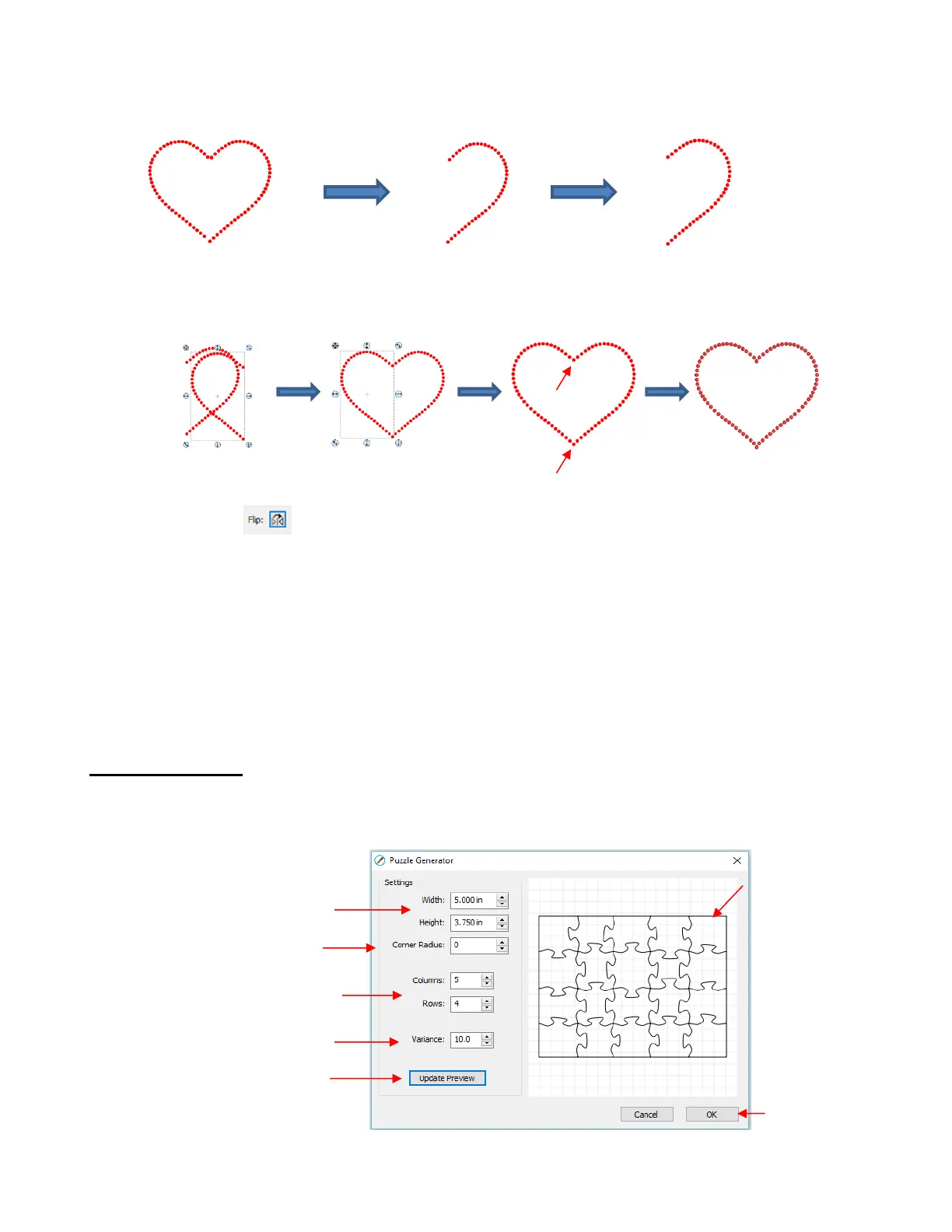
Apply Object>Break Apart to the design. Then decide which half is closer to perfect and delete the
other half. Then tweak the remaining half:
Select the tweaked design and then perform the following steps shown:
A final tip: If you plan to do a lot of rhinestone applications, create and cut a template with small patterns (~
15 – 20 circles) in different sizes so that you can test brush your rhinestones to find out the optimum size to
use when designing. A difference of just 0.1 or 0.2 mm can affect how easily the stones will brush into a
pattern right side up. If the size is too small, the stone will tend to not fall in. If the size is too large, then the
ones that land right side up will tend to get flipped over by the brush. Also, stones can vary slightly in size
from one manufacturer to the next and also from one color to the next. Further, the size of the cut holes can
vary slightly from one template material to the next.
9.11 Jigsaw Puzzle
The Jigsaw Puzzle feature will generate a rectangular jigsaw pattern with a number of options from which
to choose. To open the window, go to Effects>Puzzle Generator:
Enter desired Width and Height
(can be changed later, if needed)



 To Next Page