EasyManua.ls Logo

KNK Zing Air - Object on Path

KNK Zing Air
302 pages
Print Icon
To Next Page IconTo Next Page
To Previous Page IconTo Previous Page
Loading...
190
Click on OK and then apply Path>Union.
9.07 Object on Path
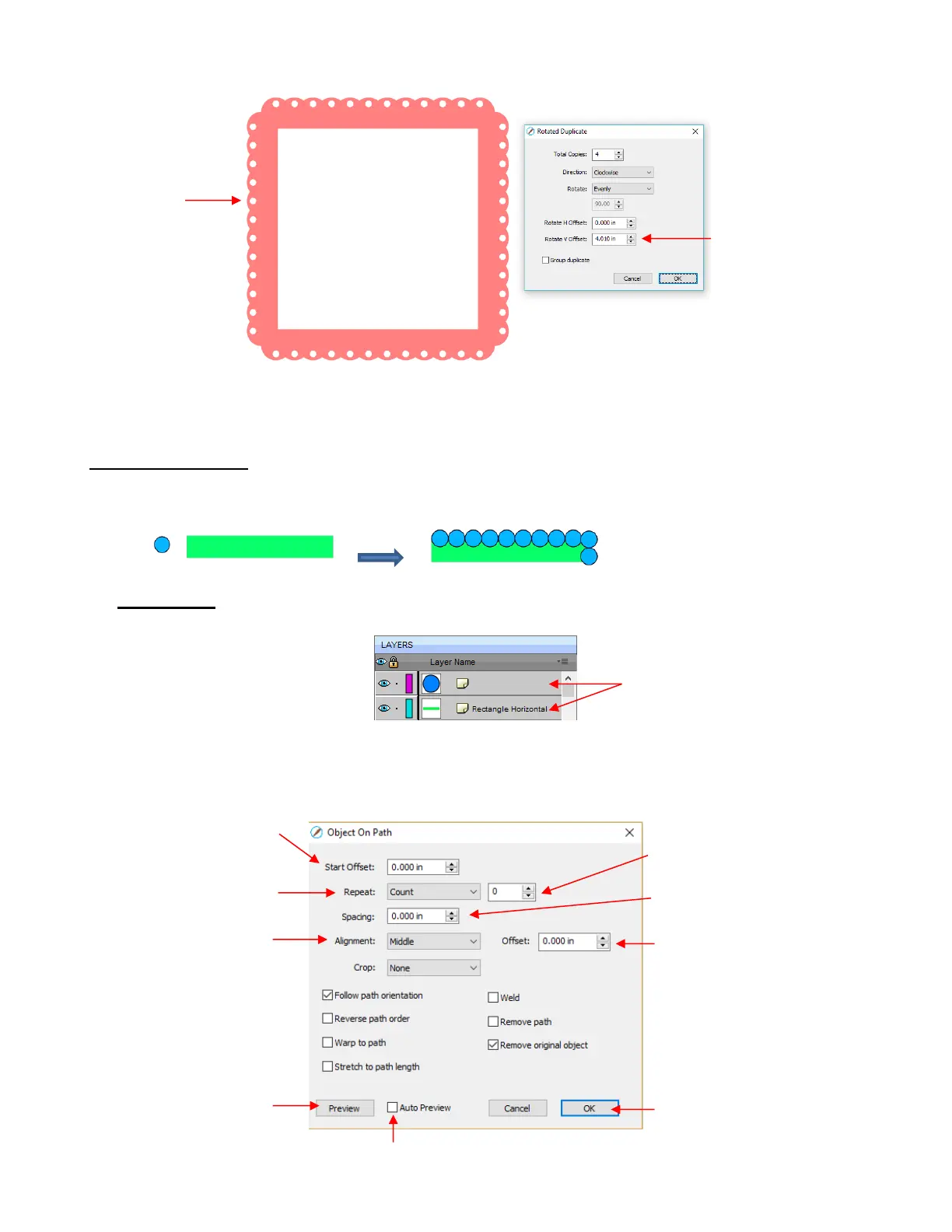
The Object on Path function can be used to align repeats of a shape along the path of another shape:
IMPORTANT: Before applying the function, check the Layers Panel to make sure the shape to be repeated
is on a higher layer than the path:
To open the Object on Path window, select both the path and the shape to be repeated and go to
Effects>Object on Path. Because there are so many settings in this window, only about half will be
explained at this point:
Increase V Offset
until the four
corners look perfect
Frame is
formed
Shape to be repeated
should be above the path
shape
If using Count, number of
Repeats
Location of first shape
Select either Count or
Fill path length
Distance between
Repeats
Select Top, Middle or Bottom
part of shape to be aligned

Distance from that part of
the shape to the path
Click here to manually
update the preview
Check this box to have the
preview update with changes
Click OK when done

Table of Contents

Related product manuals