IMPORTANT: Make sure the version of SCAL you installed matches the registration you purchased. You
can verify this by going to Help>About Sure Cuts a Lot. If the wrong version is installed, uninstall this
current version and download the correct one.
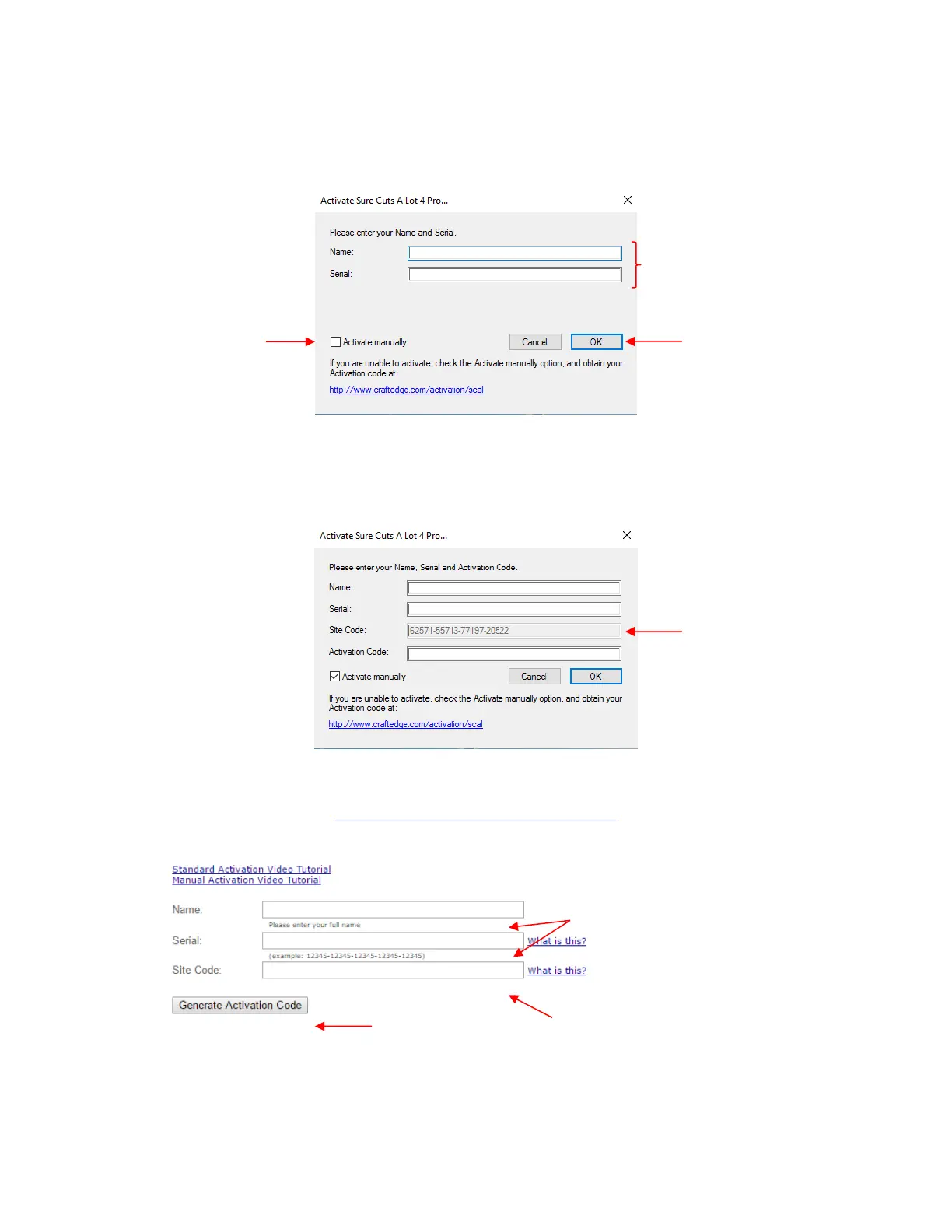
After clicking on Activate, enter your name and the Serial Number you received after purchasing SCAL:
If you do not have an Internet connection on this computer or the automatic activation fails, use the Activate
manually option in the prior screenshot.
The window will then pop up a Site Code:
Next, go to the following link:
http://www.craftedge.com/activation/scal/
Enter your Name, Serial Number and the Site Code. Then click on Generate Activation Code:
An Activation Code will be generated and it can be copied and pasted into the Activate manually screen.
The purchased Serial Number can be registered on any two computers you own. If you want to register
SCAL on a new computer:
Go to Help>Deactivate on the computer no longer needing SCAL and confirm you wish to deactivate.
Go to the new computer and activate SCAL.



 To Next Page