G-60
MX5100, WSM
G GENERAL
[2] TREADS ADJUSTMENT
(1) Front Wheels
(A) 2WD Type
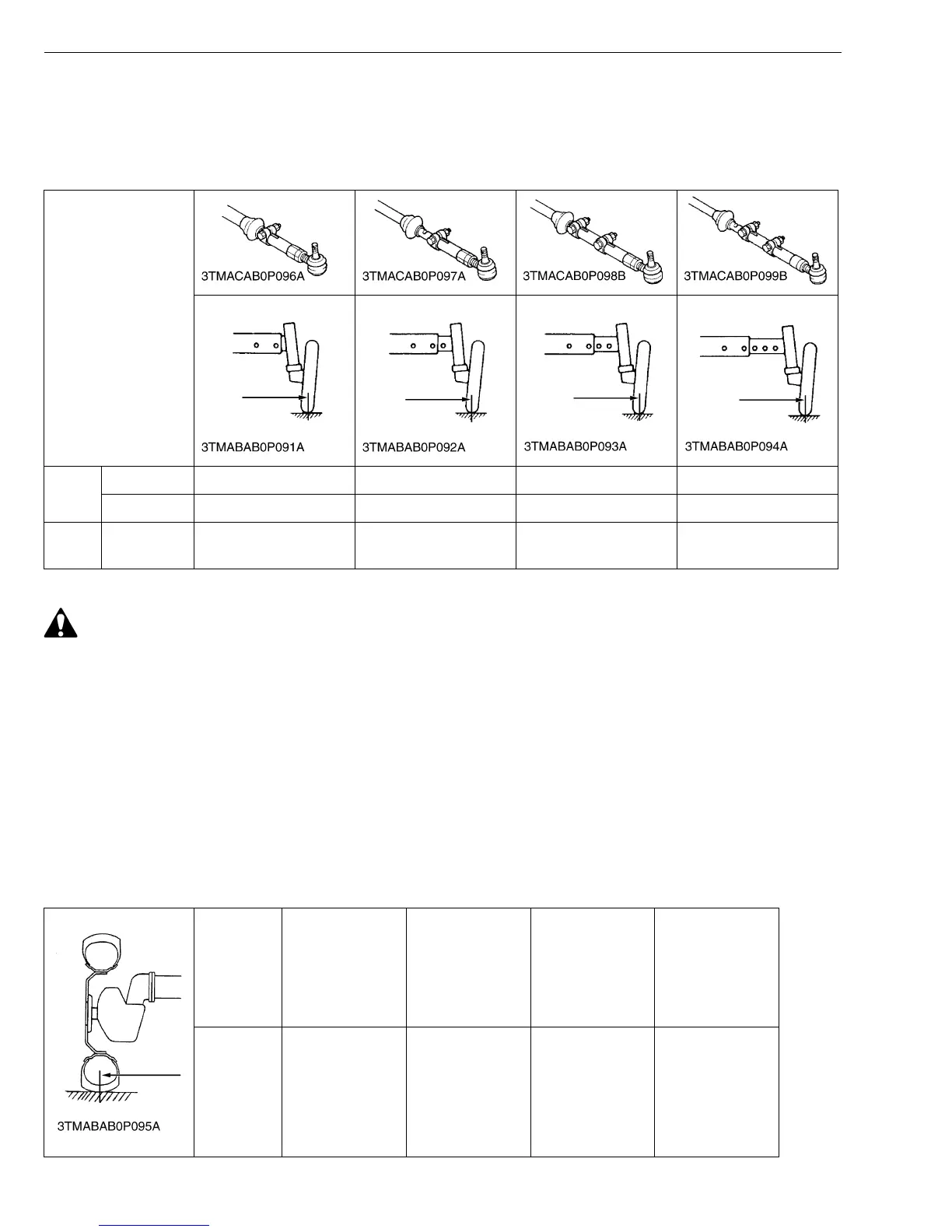
With 2WD models, the front tread can be adjusted in 4 steps.
W1050874
CAUTION
• When working on slopes or working with trailer, set the wheel tread as wide as practice for the job for
maximum stability.
To change the tread
1. Lift the front of the tractor with a jack.
2. Remove the front axle mounting screws and the tie rod mounting screws.
3. Move the front axle (right and left) to the desired position, and tighten them with the screws.
• After tread adjustment, adjust toe-in.
Toe-in: All models 2 to 8 mm (0.08 to 0.31 in.)
• The front width for the front loader application on 2WD models should not be greater than 1215 mm (47.8
in.).
(B) 4WD Type
Front tread can not be adjusted.
W10527070
Models
Farm
7.5L-15 1280 mm (50.4 in.) 1380 mm (54.3 in.) 1480 mm (58.3 in.) 1580 mm (62.2 in.)
9.5L-15 1255 mm (49.4 in.) 1355 mm (53.3 in.) 1455 mm (57.3 in.) 1555 mm (61.2 in.)
Turf
29 x 12.5-
15
1315 mm (51.8 in.) 1415 mm (55.7 in.) 1515 mm (59.6 in.) 1615 mm (63.6 in.)
Tire 9.5-16
Farm
12-16.5
Industrial
29 × 12.5–15
Turf
305R343
Industrial
Tread 1325 mm
(52.2 in.)
1325 mm
(52.2 in.)
1305 mm
(51.4 in.)
1440 mm
(56.69 in.)


 To Next Page