9-S20
MX5100, WSM
ELECTRICAL SYSTEM
(9) Combination Switch
Combination Switch
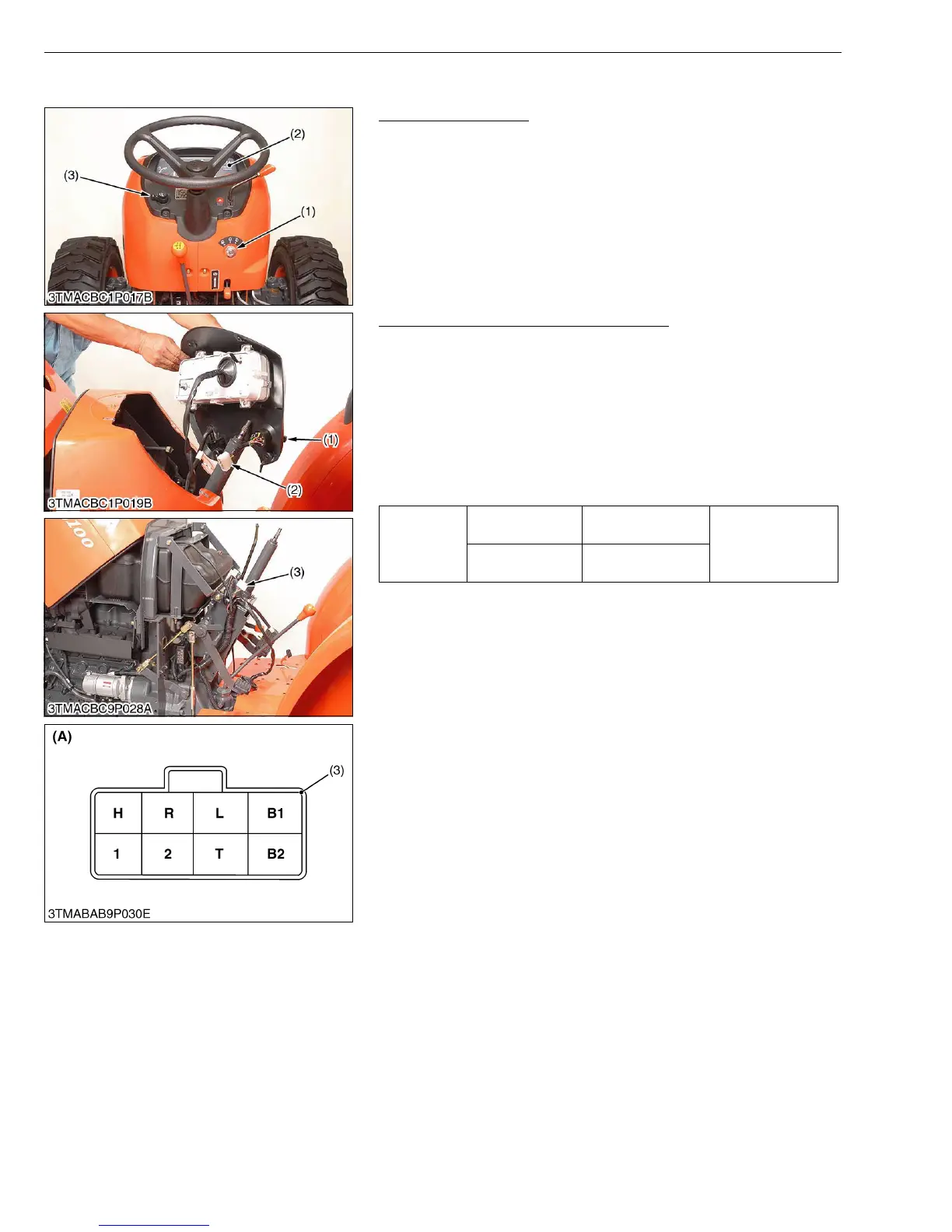
1. Turn off the main switch (1).
2. Remove the panel board (2).
3. Perform the following checks.
W1107080
Connector Voltage (Wire Harness Side)
1. Disconnect the connector 8P (1) from the combination switch.
2. Measure the voltage with a voltmeter across the connector B1
terminal and chassis when the main switch is OFF position.
3. If the voltage differs from the battery voltage, the wiring harness
is faulty.
4. Measure the voltage with a voltmeter across the connector B2
terminal and chassis when the main switch is ON position.
5. If the voltage differs from the battery voltage, check the wiring
harness and main switch.
W1108114
(1) Main Switch
(2) Panel Board
(3) Combination Switch
Voltage
Main switch at
OFF position
B1 Terminal -
Chassis
Battery voltage
Main switch at
ON position
B2 Terminal -
Chassis
(1) Combination Switch
(2) 8P Connector (Combination Switch
Side)
(3) 8P Connector (Wire Harness Side)
(A) Connector 8P (Wire Harness Side)



 To Next Page