112 User Manual QuickTOC
®
purity
ATEX 2 04E3920
7 How to Work With the Analyser
7.2 Configuration LAR | PROCESS ANALYSERS AG
7.2.14.1 Auto Calibration: Automatic Calibration through Calibration Standards
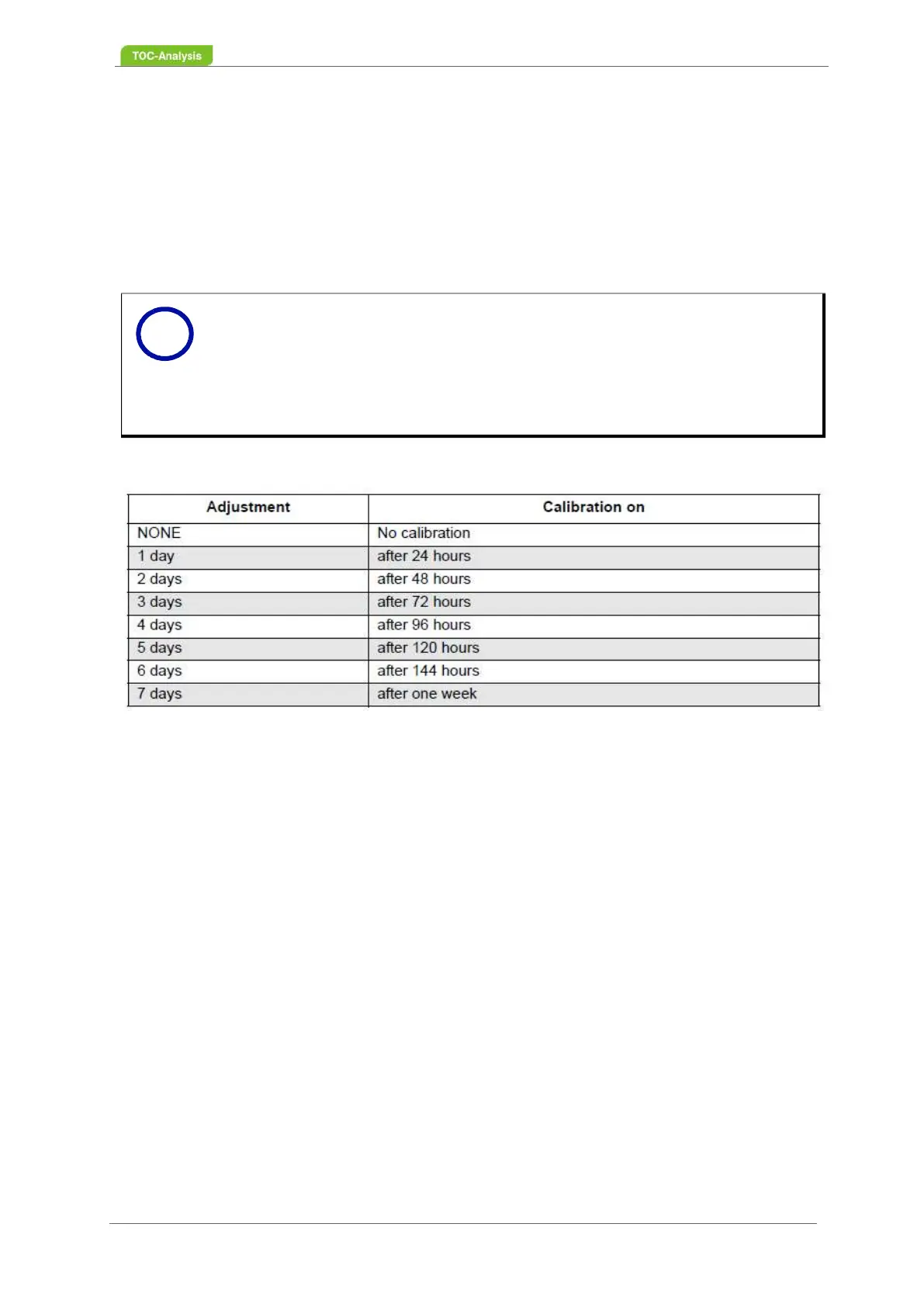
This feature allows automatic calibration of the instrument, where each sample stream can be selected
and eight different time intervals are available.
In the input field "Deviation", the percentage deviation of the new calibration must be entered.
The integration range of the automatic calibration is compared with the last manual calibration. If the de-
viation of the automatic and the manual calibration is within a defined percentage, the values of the au-
tomatic calibration are taken over as a new calibration. If the deviation is too large, the calibration is
discarded.
Tabelle 13: Possible calibration intervals
1. Activate time interval per sample stream (selection window).
2. Set deviation in percent per sample stream.
3. Start online measurement with the green button.
4. Auto-calibration starts after the selected time.
7.2.14.2 Autocheck - Automitic checking with Calibration Standards
This screen can be used to determine if the device should perform autochecks. For this, there must be
a channel that is in an online measurement and another that performs the control measurement. In order
to perform the "Check" function, please contact the technical support of the LAR (Kapitel 15.1 ab
Seite 183), as this function must be enabled.
In this screen can be determined how often measured. Thus, the device itself checks in the interval you
specify whether it still works correctly.
7.2.15 Setting Limits
A maximum of 41 limit values can be set. The parameters to be set are:
the channel
the minimum value of the measured value (lower limit)
the maximum value of the measured value (upper limit)
the name of the limit (name)
The first three points are necessary. The name is not binding and is for documentation purposes. Select
Notice
Before a calibration or measurement can be started, the status must be checked and
a visual check made on the meter. Otherwise, the Danger insists that an incorrect ca-
libration or measurement occurs.
If an automatic calibration is set, please make sure that there is enough fresh calibra-
tion standard available.
Click the "Online" button to start an automatic calibration.
i



 To Next Page