04E3920 User Manual QuickTOC
®
purity
ATEX 2 127
7 How to Work With the Analyser
7.3 Good to know
LAR | PROCESS ANALYSERS AG
7.3.11 Calibrations
Calibrate in two different screens:
• in user level 2 in the screen "Perform calibration"
• in user level 3 in the screen "Service Calibration"
Calibration can be stopped at any time by pressing the red "Offline" button.
7.3.11.1 Service Calibration
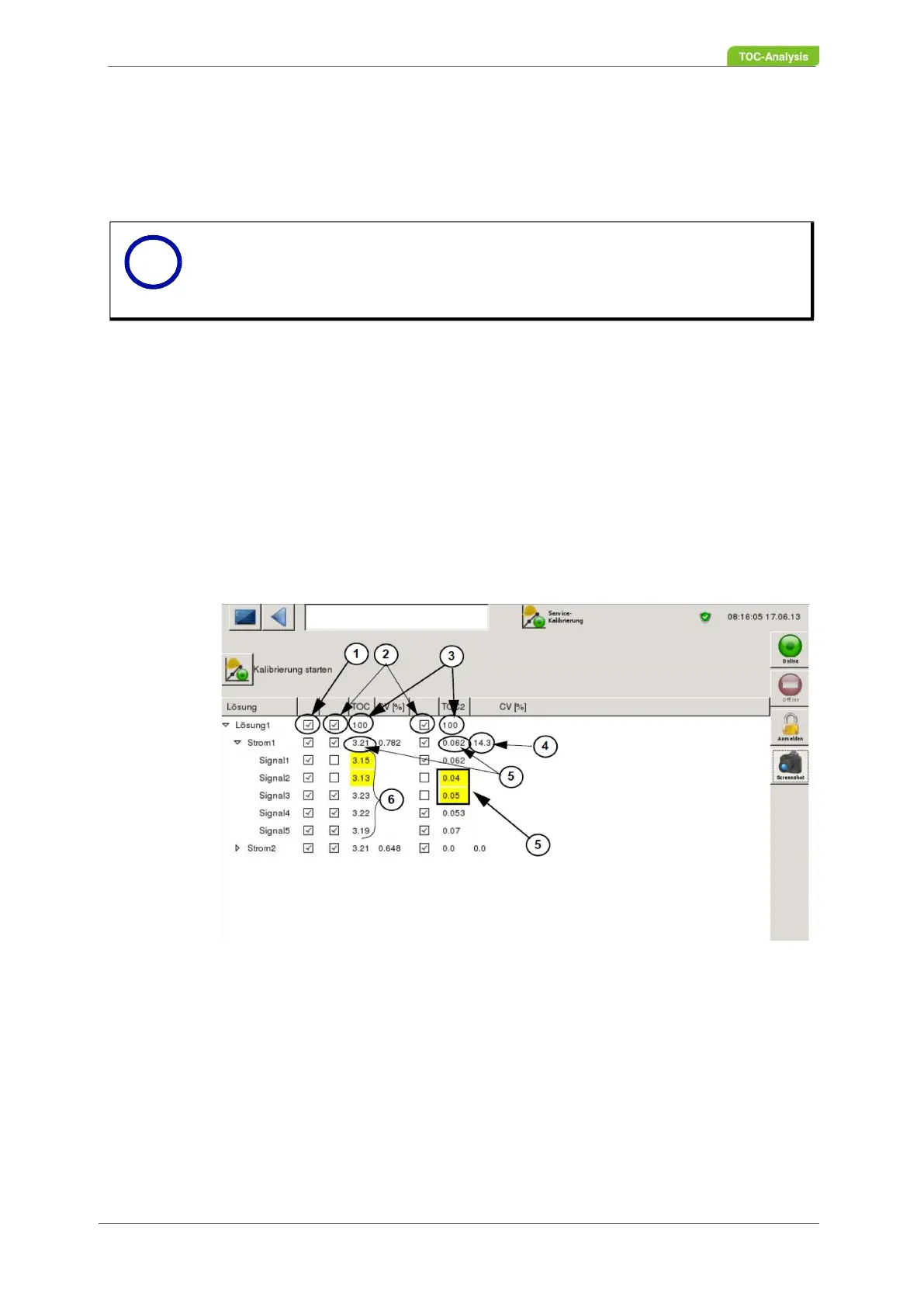
In user level 3 in the "Service Calibration" screen, "Start calibration" can also be selected. Please note
the default settings in user level 3 (Chapter 7.3.10 from page 122). In the screen "Service Calibration"
the 5 raw values (signal values) (6), as well as the calculated mean value (5) and the calculated CV (4)
for the respective solutions and currents are displayed.
Outliers are automatically highlighted in yellow and are not included in the calculation. However, outliers
can be included in the calculation by activating the respective checkbox. The checkboxes of the first col-
umn enable / disable all other checkboxes in the respective row. Furthermore, new raw values for outli-
ers can be entered manually via the number field. The number field is displayed as soon as you click in
the field to be filled in the screen mask.
1 Check box, activates all other check boxes of a row
2 Selection of individual value
3 Calibration value [ppm]
4 Calculated CV value of raw values
5 Calculated mean of the raw values
6 Raw value (signal value [FSR * s]
7 Outliers
Fig. 96: Service calibration screen
Perform a one-point calibration for a sample stream:
1. Make a calibration solution and position the calibration vessel in the analyser.
2. In the "Calibration solutions" selection box at user level 2, "Perform calibration" screen, select the
Notice
Before calibration can be performed, the necessary calibration solution must be pro-
vided and the necessary level II adjustments made in the Calibrate screen. Only then
can a calibration be carried out in user level 3 under "Service Calibration".
i



 To Next Page