LDI Intellectual Property.
Not for secondary distribution or replication, in part or entirety.
DIGISONDE-4D
SYSTEM MANUAL
VERSION 1.2.11
3-42 SECTION 3 - OPERATING INSTRUCTIONS
3:78. Activation of the Edited PROGSCHED can be done while the sounder is in the Autonomous mode of
operations and currently runs a measurement. When “Activate changes” button is pressed and sounder is run-
ning, DCART:
• commands DESC into manual state using “Soft STOP” command (display of the DESC state changes
on the screen accordingly),
• waits until DESC completes currently running measurement, if any,
• commands CONTROL platform in “Standby” state for configuration updates,
• uploads new PROGSCHED definitions, and
• returns CONTROL platform into automatic state to resume scheduled operations.
Offline PROGSCHED editing
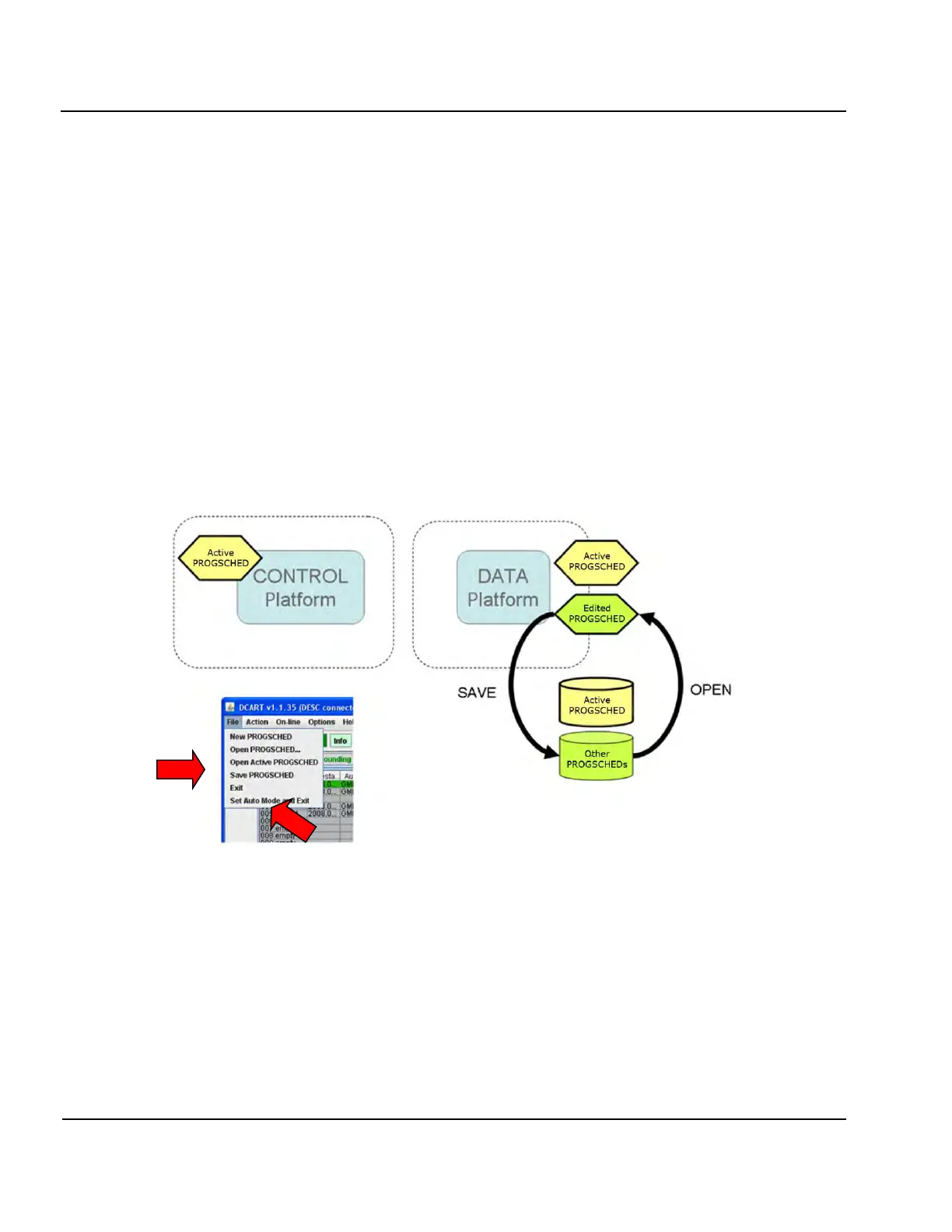
3:79. DCART can be used for offline editing of PROGSCHED definitions stored as files on DATA computer.
Such files can be opened for reading, editing in DCART, and writing back to the hard disk. Figure 3-31 illus-
trates the process of offline PROGSCHED editing using File menu of DCART.
Figure 3-31: Offline Editing of External PROGSCHED Files on DATA Platform
3:80. The File menu contains:
• “New PROGSCHED” item that will initialize an empty Edited PROGSCHED.
• Open PROGSCHED item that will read PROGSCHED definitions from a file specified by the user.
• “Open Active PROGSCHED” item that will re-read Active PROGSCHED definitions from the exter-
nal storage to make sure that Edited PROGSCHED displays the Active PROGSCHED and not some
other PROGSCHED file.
• Save PROGSCHED which allows the user to save a copy of the current Edited PROGSCHED to an-
other file.



 To Next Page