LDI Intellectual Property.
Not for secondary distribution or replication, in part or entirety.
DIGISONDE-4D
SYSTEM MANUAL
VERSION 1.2.11
SECTION 6 - MAINTENANCE 6-25
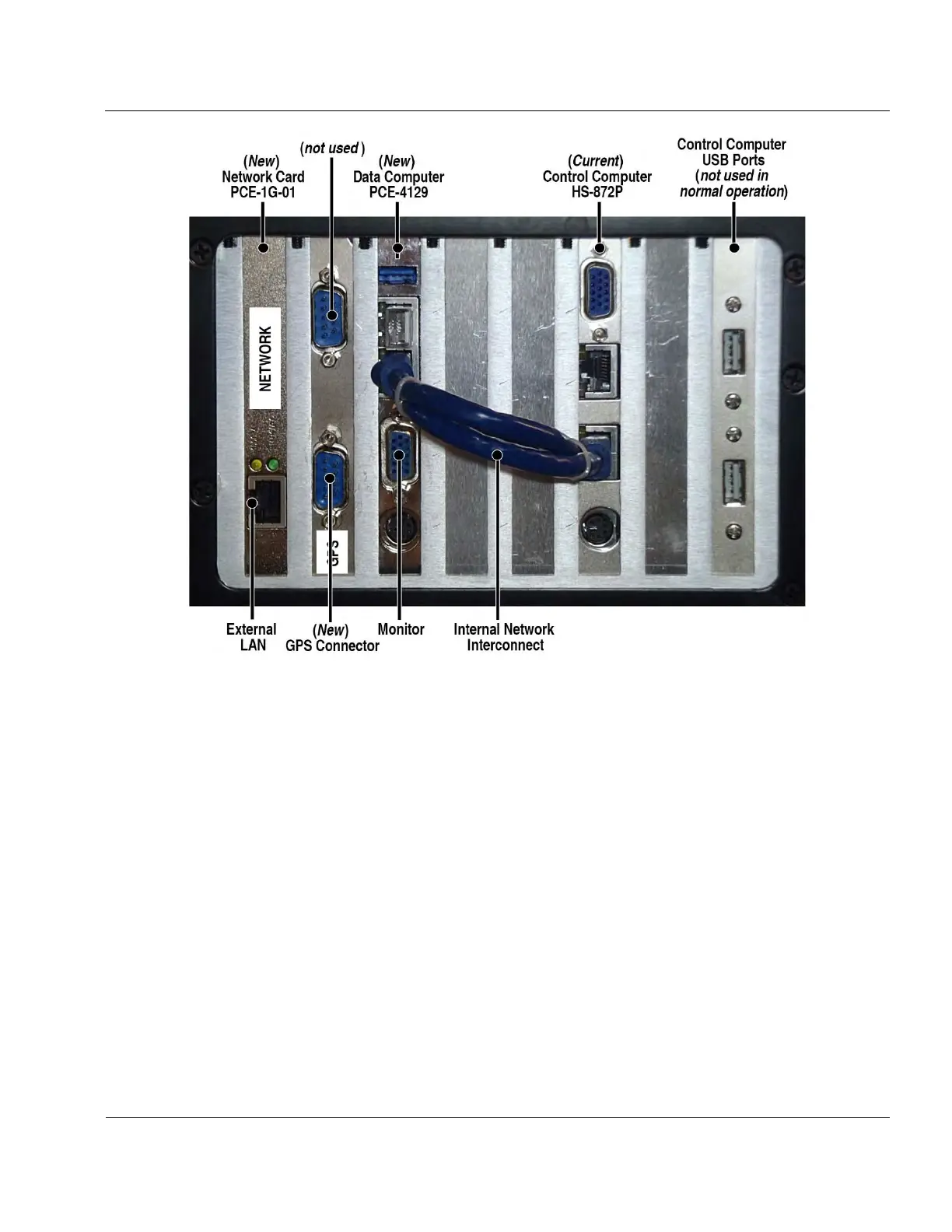
Figure 6-23: Computer Connections to Processor Chassis Rear Panel
6:73. PCE-1G-01 Network Card
1. Locate the network card in the DPS Chassis (see Figure 6-20).
2. Release chassis slide locks and slide Main Chassis out far enough to gain access to the rear of
the Main Chassis.
3. Remove the network cable from the rear of the network card.
4. Remove the #6-32 screw securing the network card’s bracket in the chassis.
5. Installation is reverse of removal.
6. Note: The backplane which the network card is installed in has PCIe slots that are a non-
standard distance from each other. For this reason, when installed properly, one can observe
that the network card circuit board is slightly flexed. This is expected and will not damage the
network card in any way.
DUAL POWER AMPLIFIER CHASSIS
6:74. Table 6-5 lists BIT faults pertaining to the Dual Power Amplifier Chassis. Upon detection the PA chas-
sis should be replaced and repair concluded at depot level.
Equipment needed: #1 Philips and flat head screwdriver



 To Next Page