LDI Intellectual Property.
Not for secondary distribution or replication, in part or entirety.
DIGISONDE-4D
SYSTEM MANUAL
VERSION 1.2.11
SECTION 3 - OPERATING INSTRUCTIONS 3-41
NOTE
Program and schedule definitions displayed on the Digisonde-4D screen may
not correspond to the measurements that CONTROL platform of the sounder
is actually running -- if DCART shows the edited PROGSCHED with changes
that have not been activated.
PROGSCHED Activation
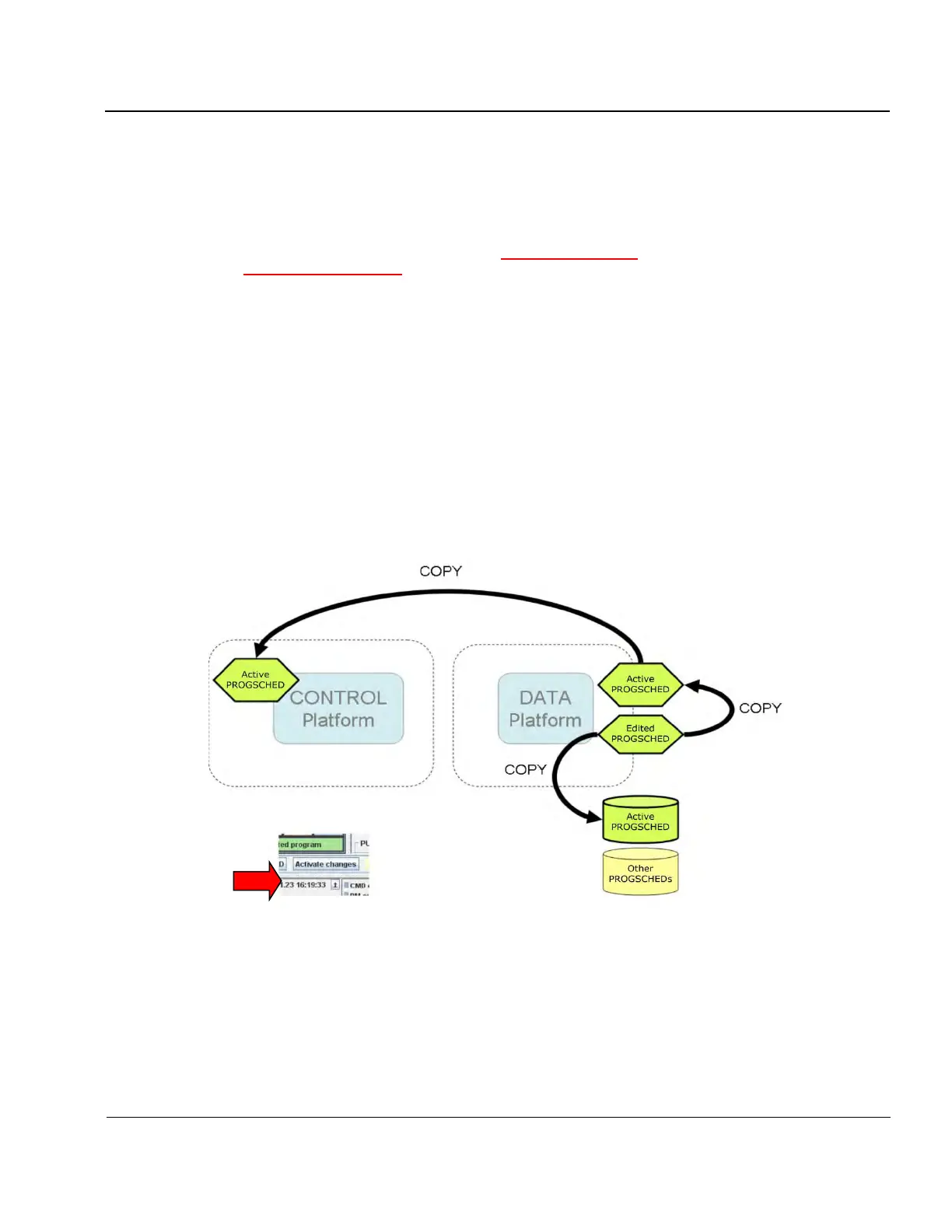
3:77. Operator-introduced changes to the edited PROGSCHED that is currently visible in DCART has to be
activated in order for the sounder to starting using it in new measurements. “Activate changes” button above
the system clock display in Figure 3-29 is used for PROGSCHED activation. As illustrated in Figure 3-30,
when “Activate changes” button is pressed, the following actions are taken:
• Edited PROGSCHED is validated (tested for possible programming errors),
• Program definitions, Schedule definitions, and current SST Queue from the Edited PROGSCHED are
copied to CONTROL platform using DCART-DESC commanding protocol,
• Full specifications of the Edited PROGSCHED are saved in the PROGSCHED file in the
/digisonde/Control progsched file (for resuming operations in case of a system reset).
Figure 3-30: Activation of the Edited PROGSCHED



 To Next Page