LDI Intellectual Property.
Not for secondary distribution or replication, in part or entirety.
DIGISONDE-4D
SYSTEM MANUAL
VERSION 1.2.11
SECTION 3 - OPERATING INSTRUCTIONS 3-57
Advanced Schedule Editing with DCART
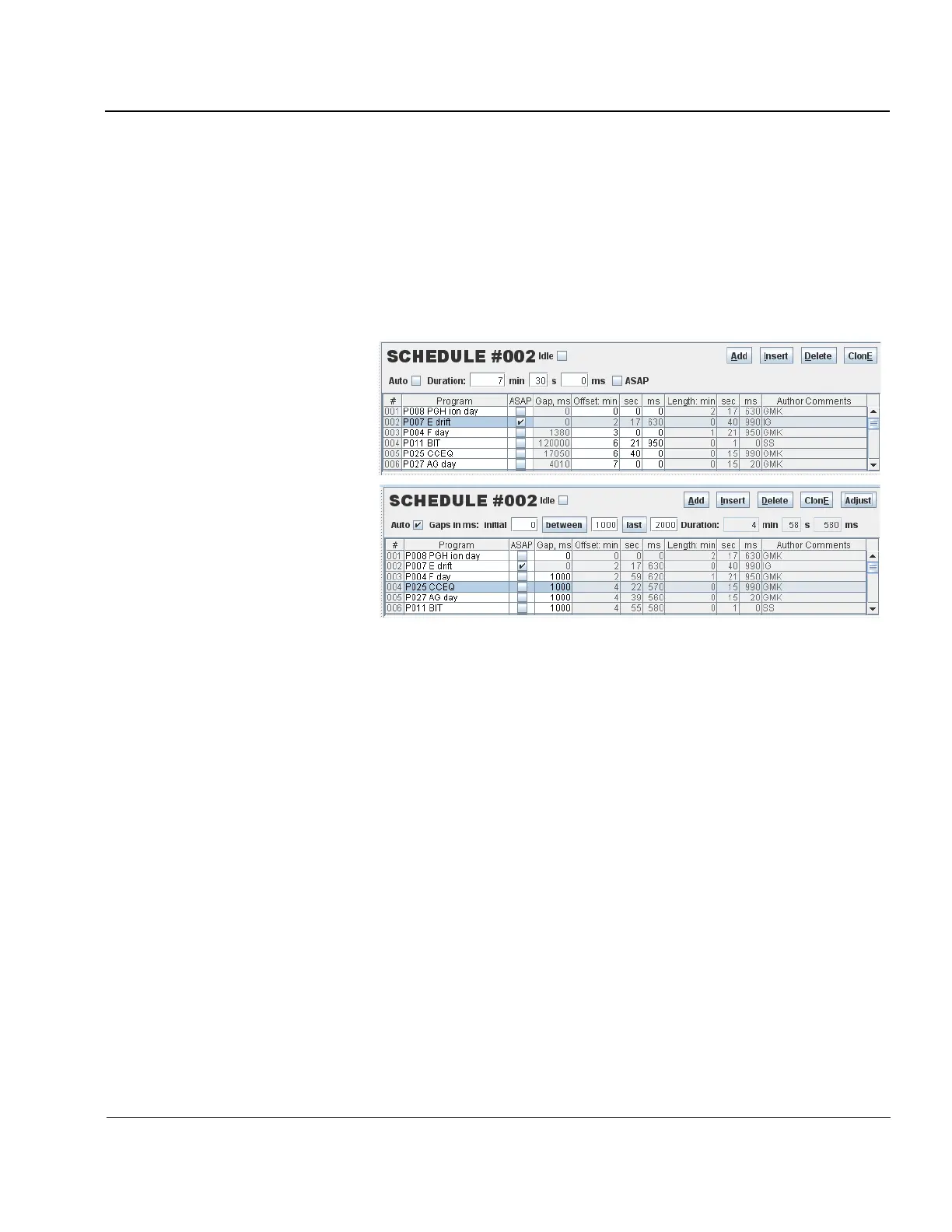
3:101. The “Auto” checkbox of the Schedule Editor switches the editor into the automatic placement mode
(Figure 3-45) in which gaps between scheduled programs are forced to a fixed value (1000 ms for the example
shown in Figure 3-45), and schedule duration can be padded to a needed value by entering appropriate “last”
gap value (2000 ms for the example shown in Figure 3-45). “Adjust” button is used to enforce automatic
placement rules on all programs in the schedule. “Between” and “last” buttons are used to make adjustments to
individual parts of the schedule.
Automatic Placement mode:
Figure 3-45: Manual and Automatic Placement Modes of the Schedule Editor
3:102. ASAP (As Soon As Possible) modifier replaces fixed offset and duration times of the schedule with
instruction to the DESC software to start next program as soon as current program completes. The ASAP modi-
fier brings uncertainty of the actual program start time because the time is not synchronized to the computer
clock anymore. Although CONTROL platform warrants deterministic execution of the programs, their actual
duration can still be affected by unaccounted events in the system. The ASAP modifier is used to start programs
whose absolute timing is not required within the schedule duration period (e.g., skymaps, CCEQ, autogain pro-
grams). The ASAP modifier can also be placed on the schedule duration itself, which may be useful for contin-
uous observations without absolute timing of their start (as in space applications, for example).
Programming SSTs with Planning Rules and Campaign Requests
3:103. Calculation of new Schedule Start Times (SST) is needed for appropriate switching of Digisonde
®
schedules within a day (e.g., daytime and nighttime) or in support of joint observational campaigns with other
instruments. There are two distinct mechanisms for calculation of SSTs working in conjunction:
• RULES: algorithms to appropriately start schedules within one day
• CAMPAIGNS: specification of UT periods (start and stop times) to override the rule-calculated SSTs
3:104. Figure 3-46 shows SST Editor panel of DCART. The upper section of SST Editor has Status bar and
two tables with rules and campaigns, and the lower section displays Timeline window with optional SST Table.
The Timeline window has Timeline Image with zoom-in controls and option selectors. Timeline example in



 To Next Page