LDI Intellectual Property.
Not for secondary distribution or replication, in part or entirety.
DIGISONDE-4D
SYSTEM MANUAL
VERSION 1.2.11
5-16 SECTION 5 - SYSTEM SOFTWARE
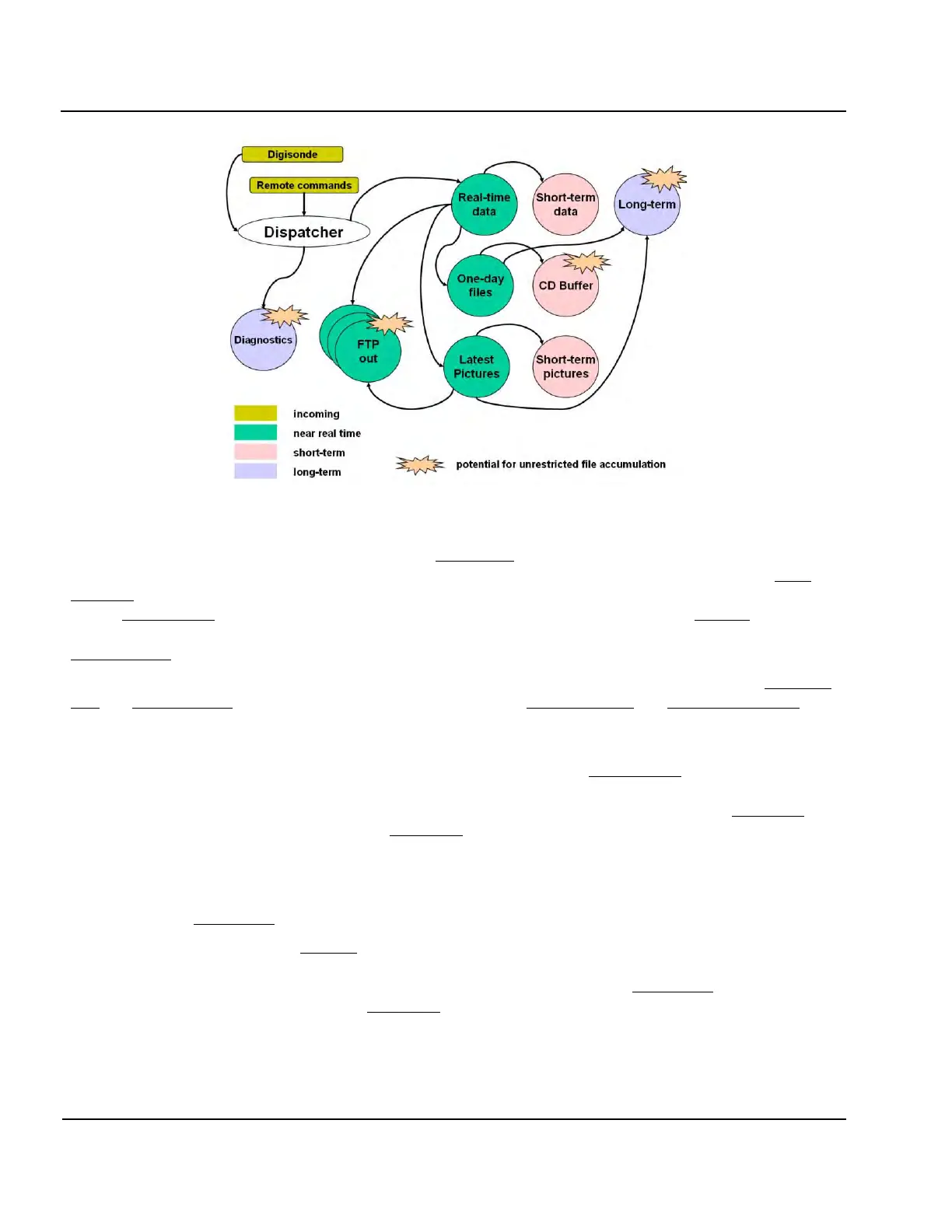
Figure 5-5: Data Routing Within AUX Computer
5:22. Newly made sounder data files appear in the Digisonde
®
incoming folder from DCART. Dispatcher
initiates processing of each new file and collects all associated source and derived data products in the Real-
time data folder. As soon as processing is complete, new data records are appended to corresponding one-day
files in One-day files folder, outgoing files for remote servers are placed in the appropriate FTP out folders, and
image making programs are called to produce pictures for WWW publishing and place resulting image files in
Latest pictures folder.
5:23. As soon as the hold-off time for restricted access to the latest data expires, individual files in Real-time
data and Latest pictures folders are moved for public access to the Short-term data and Short-term pictures
folders. The default behavior configures expiration time to be 0, so that data are released to public folders im-
mediately.
5:24. At the end of the day, Dispatcher finalizes one-day files residing in One-day files folder. It is possible
to archive selected one-day files on removable media (CDs or DVDs) and keep them on the hard disk in the
public long-term archive. Depending on configuration of Dispatcher, one-day files are copied to CD Buffer
folder for archiving to removable media, or to Long-term folder for storage on the hard disk. Considering lim-
ited local hard disk space at the DATA Platform computer, it is recommended to store only one-day SAO files
with ionogram-derived data in the long-term archive.
5:25. Dispatcher is configured to keep system log files and copies of ionograms that caused ARTIST soft-
ware problems in Diagnostics folder.
5:26. Dispatcher keeps files in FTP-out folders if the recipient is not ready to accept the data. This creates
potential for unlimited accumulation of the files in these folders if the recipient does not come online for a long
time (e.g., remote data server is inaccessible over the network). Together with the Diagnostics folder that holds
ionograms causing ARTIST problems, and Long-term folder holding one-day files indefinitely, these folders
may cause disk overfill condition on the DATA computer.
5:27. Table 5-1 lists physical locations of the appropriate directories on the hard disk.


 To Next Page