EasyManua.ls Logo

Leica C - Page 18

Leica C
292 pages
Print Icon
To Next Page IconTo Next Page
To Previous Page IconTo Previous Page
Loading...
I Menu
control
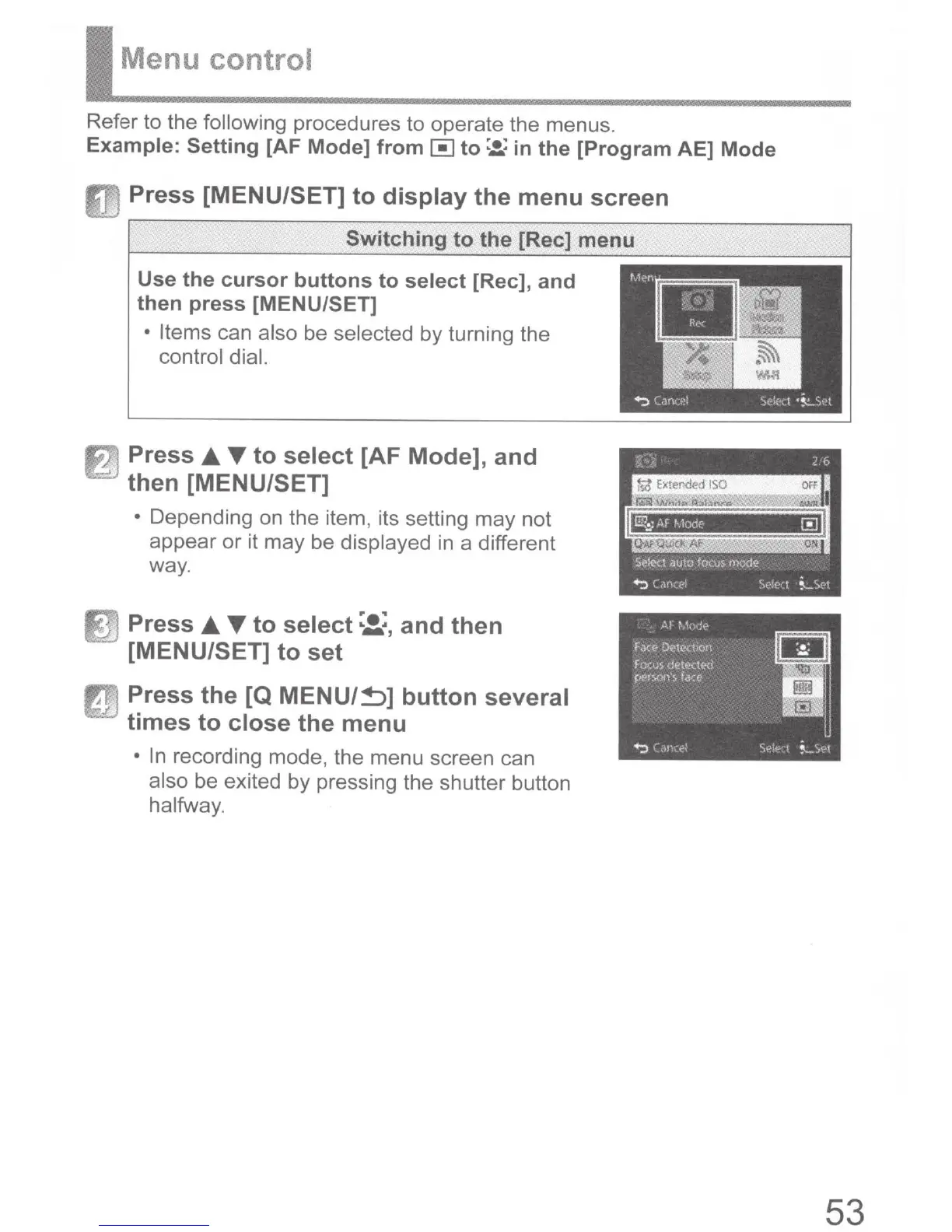
Refer to the following
procedures to operate the menus.
Example:
Setting
[AF
Mode]
from~
to:.!(
in
the
[Program
AE]
Mode
Press
[MENU/SET]
to
display
the
menu
screen
Switching
to
the
[Rec]
menu
Use
the
cursor
buttons
to
select
[Rec],
and
then
press
[MENU/SET]
Items
can
also
be
selected
by turning the
control dial.
fi)
Press
T
to
select
[AF
Mode],
and
then
[MENU/SET]
Depending on the item,
its setting may not
appear or it may be displayed
in
a different
way.
in
Press
T
to
select
:Z.:,
and
then
[MENU/SET]
to
set
JJ
Press
the
[Q
MENU/~]
button
several
times
to
close
the
menu
In
recording mode, the menu screen can
also
be exited by pressing the shutter button
halfway.
53

Table of Contents

Other manuals for Leica C

Related product manuals