215651 78 Revision B
3.8.2 Adjusting Delivery Opening on Header using Hydraulic Deck Shift
The width and position of the delivery opening affects the width and configuration of the windrow. Adjust the delivery
opening by moving the inboard deck shift stops.
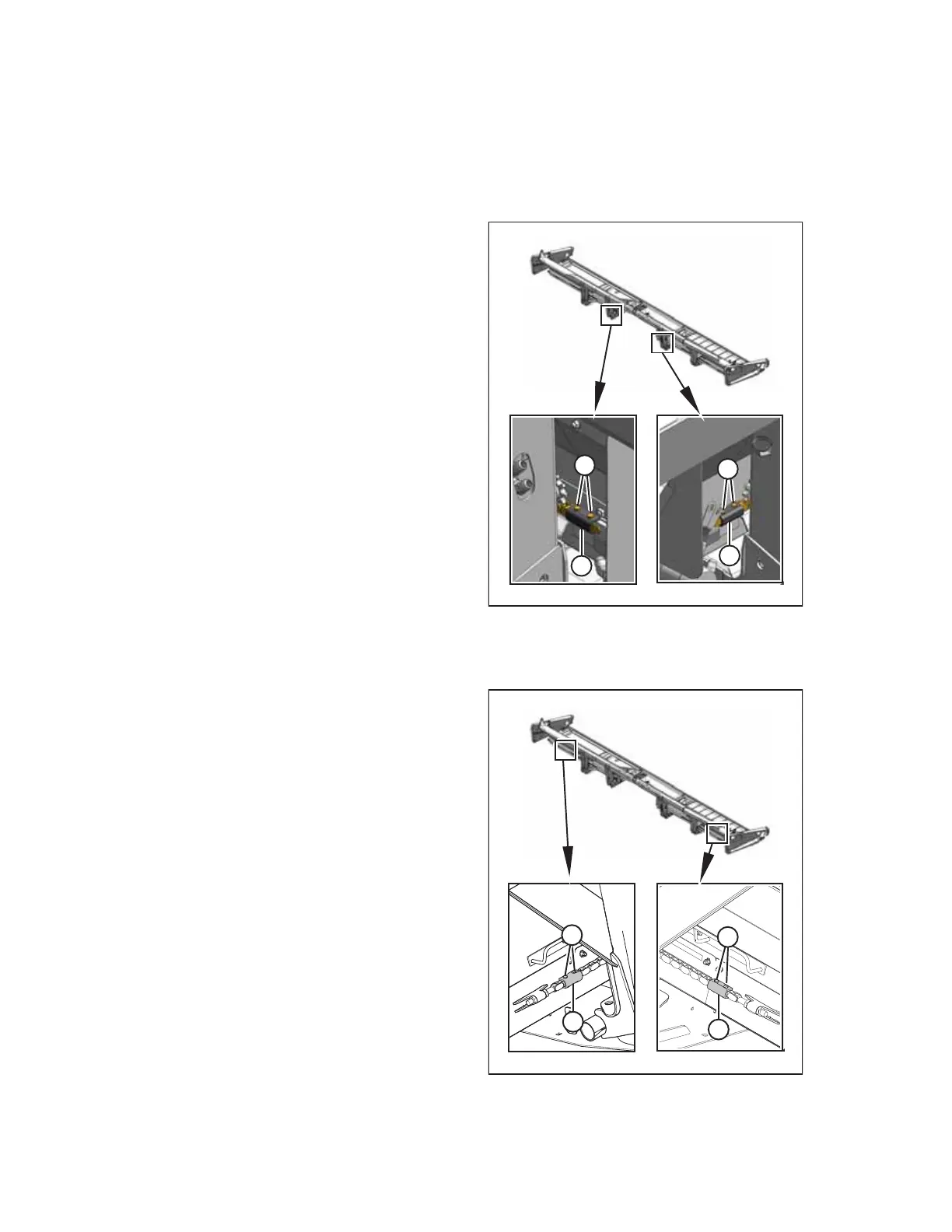
Adjusting inboard deck shift stop
$
$
%
%
Figure 3.53: Inboard Hydraulic Deck Shift Stops
1. Remove two 1/4 in. hex head bolts (A) and nuts.
2. Slide stop (B) outboard to decrease the maximum opening
size, or slide the stop inboard to increase the maximum
opening size.
IMPORTANT:
Ensure that the deck shift stops are sufficiently adjusted to
prevent the decks from contacting each other.
3. Install two 1/4 in. hex head bolts (A) and nuts, and
tighten them.
Adjusting outboard deck shift stop
%
%
$
$
Figure 3.54: Outboard Hydraulic Deck Shift Stops
4. Remove two 1/4 in. hex head bolts (A) and nuts.
5. Slide stop (B) inboard to move decks away from each other,
or slide the stop outboard to move decks closer to
each other.
IMPORTANT:
Ensure that the deck shift stops are sufficiently adjusted to
prevent the decks from contacting each other.
6. Install two 1/4 in. hex head bolts (A) and nuts, and
tighten them.
OPERATION



 To Next Page