214366 135 Revision A
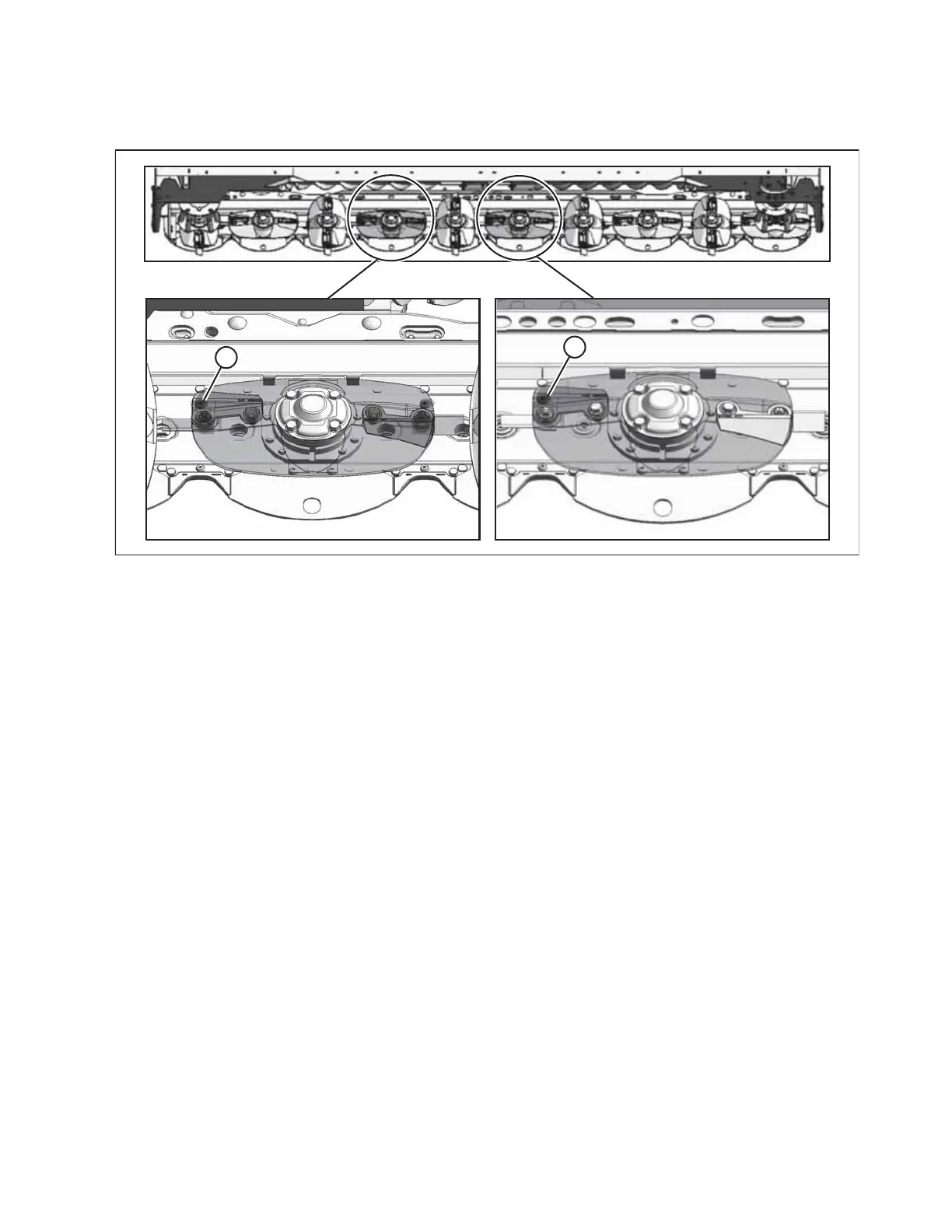
Figure 5.8: Cutterbar Filler Plug Locations
1018989
B
A
11. Clean around and remove filler plugs (A) and (B) with an 8 mm hex key.
NOTE:
Opening two fill plugs allows air to escape while adding oil to the cutterbar and prevents oil from blowing back
through the fill hole.
NOTE:
Rotate disc to expose filler plug if necessary.
12. Add lubricant to cutterbar through filler hole (A). Refer to for recommended lubricant type and volume.
IMPORTANT:
DO NOT overfill the cutterbar. Overfilling can cause overheating and damage to or failure of the cutterbar. To
avoid overfilling, completely drain the oil from the cutterbar before adding the recommended volume of oil.
Refer to Draining the Cutterbar Lubricant, page 132.
13. Install the filler plugs that were removed.
14. Close the cutterbar door(s). Refer to 3.5 Cutterbar Doors, page 33.
15. Start engine and raise header off blocks.
16. Engage header safety props. Refer to 3.3 Engaging and Disengaging Header Safety Props, page 28.
17. Remove blocks and lower the header fully.
18. Stop the engine and remove the key.
19. Disengage header safety props. Refer to 3.3 Engaging and Disengaging Header Safety Props, page 28.
20. Start engine and lower the header fully.
MAINTENANCE AND SERVICING





 To Next Page