214366 167 Revision A
1006442
A
C
D
B
E
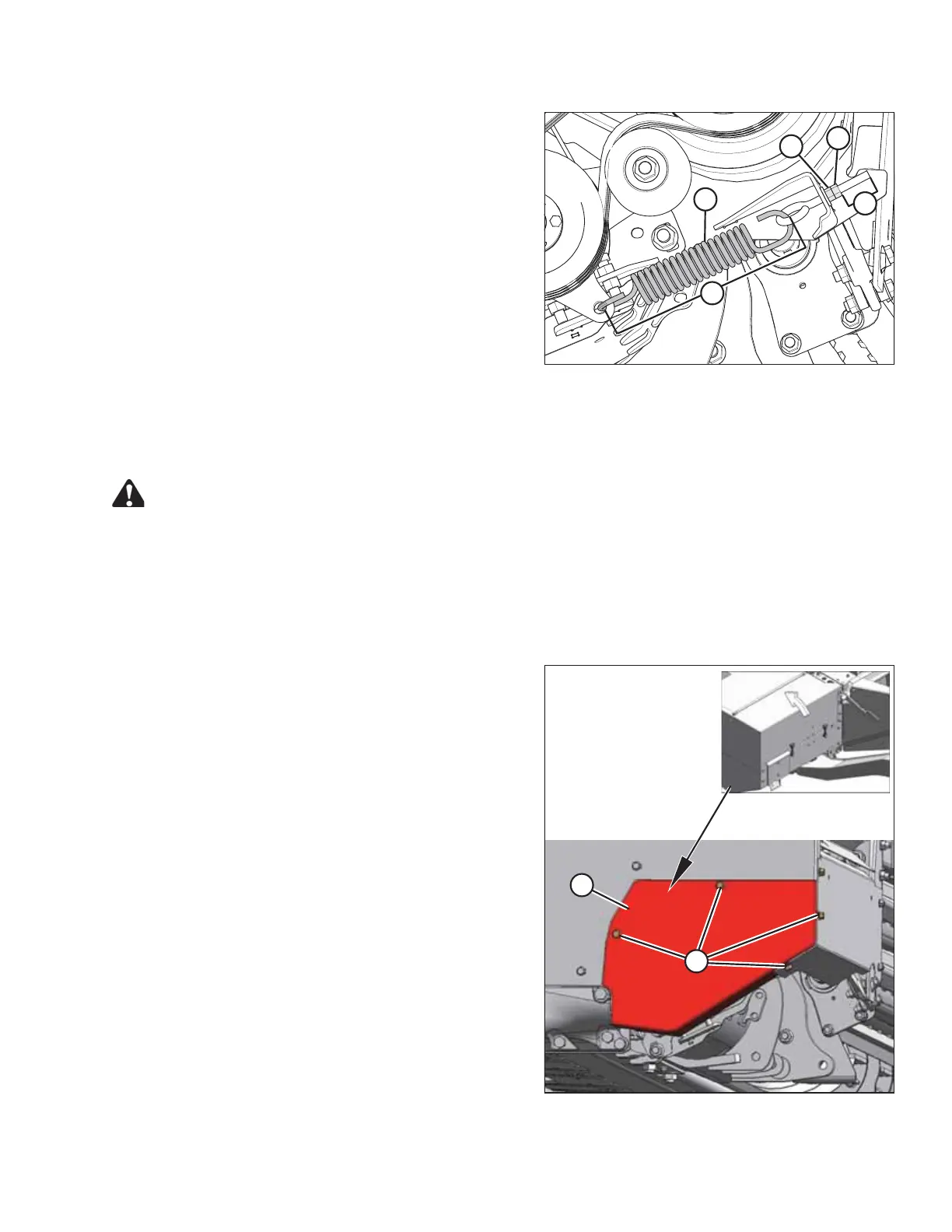
Figure 5.65: Belt Tension Spring
7. To check the belt tension, spring (A) length should
measure 262 mm (10.3 in.) (B). If necessary, adjust belt
tension as follows:
a. Loosen jam nut (C).
b. Adjust eye bolt with adjuster bolt (D) until spring
length (B) is achieved.
c. Tighten jam nut (C).
NOTE:
Edge of eye bolt to jam nut (E) should measure 41 mm
(1.6 in.).
8. Close the driveshield. Refer to 3.4 Driveshields, page
30.
Replacing the Auger Drive Belts
Follow these steps to replace the auger drive belts:
DANGER
To avoid bodily injury or death from unexpected startup of the machine, always stop the engine and
remove the key from the ignition before leaving the operator’s seat for any reason.
1. Raise the header fully.
2. Stop the engine and remove the key.
3. Engage header safety props. Refer to 3.3 Engaging and Disengaging Header Safety Props, page 28.
1006236
A
B
Figure 5.66: Drive Cover
4. Open the driveshield. Refer to 3.4 Driveshields, page
30.
5. Remove/loosen four bolts (A) and remove cover (B).
MAINTENANCE AND SERVICING





 To Next Page