214366 164 Revision A
5.4.4 Header Drive Speed Sensor
The header drive speed sensor monitors the rotational speed of the bevel gearbox pulley and sends a signal to the
system monitor in the windrower cab to display disc speed.
The sensor does not require regular maintenance; if it malfunctions or is damaged, it can be easily adjusted
or replaced.
Adjusting the Header Drive Speed Sensor
DANGER
To avoid bodily injury or death from unexpected startup of the machine, always stop the engine and
remove the key from the ignition before leaving the operator’s seat for any reason.
1. Lower header to ground, turn off engine, and remove key.
1014202
A
A
B
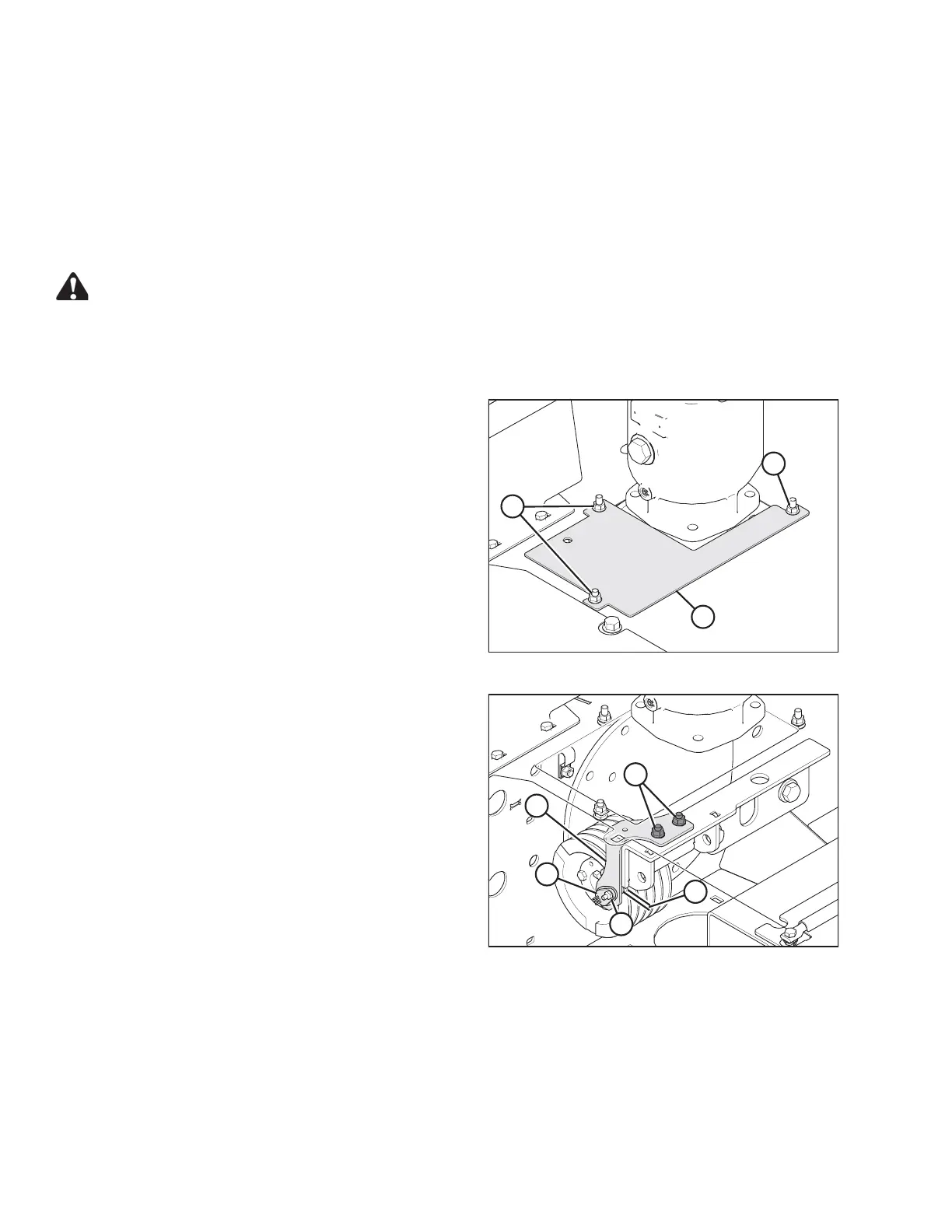
Figure 5.58: Header Drive
2. Loosen bolts (A) and slide cover (B) off opening.
1014206
A
B
C
D
E
Figure 5.59: Header Drive Speed Sensor
3. Check gap (B) between sensor (A) and pulley. If
required, adjust gap by loosening bolts (D) and moving
bracket (C) to achieve 2–3 mm (0.08– 0.12 in.) gap (B).
When correct gap is achieved, tighten bolts (D).
4. Check position of sensor (A). If required, adjust position
by loosening bolt (E) and moving sensor to align it with
rim of pulley.
NOTE:
Top panel removed for clarity.
MAINTENANCE AND SERVICING





 To Next Page