214366 152 Revision A
1006788
A
B
B
C
D
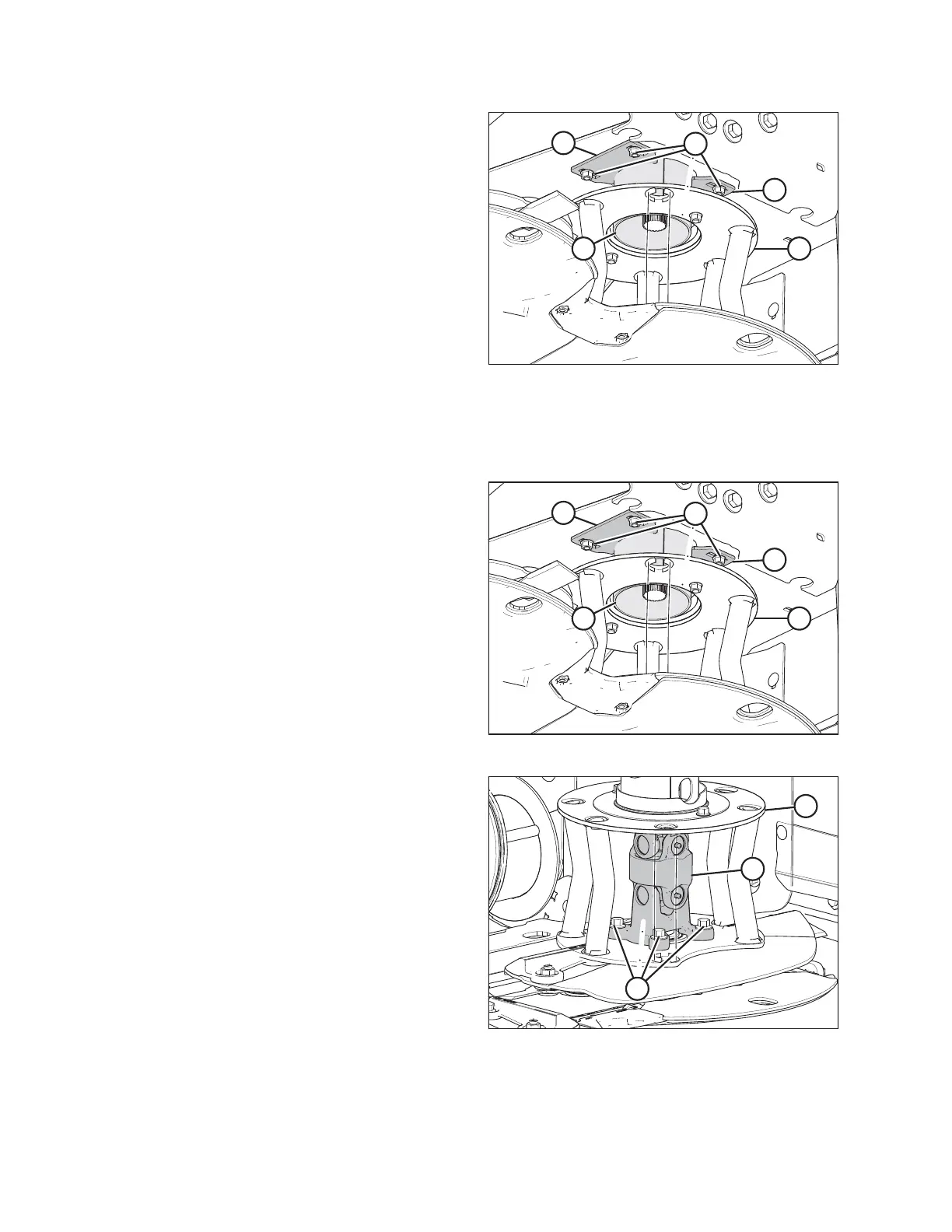
Figure 5.34: Driveline Deflector
8. Loosen four bolts (A) in the two plates (B) that hold
upper driveline shield (C) in place.
9. Move plates (B) so that shield (C) can be lowered into
deflector (D).
10. Remove deflector (D).
Installing the Driveline Deflector
Follow these steps to install the driveline deflector:
1006788
A
B
B
C
D
Figure 5.35: Driveline Deflector
1. Position deflector (D) and upper driveline shield
onto spindle.
2. Raise upper driveline shield (C) into position and slide
plates (B) into slots in shield. Do not tighten bolts.
1006787
A
B
C
Figure 5.36: Driveline Deflector
3. Insert driveline (B) into deflector (C) and install onto
shaft. Ensure that driveline (B) grease zerks will be
accessible through large opening in deflector.
4. Align mounting holes in deflector (C), spindle, and
driveline (B) and reinstall four bolts (A). Tighten bolts.
5. Adjust the upper driveline shield to achieve consistent
gap around deflector shield (C).
MAINTENANCE AND SERVICING





 To Next Page