4-5
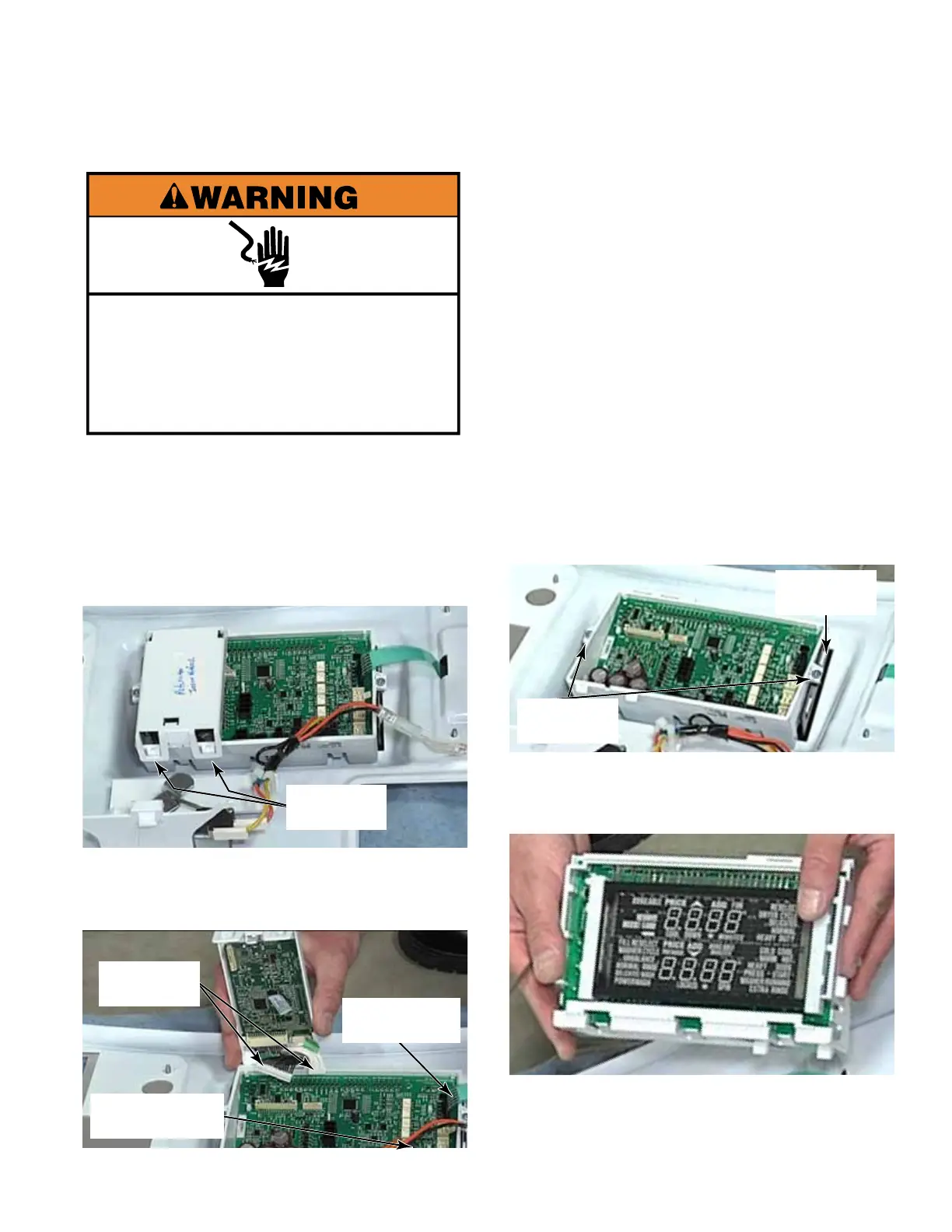
1. Open the control panel (See page 4-3).
2. Disconnect the wire connectors from the
control board.
3. To remove the atlas board, lift two catches
off two tabs.
4. Tilt the board up. Press the locking tabs
and disconnect two wire harnesses from the
control board.
TECH TIP: The Atlas board contains the
factory installed software for the Stack
Washer/Dryer. This is available as a
separate part.
5. Press the locking tab and disconnect the
coin vault and service switch connector.
6. Press the locking tab and disconnect the
ribbon cable to the keypad.
7. To remove the control board from the
control panel, remove two Phillips head
screws.
8. Use a flat blade screwdriver to release the
locking tabs at one end and lift the control
board assembly off the control panel cover.
9. Turn the assembly over to view the user
interface display board, which shows both
the washer and dryer display functions.
CONTROL BOARD
Electrical Shock Hazard
Disconnect power before servicing.
Replace all parts and panels before
operating.
Failure to do so can result in death or
electrical shock.
Two
Catches
Two Wire
Harnesses
Coin Vault /
Service Switch
Keypad
Ribbon Cable
Locking
Tabs
Two Phillips
Screws



 To Next Page