4-53
1. Unplug washer or disconnect power.
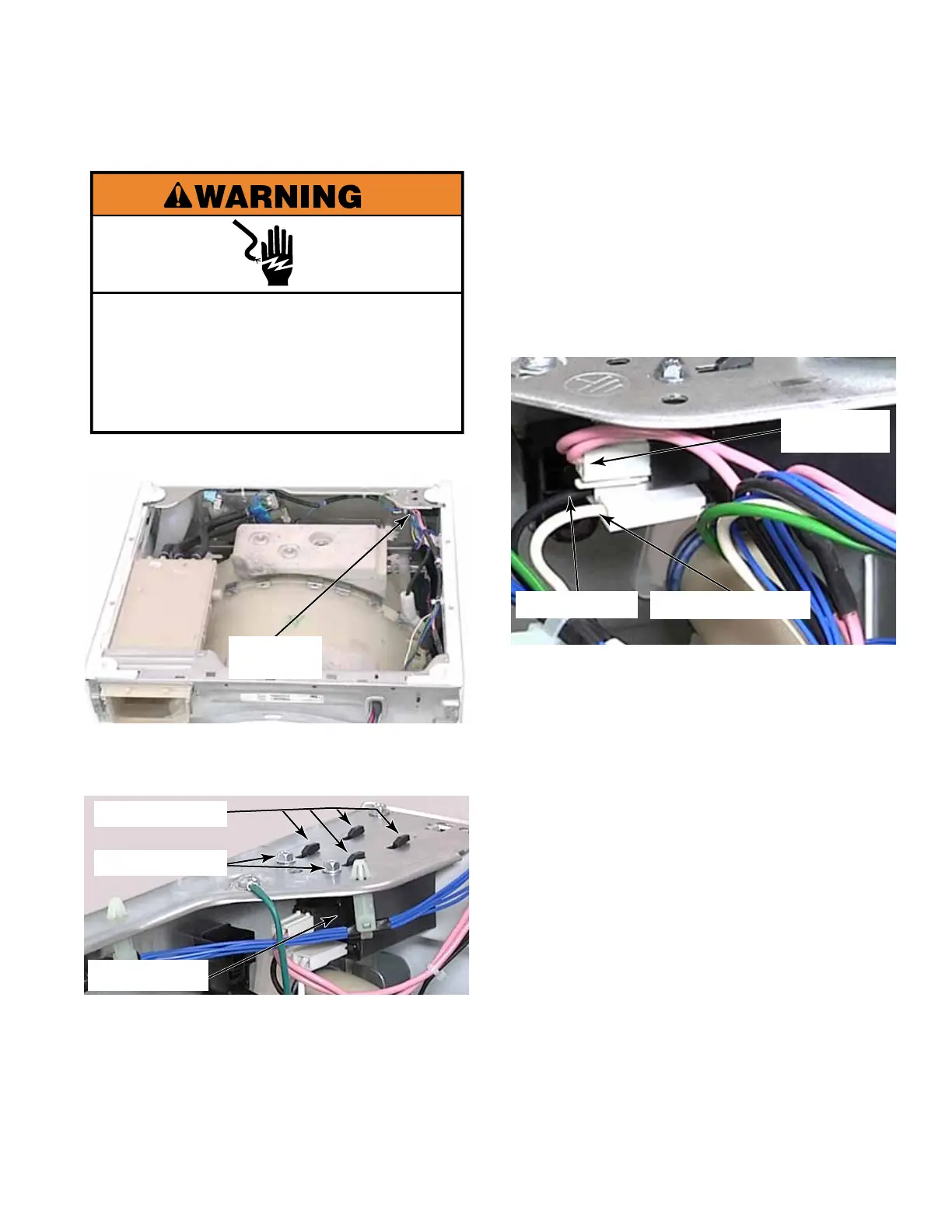
2. Remove two T-20 1/4” hex head screw from
the top of the back right corner brace.
3. Slide the RFI line lter toward the water
inlet valves to release the tabs in the slots
and pull it down to remove it.
4. To disconnect the RFI Filter, pull the
incoming power, L1, black wire, and neutral,
white wire connectors off their spade
terminals.
5. Press the locking tab and remove the
connector for the pink wires that go to the
CCU and the UIC transformer.
NOTE: Problems can occur with this washer
if the AC Power is connected with reverse
polarity. When properly installed the neutral,
white wire connector, should be toward the
front of the washer as viewed from the RFI
lters installed orientation.
TECH TIP: To test for proper polarity,
power must be reconnected to the washer.
Test between the neutral wire connector
and any chassis earth connection with a volt
meter. If the polarity is correct, there should
be no voltage present. Disconnect the
washer from power before proceeding.
Electrical Shock Hazard
Disconnect power before servicing.
Replace all parts and panels before
operating.
Failure to do so can result in death or
electrical shock.
RFI LINE FILTER
RFI Line
Filter
2 T-20 Screws
RFI Line Filter
4 Tabs In Slots
L1 Black Wire
Pink Wires
Out To CCU
Neutral White Wire



 To Next Page