4-18
Electrical Shock Hazard
Disconnect power before servicing.
Replace all parts and panels before
operating.
Failure to do so can result in death or
electrical shock.
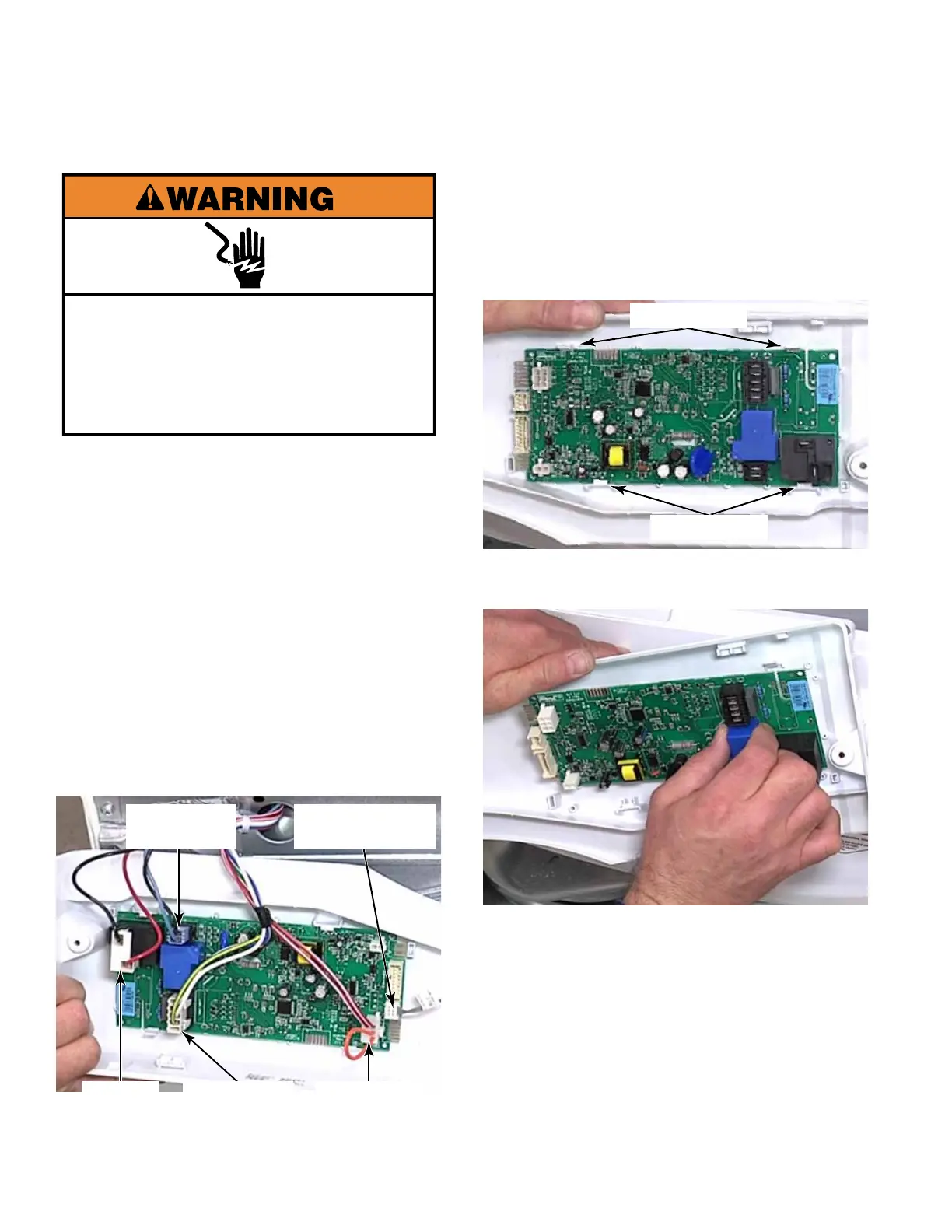
1. Open dryer console cover (See page 4-17).
2. Press the locking tab and disconnect the
Rast connector for the control board to user
interface communication cable.
3. Press the locking tab and disconnect the
temperature sensor connector.
4. Press two locking tabs and disconnect the
incoming power wire connector.
5. Disconnect the motor wire connector.
6. Disconnect the heat relay wire connector.
CONTROL BOARD - DRYER
7. Remove the console cover.
8. To remove the control board from the
console cover, release two tabs on the top
edge of the board and remove it from the
console cover.
Locking Tabs
Locking Tabs
Communication
Cable
Temperature
Sensor
Incoming
Power
Heat
Relay
Motor
Connector



 To Next Page