PCWS 2015 Setup Guide - 2nd Edition 3-47
What’s Inside?
Installing Options
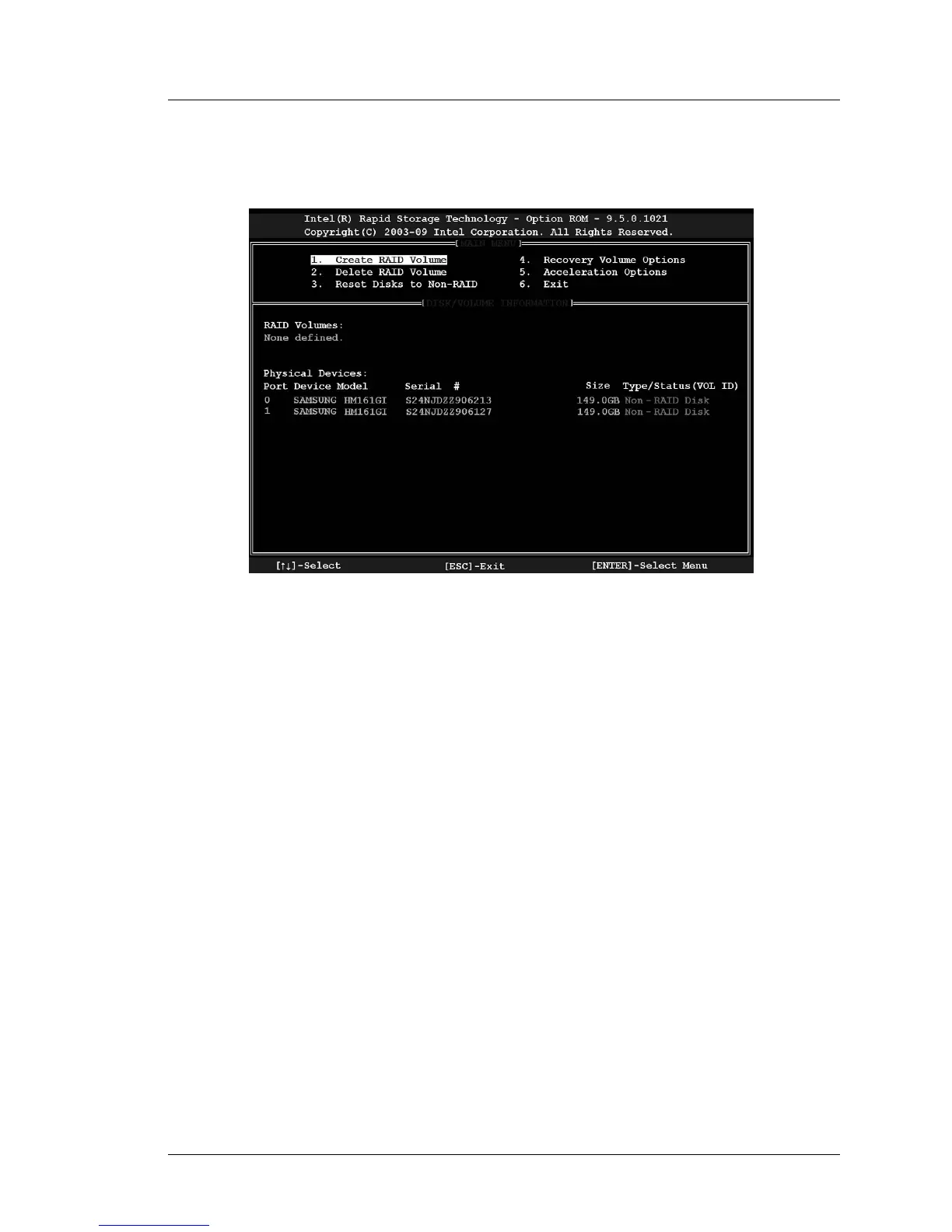
6. Press [Control-I] to enter the ‘Intel Rapid Storage Technology Option
ROM’. A sample of this screen is shown below.
Figure 3-41: Creating a RAID Volume
o This example shows two drives and the Type/Status field for each drive
reports ‘Non-RAID Disk.’
If you installed one or more drives from an existing system, select [2]
to delete any previous RAID partitions, then [3] to reset each disk
status fields to ‘Non-RAID’ before proceeding.
7. From the Main Menu, select [1] to create a RAID.
o From the Create Volume Menu, use the tab key to move between each
field and select the type of RAID and other required parameters.
o When you create a RAID volume, the Option ROM exports the volume
data to the Phoenix BIOS Boot Priority Order.
8. Image the RAID. OS images created for a single drive will not boot on a
RAID system. Conversely, OS images created for a RAID will not boot on
a single drive configuration.
o RAID and non-RAID PCWS 2015 images can be obtained from the
MICROS HSG Portal.
o RAID and non-RAID images for the 2015 are posted in the Member
Login Area of the MICROS Web Site: Members -> Product Support ->
Hardware -> Downloads, Disk Images.



 To Next Page