B-2 PCWS 2015 Setup Guide - 2nd Edition
Connector and Cable Diagrams
IO Panel Connectors
IO Panel Connectors
The following connectors are located on the IO Panel.
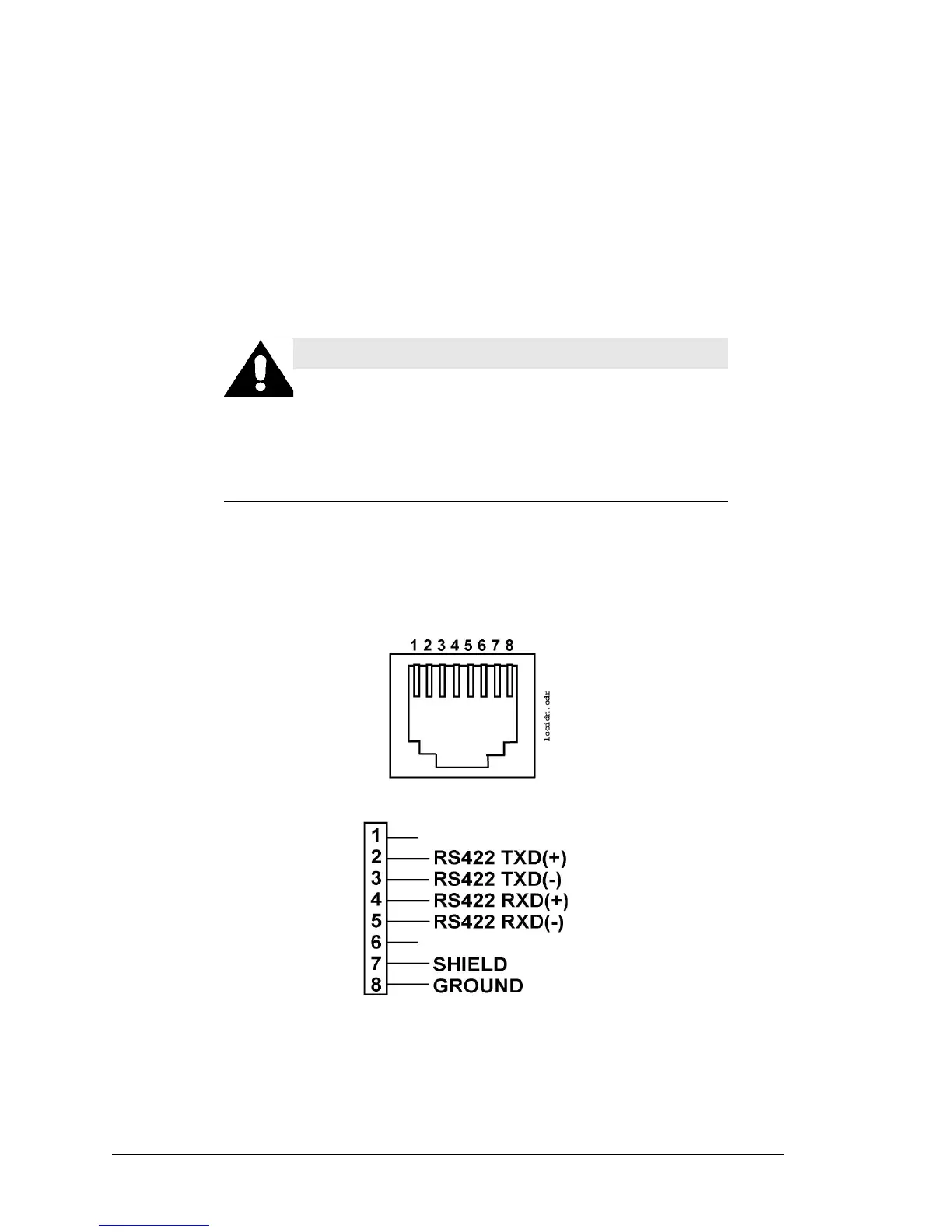
IDN Port
The IDN connector is a combination RS422/RS232 port associated with
COM4. This port is functionally equivalent to the RS422-A and RS422-B ports
on the WS4, WS4 LX, KWS4, and the IDN Port on the Workstation 5 and 5A.
Two configurations are possible, determined by application settings.
IDN Port - Driving IDN Printers
The most popular configuration of the IDN Port is the RS422 based IDN(+)
mode configured as COM4. Figure B-1 shows the pin-out for this
configuration.
Figure B-1: IDN Connector Configured for RS422 IDN
WARNING:
Do not insert a 6-Pin modular plug into the 8-Pin IDN Port.
The 6-Pin plug can push pins 1 and 8 of the connector out of
position. These pins are used by the RS232 Interface. Should
you wish to use the RS232 Interface at a later time, it may not
function. Always use an 8-Pin modular plug to connect an IDN
printer to the workstation - use cable P/N 300319-001.



 To Next Page