B-8 PCWS 2015 Setup Guide - 2nd Edition
Connector and Cable Diagrams
Hook-up Cables
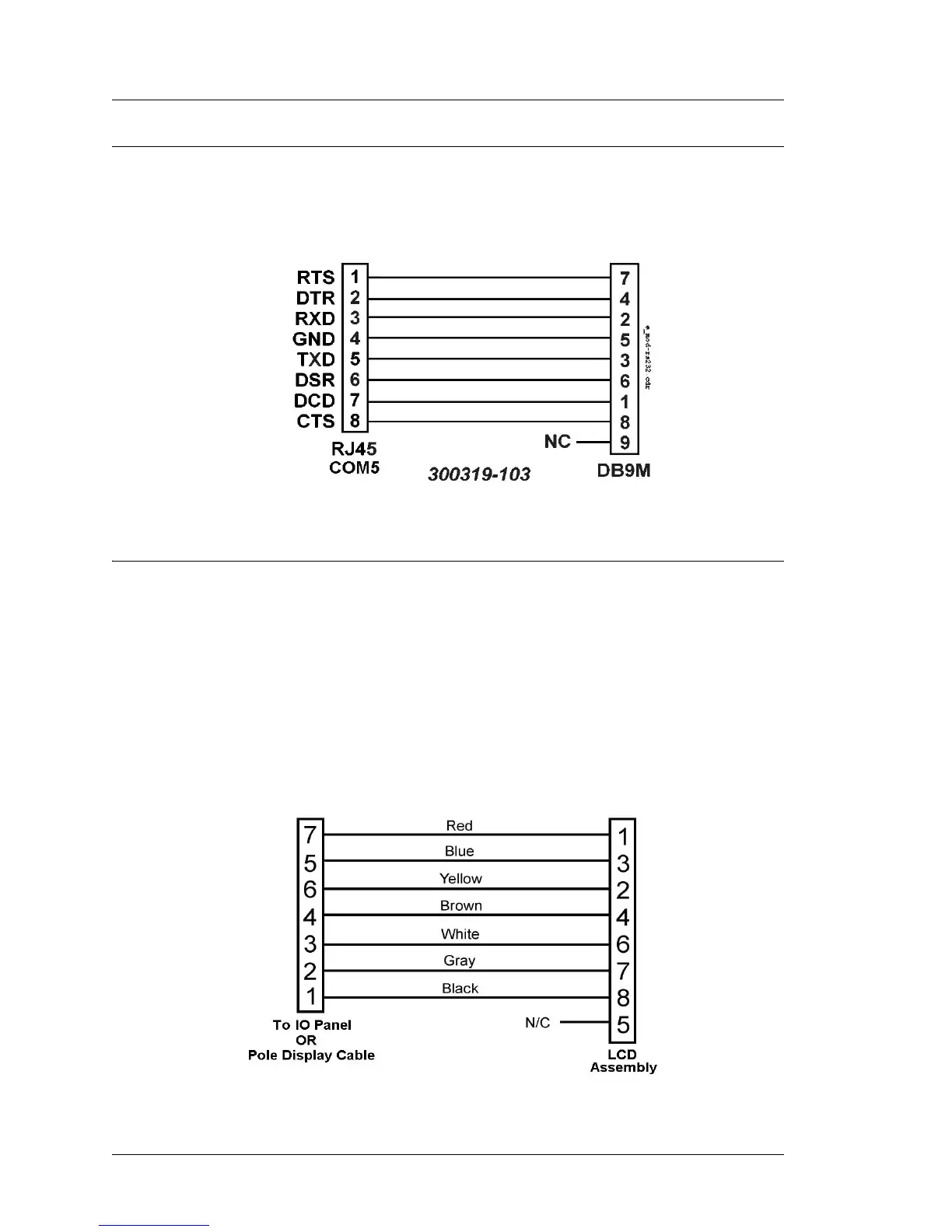
COM5 RS232 Cables
Figure B-11 displays a diagram of an extension cable that brings all RS232
signals from the COM5 port to a DB9 connector.
Figure B-11: COM5 RS232 Extension Cable (DB9M)
LCD Customer Display Cables
The LCD based Customer Display includes two cable assemblies. The function
of each cable is detailed in the following pages.
LCD Customer Display Housing Interface Cable
The LCD Customer Display Housing consists of the LCD Panel, Interface
Board, mounting bracket and interface cable. A diagram of this interface cable
is shown in Figure B-12.
When the LCD Customer Display is attached directly to the Workstation, this
cable plugs into the ‘Rear Display’ IO Panel connector shown in Figure B-14.
Figure B-12: LCD Customer Display Housing Cable



 To Next Page