3-38 PCWS 2015 Setup Guide - 2nd Edition
What’s Inside?
Installing Options
PCWS 2015 and Adjustable Stand and Pole Display
The Adjustable Stand Pole Display can be used with the PCWS 2015. The kit
consists of a the LCD customer display, 6” Pole, mounting bracket and
hardware.
1. Determine the location of the mounting bracket on the base plate. It can be
mounted to the left, right, or rear of the Base Plate.
2. Attach the Mounting Bracket to the Base Plate. Be sure to use the spacers
included in the kit between the base plate and bracket.
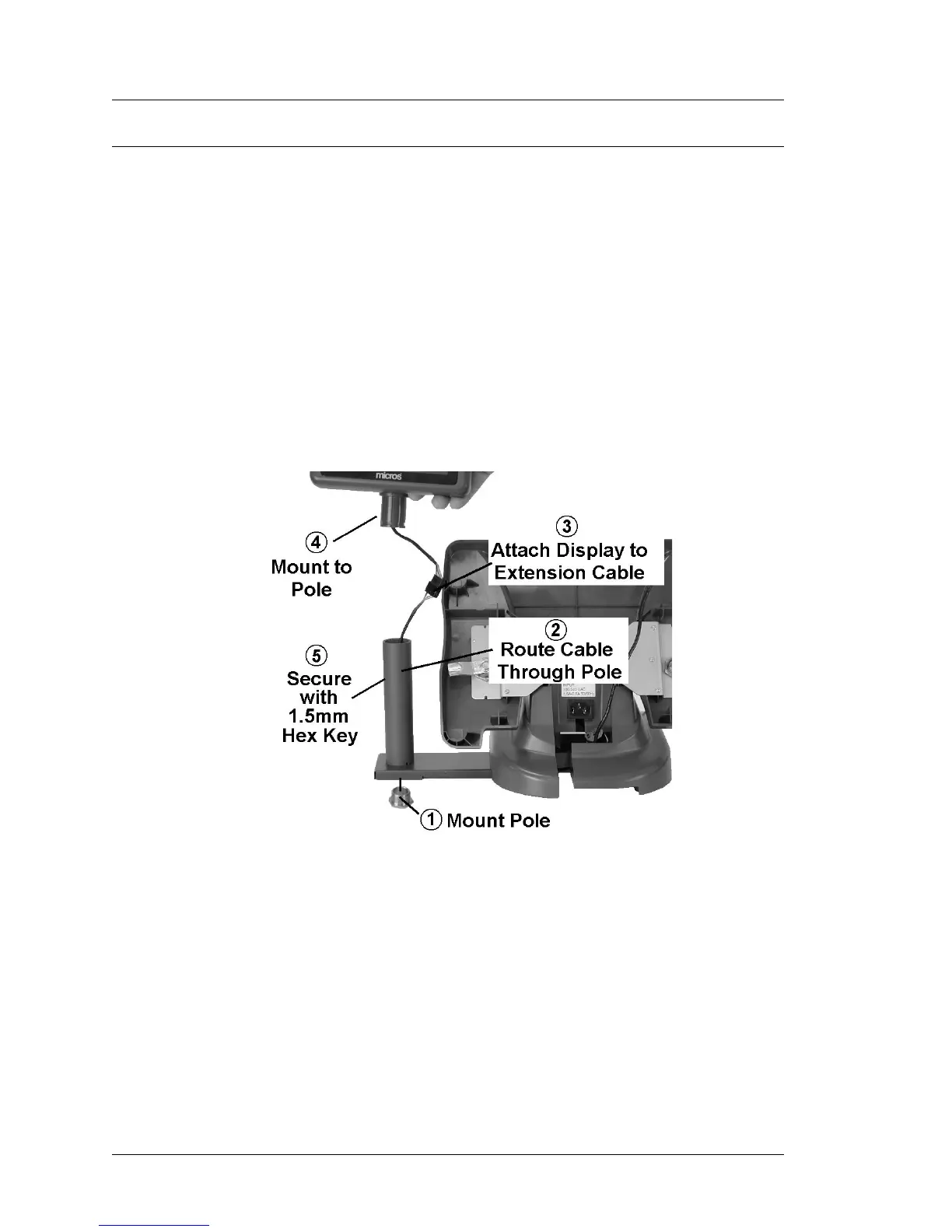
3. Refer to the numbered steps in Figure 3-34 to attach the pole to the bracket,
run the interface cable, and attach the LCD to the pole.
4. Rotate the LCD to the desired position and use a 1.5mm hex wrench to
tighten the set screw and lock the display in place.
Figure 3-34: Assembling the Adjustable Stand Pole Display
5. Make sure the interface cable is routed up through the stand in order to
attach it to the IO Panel. Before placing the workstation on the Stand,
connect the interface cable to Customer Display IO Connector.



 To Next Page